A writer can be brilliant and still produce the wrong page if the brief is weak. Maybe the article targets the wrong search intent. Maybe it repeats another page already on the website. Maybe the writer has no idea which evidence to use. Or perhaps the content reads well but has no clear link to the service, customer journey or business goal. That is why an SEO content brief needs to do more than list a keyword and word count.
A useful SEO content brief explains what the page needs to achieve, who it is for, which search need it should answer and how the writer, editor and subject expert should work together. At Wixdek, we treat the brief as the link between SEO research and the final content. It gives everyone one clear plan before the writing starts. This guide explains each field you should include and gives you a practical SEO content brief template you can reuse.
What Is an SEO Content Brief?
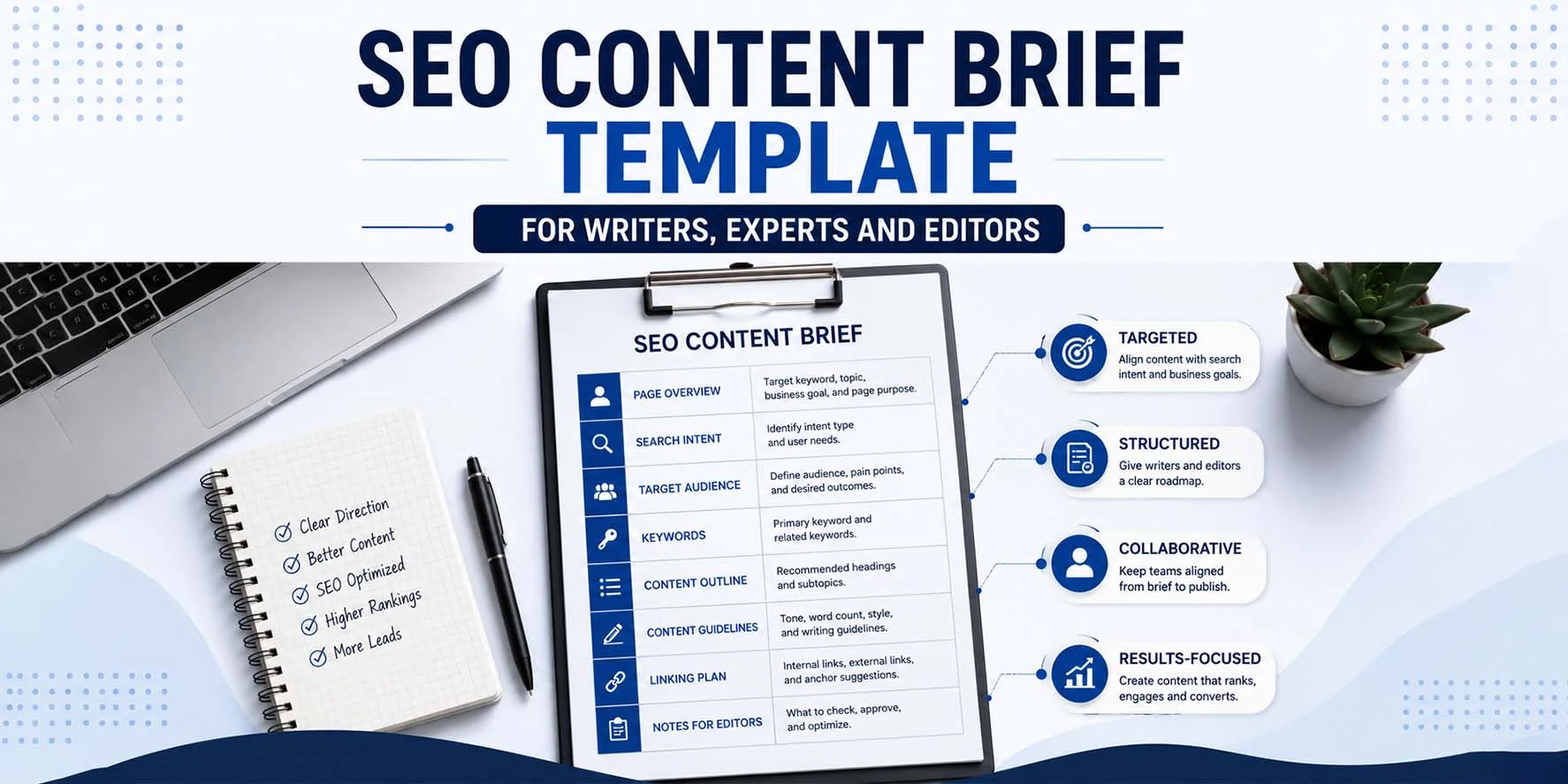
An SEO content brief is a planning document used before content is written or updated. It gives the writer clear instructions about the page. A good brief normally explains:
- the purpose of the page,
- the intended reader,
- search intent,
- the main keyword,
- supporting topics,
- questions that need answering,
- evidence requirements,
- internal links,
- the CTA,
- expert input,
- visual requirements,
- and how the page should avoid competing with existing content.
The aim is not to control every sentence. It is to stop important decisions being left until the draft is already finished.
Why a Keyword Alone Is Not a Content Brief
Imagine you send a writer this:
Keyword: commercial cleaning London
That leaves a lot unanswered.
- Is this a service page?
- A guide?
- A location page?
- Who is reading it?
- What does the reader want?
- Which existing Wixdek page should it support?
- What proof is available?
- What should the person do after reading?
- Which topics should the writer avoid because another URL already owns them?
Without those answers, the writer has to guess. That is where content overlap, weak search intent and endless revisions often begin. A proper SEO writing brief removes that guesswork.

Start With People Before SEO Fields
The brief should first explain who the content is meant to help. Google says its ranking systems aim to prioritise helpful and reliable content created primarily for people rather than content made mainly to manipulate search rankings. Google also suggests asking whether your intended audience would find the content useful if they came directly to your website.
That gives us a good starting question:
Who needs this page and what are they trying to achieve?
For example, a blog aimed at London business owners comparing SEO providers needs a very different structure from a beginner guide explaining what SEO means. Define that difference before writing.
The Wixdek SEO Content Brief Template
The following framework can be used for new articles, service content, guides, comparisons and content updates.
1. Content ID and Administrative Details
Start with basic production information. This makes the content easier to manage once several writers, editors and experts are involved. Record:
| Field | What to include |
| Content ID | Internal project or article number |
| Working title | Clear proposed title |
| Content owner | Person responsible for delivery |
| Writer | Assigned writer |
| Editor | Assigned editor |
| Expert reviewer | Genuine subject expert where needed |
| Due date | Draft deadline |
| Publish date | Planned publication date |
| Status | Planned, drafting, editing, approved or published |
| Target URL | Planned or existing URL |
| Update date | When the page should be reviewed |
For Wixdek, this also makes it much easier to manage a large content plan without losing track of page ownership.
2. Page Purpose
Every brief needs one clear page purpose.
Finish this sentence:
- This page exists to help the reader…
- For example:
- This page exists to help London business owners understand what affects SEO pricing before they request a proposal.
- That is much stronger than:
- Write an article about SEO pricing.
The first version tells the writer why the page exists. The second only gives them a subject.
Keep the Purpose Specific
Avoid giving one page five different jobs.
A page should not try to be:
- a beginner guide,
- a pricing guide,
- a service page,
- a comparison,
- and a sales page
- all at once.
- Pick the main job first.
- Other useful information can support it.
3. Primary Search Intent
State the main search intent clearly. For service-business content, this may include: Informational: The person wants an answer or explanation. Commercial investigation: The person is comparing services, costs or providers. Transactional: The person looks ready to enquire, book or buy. Local commercial: The person is looking for a provider in a specific area. Navigational: The person wants a particular business or website.
Search intent should guide the whole brief. It influences the page type, headings, depth, CTA and internal links. For a deeper process, use the Wixdek guide on search intent mapping for service businesses.
4. Funnel Stage
State where the content sits in the customer journey.
For example:
- TOFU: Early research or problem awareness.
- MOFU: Comparing solutions or learning what to choose.
- BOFU: Close to taking action.
This helps the writer judge how sales-focused the content should be. A TOFU guide should not read like a service page. A BOFU pricing or comparison page should not avoid useful commercial information.
5. Content Type
Tell the writer what they are actually producing.
Possible formats include:
- Service page
- Location page
- Informational blog
- Problem-solving guide
- Pricing guide
- Comparison page
- Checklist
- Template
- Framework
- Case study
- Technical guide
- The format should match the intent.
Do not ask for a “blog” simply because every piece of content on your website has historically been called a blog. Choose the type that best helps the reader.
6. Primary Keyword
Each brief should have a clear main keyword or primary query theme. For this article, that would be:
SEO content brief
The primary keyword helps keep the page focused. It is not an instruction to repeat the same phrase in every heading. Google recommends using words people would use to find your content in useful places such as the title, main heading and other descriptive areas. It does not recommend unnatural repetition.
Add the Keyword Naturally
A good brief should tell the writer: Use the primary phrase where it helps explain the page. Do not force it into every paragraph. Do not rewrite natural sentences only to increase keyword frequency.
7. Supporting Keywords and Topics
Supporting terms help the writer cover related parts of the subject.
For this article, examples include:
- SEO brief template
- content writing brief
- SEO brief for writers
- SEO content planning template
- content brief checklist
- SEO content workflow
- content optimisation brief
These should be treated as useful language and related topics. They are not a checklist where every exact phrase has to appear a set number of times. The writer should use them only where they fit naturally.
8. Topics the Page Must Cover
Keywords tell you how people search. Topics tell the writer what the page must actually explain.
For example, this brief needs to cover:
- search intent,
- main keyword,
- supporting topics,
- page purpose,
- evidence,
- internal links,
- CTA,
- author and expert input,
- cannibalisation,
- visuals,
- and the update rule.
- This section prevents thin content.
- The writer knows which questions cannot be skipped.
9. Audience
Tell the writer exactly who the page is for.
Avoid vague descriptions such as:
- Businesses
- A better description might be:
- UK service-business owners, in-house marketers and content teams that need a repeatable SEO briefing process.
That immediately changes the examples, language and level of detail.
The audience field may also include:
- what they already know,
- what they are worried about,
- what decision they need to make,
- and what level of technical knowledge they have.
10. Customer Pain Points
Good content should answer the worries that brought the reader to the page.
For an SEO content brief article, those pain points may include:
- writers producing content that misses the search intent,
- too many revisions,
- keywords being added after the draft is complete,
- blogs competing with service pages,
- generic content with no real evidence,
and editors receiving drafts without knowing what success should look like. You do not need a dramatic pain point in every section. Use it where it helps the reader feel understood.
11. Main Angle
The main angle explains what makes your page different from another generic article on the same topic. For this blog, the angle is: A practical Wixdek production brief that connects SEO research with writers, editors and experts rather than giving writers a simple keyword checklist. That is much clearer than:
Write the best guide about content briefs.
The angle should be specific enough for the writer to use.
12. Information Gain
Ask what this page adds that readers cannot get from another basic search result. Google encourages publishers to provide original information, reporting, research or analysis rather than simply rewriting what other pages already say.
Information gain might come from:
- real company processes,
- first-hand examples,
- original screenshots,
- internal data,
- expert commentary,
- a downloadable tool,
- a decision framework,
- or a practical template.
For this article, the main information gain is the Wixdek production brief template itself. That gives the page something useful beyond another definition of an SEO brief.
13. Evidence Requirements
Do not leave evidence as an optional extra. Tell the writer what needs proof. The brief might state:
Evidence required:
Use current Google Search Central guidance for people-first content, authorship and search appearance. Use real Wixdek processes where they can be confirmed. Do not invent campaign results, client quotes or performance data. Use an expert reviewer where technical claims need checking. This improves trust and reduces unsupported claims. Google’s people-first guidance encourages clear sourcing and information about the expertise behind content.
14. First-Hand Experience
If your business has real experience that can improve the page, tell the writer what is available. For example: Wixdek experience to include: Explain how briefs are used to separate intent, internal links, evidence, CTA and cannibalisation before drafting. Do not tell the writer to “add experience” without giving them any experience to use. That often leads to invented stories.
If no first-hand example is available, say so. It is better to have no case study than a fake one.
15. Expert Input
Some pages need specialist review. The brief should name the real reviewer if one has been assigned.
For example:
- Expert reviewer: [Name], Technical SEO Specialist
- If no reviewer has been confirmed, leave a clear production note:
- [ADD GENUINE WIXDEK EXPERT REVIEWER]
Do not make up a name or qualification to make the page look more authoritative. Google recommends making authorship clear where readers would reasonably expect it and giving users access to useful background about the creator.
16. Author Requirements
The writer field and author field are not always the same thing. The brief should state whose name appears publicly on the article and what relevant experience can genuinely be mentioned. For Wixdek content, a useful author instruction could include: Author: Areeba “Anna”, Senior SEO Content Writer at Wixdek Relevant expertise to mention: Search-intent research, SEO content planning, content briefs, on-page optimisation and commercial service content.
Keep the bio relevant to the subject. Do not pack it with unrelated details just to make it longer.
17. Required External Sources
Tell the writer which source types should be used. For SEO content, first-party sources are normally preferable when explaining Google products, search requirements or Google guidance.
For example:
- Google Search Central
- Google Search Console documentation
- Google Business Profile help
- ICO or GOV.UK where UK compliance is relevant
Do not tell the writer to add “three external links” simply to hit a quota. Sources should support claims that genuinely need support.
18. Competitor and SERP References
Competitor research can help a writer understand the current topic. But it should not become a copying exercise. The brief can record a few useful competing pages and explain what to inspect.
For example:
- What questions do they answer?
- What page type is ranking?
- What information is missing?
- Where can Wixdek provide a clearer example?
- What evidence do they use?
Do not tell the writer to copy their headings in the same order. Google’s people-first guidance asks whether content adds substantial value instead of mainly summarising or rewriting what other sources already say.
19. Suggested Content Structure
Now give the writer a logical outline. This does not need to control every sentence. It should show the questions the page needs to answer. For example:
H1
SEO Content Brief Template for Writers, Experts and Editors
H2
What Is an SEO Content Brief?
H2
Why a Keyword Alone Is Not Enough
H2
The Wixdek SEO Content Brief Template
H3
Search intent
H3
Page purpose
H3
Keywords and topics
H3
Evidence
H3
Internal links
H3
CTA
H3
Expert input
H3
Cannibalisation guardrail
H3
Visual requirements
H3
Update rule
H2
Worked SEO Content Brief Example
H2
How Writers Should Use the Brief
H2
How Editors Should Use the Brief
H2
How Experts Should Use the Brief
H2
Common Content Brief Mistakes
H2
Download the Wixdek SEO Content Brief Template
H2
Frequently Asked Questions This gives the writer direction while leaving room to write naturally.
20. Title Tag Guidance
A content brief can include a proposed SEO title. But avoid treating 60 characters as a Google rule. Google recommends descriptive, concise title text and warns against titles that are unnecessarily long or vague. Google can also create title links using several page signals rather than displaying the title element exactly as written. A useful brief field is therefore: Proposed title: [Add descriptive page title] Title instruction: Keep it clear, accurate and concise. Do not shorten useful wording only to hit an arbitrary character number.
21. Meta Description Guidance
Add a proposed meta description where useful. But do not tell writers that Google requires 120 to 160 characters. Google states that there is no fixed limit for the meta description tag, although snippets may be shortened to fit the device and search result. Use this brief instruction instead: Meta description: Write a short, useful summary that accurately describes the page and gives the searcher a reason to read it.
22. Word Count Guidance
Do not give writers a word count because you think Google prefers long articles. Google explicitly says it does not have a preferred word count. A rough range can still be useful for editorial planning. For example: Expected depth: Detailed practical guide. Cover every required section fully without padding the article to hit a number.
That is more useful than:
Must be exactly 2,500 words.
The content should be as long as needed to answer the search need properly.
23. Internal Link Requirements
Do not wait until publishing to think about internal links. Add them to the brief.
For this article, the planned internal links include:
- SEO content audit framework
- search intent mapping for service businesses
- fix keyword cannibalisation without losing rankings
- Tell the writer why each link matters.
- For example:
- The content-audit guide helps readers deal with existing content.
The search-intent guide explains how queries are assigned to pages. The cannibalisation guide helps when several pages overlap. That is better than a random list of URLs.
24. Inbound Link Opportunities
A good brief can also state which existing pages should later link into the new article. This is easy to forget. Imagine you publish a new content-brief template. Older Wixdek articles about content strategy, search intent or SEO workflow may have natural places where this guide can help the reader. Add those inbound links after publication where they make sense.
This keeps new content connected to the existing website.
25. Cannibalisation Guardrail
Every SEO content brief should answer:
- Which existing page must this content not compete with?
- This can save a lot of trouble later.
- For example:
Do not target: SEO Services London as the main intent. Reason: That commercial query belongs to the main service page. This article owns: SEO content brief and content-brief-template intent. That keeps the blog educational and stops it becoming another SEO service page. For a deeper process, read how to fix keyword cannibalisation without losing rankings.
26. Topics to Avoid
The cannibalisation guardrail can be made even clearer by listing topics the writer should not expand too deeply. For example: Do not turn this article into a full keyword-research guide. Do not turn it into a complete internal-linking guide. Do not retarget the SEO Services London commercial intent. Do not duplicate the content-audit framework. Mention those subjects where needed and guide readers to the dedicated pages.
This helps each article stay focused.
27. CTA
The writer should know the main next step before writing the ending. For this article: Primary CTA: SEO Services or content strategy consultation. A CTA should match the article. Someone reading an SEO content-brief guide may be interested in help planning SEO content. They do not need an unrelated sales offer. The brief can include: CTA goal: Encourage businesses that need a structured content strategy to speak with Wixdek.
CTA page: SEO Services London.
28. Visual Requirements
Visuals should be planned during briefing, not added at the last minute because the page “needs an image”. The brief should explain what the visual helps the reader understand. For this article: Required original asset: Downloadable Wixdek SEO Content Brief Template. You may also create a simple content-workflow graphic showing research, briefing, writing, expert review, editing, publishing and review.
Keep it useful. Do not add stock graphics that simply repeat the heading.
29. Image Alt Text Guidance
If an image needs alternative text, describe what the useful image shows. Do not stuff target keywords into alt text just because the brief has an SEO field. For example: Suggested alt text: Wixdek SEO content brief template showing search intent, keywords, evidence, internal links, CTA and editorial requirements. Make the description useful and accurate.
30. Update Rule
Every important article should have a review rule. This tells the editorial team when the content may become stale. A useful field is:
Review frequency: Every six months.
Review earlier if: Google guidance changes, the Wixdek content workflow changes, linked articles change or the downloadable template is updated. A page should not receive a new date simply to make it look fresh.
Google specifically warns against changing dates or adding and removing content mainly to create an appearance of freshness. Update when something meaningful has changed.
Wixdek SEO Content Brief Template
Use the following template for future Wixdek content.
Basic Details
Article ID:
[Add ID]
Working title:
[Add title]
Target URL:
[Add planned or existing URL]
Publish date:
[Add date]
Priority:
[High / Medium / Low]
Writer:
[Add genuine writer]
Editor:
[Add genuine editor]
Expert reviewer:
[Add genuine reviewer or mark as pending]
Search and Content Strategy
Primary intent:
[Informational / Commercial investigation / Transactional / Local / Navigational]
Funnel stage:
[TOFU / MOFU / BOFU]
Content type:
[Guide / Framework / Template / Service / Location / Pricing / Comparison / Case study]
Page purpose:
[Explain in one sentence what the page must help the reader achieve]
Target audience:
[State the real reader]
Main pain point:
[What problem brings the reader here?]
Primary keyword:
[Add keyword]
Supporting keywords:
[Add closely related terms]
Semantic topics:
[Add useful subjects the page needs to cover]
Search Intent and Page Ownership
Main search need:
[What does the user want?]
Why this page type fits:
[Explain briefly]
Existing page that owns related commercial intent:
[Add page]
Cannibalisation guardrail:
[State what this page must not compete with]
Topics to avoid or keep brief:
[Add overlapping subjects owned by other URLs]
Content Requirements
Main angle:
[What makes this piece useful or different?]
Information gain:
[Original example, data, process, tool, template, research or insight]
Required questions to answer:
[Add key user questions]
Required sections:
[Add H2 and H3 structure]
Content depth:
[State what needs full explanation]
Tone:
[Plainspoken, professional, British English and other brand rules]
Readability:
[State audience reading level where relevant]
Evidence and Trust
Evidence required:
[Official sources, real data, screenshots, examples]
First-hand experience available:
[Add genuine experience or state none]
Expert contribution:
[What needs expert input?]
Claims that need checking:
[Add technical, legal, health, financial or statistical claims]
Claims that must not be invented:
[Client results, credentials, prices, case studies or other unsupported facts]
Linking
Primary internal link:
[Add target page and anchor idea]
Secondary internal links:
[Add supporting pages]
Future sibling links:
[Add planned related articles]
Pages that should link into this article:
[Add older relevant pages]
External source requirements:
[Add official or authoritative sources]
Conversion
Primary CTA:
[Add one main action]
CTA destination:
[Add service or consultation page]
Conversion role:
[Explain how this article supports the customer journey]
Original Assets
Required visual:
[Graphic, screenshot, table, checklist, calculator or diagram]
Downloadable asset:
[Template, spreadsheet, checklist or PDF]
Video opportunity:
[Add if genuinely useful]
Alt text direction:
[Describe the useful visual clearly]
Publishing and Review
Author bio:
[Add accurate relevant author information]
Expert reviewer:
[Add genuine reviewer]
Schema:
[Article and Breadcrumb where appropriate]
Publish date:
[Add date]
Update rule:
[Add review frequency]
Update triggers:
[Search changes, product changes, legal changes, new evidence or outdated examples]
Success measures:
[Relevant Search Console visibility, qualified traffic, conversions, engagement or other business measures]
Worked Example: Wixdek SEO Pricing Article
Here is how part of the template might look when applied to an SEO article. Working title: How Much Does SEO Cost in London? A Transparent Pricing Breakdown Primary intent: Commercial investigation Funnel: MOFU Page purpose: Help London businesses understand SEO pricing and what changes the final cost before comparing providers. Main keyword: SEO cost London Page type: Pricing guide Audience: London business owners considering professional SEO.
Main pain point: They want to understand realistic SEO costs without vague sales language. Cannibalisation guardrail: Do not turn the article into another general SEO Services London page. Commercial page supported: SEO Services London. Evidence required: Current market context where verified, real Wixdek service information and clear explanations of pricing factors. CTA: Speak with Wixdek about the SEO scope your business needs.
Original value: Clear breakdown of what changes SEO cost instead of presenting one unexplained monthly figure. This example shows how the brief protects the article’s job before the writing begins.
How Writers Should Use the Brief
A writer should not treat the brief like a keyword insertion sheet. Start by understanding the audience, page purpose and intent. Then read the evidence requirements. Check the cannibalisation guardrail. Understand where the internal links lead. Only then start drafting. If the brief says the page is informational, keep the article useful and educational. Do not quietly turn it into a sales page because the company offers the service.
What If the Brief and Research Disagree?
Flag it. For example, the brief may call for an informational article, but current search results may suggest the query is mainly commercial. Do not simply ignore the brief. Raise the issue before the whole draft is written. A good content workflow allows research to improve the brief.
How Editors Should Use the Brief
Editors should use the brief as the main quality-control document. Do not only check grammar. Check whether the final page still matches the original intent.
Ask:
- Does the opening address the reader’s real problem?
- Did the writer answer the required questions?
- Are claims supported?
- Are internal links placed naturally?
- Did the content wander into another page’s intent?
- Does the CTA make sense?
- Is the original information gain still present?
The brief helps editors judge strategy as well as writing quality.
How Subject Experts Should Use the Brief
Experts should not have to edit every sentence. The brief should tell them exactly where their input matters.
For example:
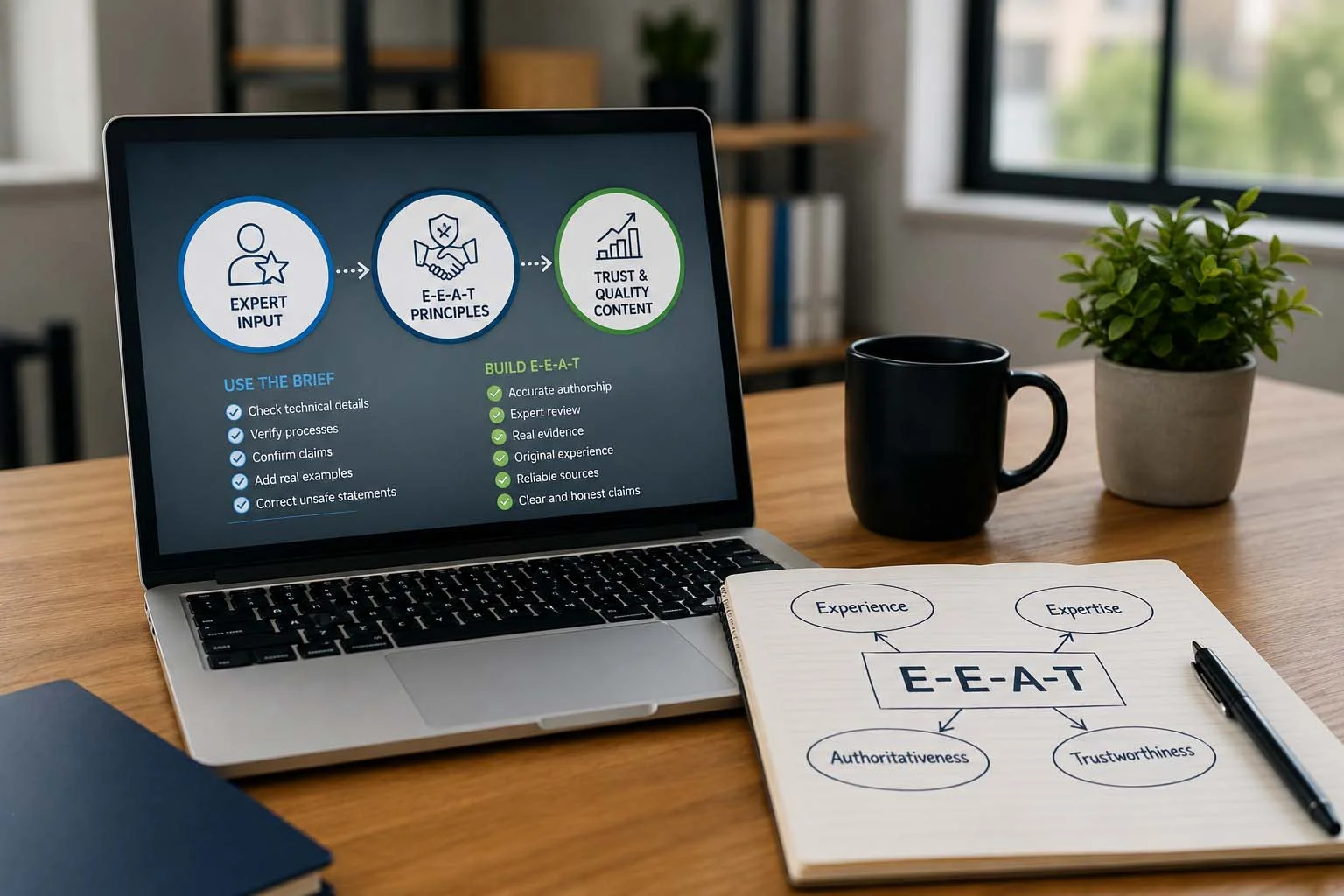
- Check the technical explanation.
- Verify a process.
- Confirm a claim.
- Add a first-hand example.
- Correct an unsafe or misleading statement.
This saves time and makes expert review much more useful. A technical SEO specialist does not need to spend an hour fixing commas. The editor can do that.
SEO Content Briefs and E-E-A-T
A brief cannot “add E-E-A-T” by placing a few keywords on the page. What it can do is make trust requirements part of production from the start. Google explains E-E-A-T as experience, expertise, authoritativeness and trustworthiness, while also noting that E-E-A-T itself is not one specific ranking factor. Trust is especially important.
A good brief can therefore request:
- accurate authorship,
- genuine expert review,
- real evidence,
- original experience,
- reliable sources,
- and clear claims.
For articles using Article structured data, Google also recommends accurately representing authors and can use author URLs or profile information to better understand who wrote the content. The key word is accurate. Do not invent credentials to fill a template field.
Common SEO Content Brief Mistakes
Giving the Writer Too Many Keywords
A list of 80 keywords does not create a better article. It often creates unnatural writing. Give the writer the main query, close variations and the actual topics the reader needs.
Copying Competitor Headings
Competitors can help with research. They should not become your outline word for word. Your brief should identify where your company can add something more useful.
Fixing the Word Count Before Understanding the Topic
A word range can help with planning. But Google does not prefer a particular word count. Plan around the questions the page needs to answer.
Forgetting Existing Content
Before approving a new page, check whether another URL already owns the intent. Otherwise, your content calendar can slowly create keyword cannibalisation.
Adding Evidence After the Draft
If the article needs real screenshots, expert input or client evidence, put that requirement in the brief. Do not finish a generic article and then try to bolt experience onto it at the end.
Treating the CTA as an Afterthought
The CTA should fit the customer journey. A useful informational guide may need a softer next step. A commercial comparison can support a stronger consultation CTA.
Giving Everyone the Same Brief
Writers, editors and experts use the same core document, but they need different parts of it. The writer needs purpose and structure. The editor needs quality and intent rules. The expert needs clear verification points. A strong template supports all three.
Why Wixdek Uses Detailed Content Briefs
At Wixdek, the aim of a content brief is not to make writing robotic. It is to protect the strategy. The brief makes the search intent clear. It shows which URL owns the topic. It explains which service page the article supports. It records the evidence needed. It gives the writer useful internal links. It tells the editor what to check.
And it makes clear where expert input is still required. That means fewer important decisions are left until publication day. The writer still writes naturally. They simply have a clearer destination.
Download the Wixdek SEO Content Brief Template
Use the Wixdek SEO content planning template before writing new service pages, blogs, pricing guides, comparisons or technical articles.
The template should include:
- page purpose,
- search intent,
- main and supporting keywords,
- audience,
- evidence,
- internal links,
- CTA,
- author and expert requirements,
- cannibalisation guardrails,
- visual assets,
- and the update rule.
- Download the Wixdek SEO Content Brief Template
A downloadable spreadsheet or editable document version can use the same fields shown in the copy-paste template above.
Build the Brief Before the Draft
A good article normally starts before the first paragraph is written. Decide why the page exists. Understand the search intent. Choose which URL should own it. Give the writer the right evidence. Plan internal links. Protect existing pages from overlap. Choose the CTA. Then write. This does not make content less creative. It removes avoidable confusion.
And when writers, editors and experts are all working from the same SEO content brief, it becomes much easier to produce content that is useful for readers and connected to the wider website strategy.
Get Help With SEO Content Strategy
If your content team is publishing regularly but pages overlap, briefs are inconsistent or commercial pages are not getting enough support, Wixdek can help build a clearer content process. Our SEO services in London include search-intent research, content strategy, on-page SEO, internal linking and ongoing optimisation. Wixdek currently positions its SEO service around high-intent visibility and measurable enquiries rather than traffic alone.
Request an SEO Content Strategy Consultation
Frequently Asked Questions
What Is an SEO Content Brief?
An SEO content brief is a planning document that explains what a page should achieve, who it is for, which search intent it targets and what the writer needs to cover.
What Should an SEO Content Brief Include?
It should include page purpose, search intent, keywords, supporting topics, audience, evidence, internal links, CTA, author or expert requirements, cannibalisation rules, visuals and an update plan.
Who Should Use an SEO Content Brief?
Writers, editors, SEO specialists, content managers and subject experts can all use the same core brief. Each role uses different fields during production.
How Many Keywords Should Be in a Content Brief?
There is no fixed number. Use one clear primary topic and enough closely related terms to explain the subject naturally without turning the brief into a keyword-stuffing checklist.
Should an SEO Brief Include Search Intent?
Yes. Search intent helps the writer understand whether the page should educate, compare, sell a service, answer a local need or support another part of the customer journey.
Should a Content Brief Include a Word Count?
A rough range can help production planning, but it should not be treated as a Google ranking requirement. Google says it has no preferred word count.
Does a Title Tag Have to Be Under 60 Characters?
No fixed 60-character rule comes from Google. Google recommends descriptive and concise titles and may generate the displayed title link from several page signals.
Does a Meta Description Have to Be Under 160 Characters?
No. Google states that there is no fixed length limit for the meta description tag, although displayed snippets may be shortened depending on the search result and device.
What Is a Cannibalisation Guardrail?
It is a note in the brief stating which existing page owns a related search intent and what the new content should avoid targeting too closely.
Should Competitor Pages Be Added to the Brief?
They can help with research and search-result analysis, but writers should not copy their structure or simply rewrite the same information. The brief should identify how your page can add its own value.
Should a Brief Include Internal Links?
Yes. Add the main internal destinations and explain why they are relevant. You can also list older pages that should link into the new content after it is published.
How Often Should a Content Brief Template Be Updated?
Review the template when your SEO process, website structure, evidence standards or search guidance changes. The brief itself should stay practical rather than becoming longer just for the sake of it.