
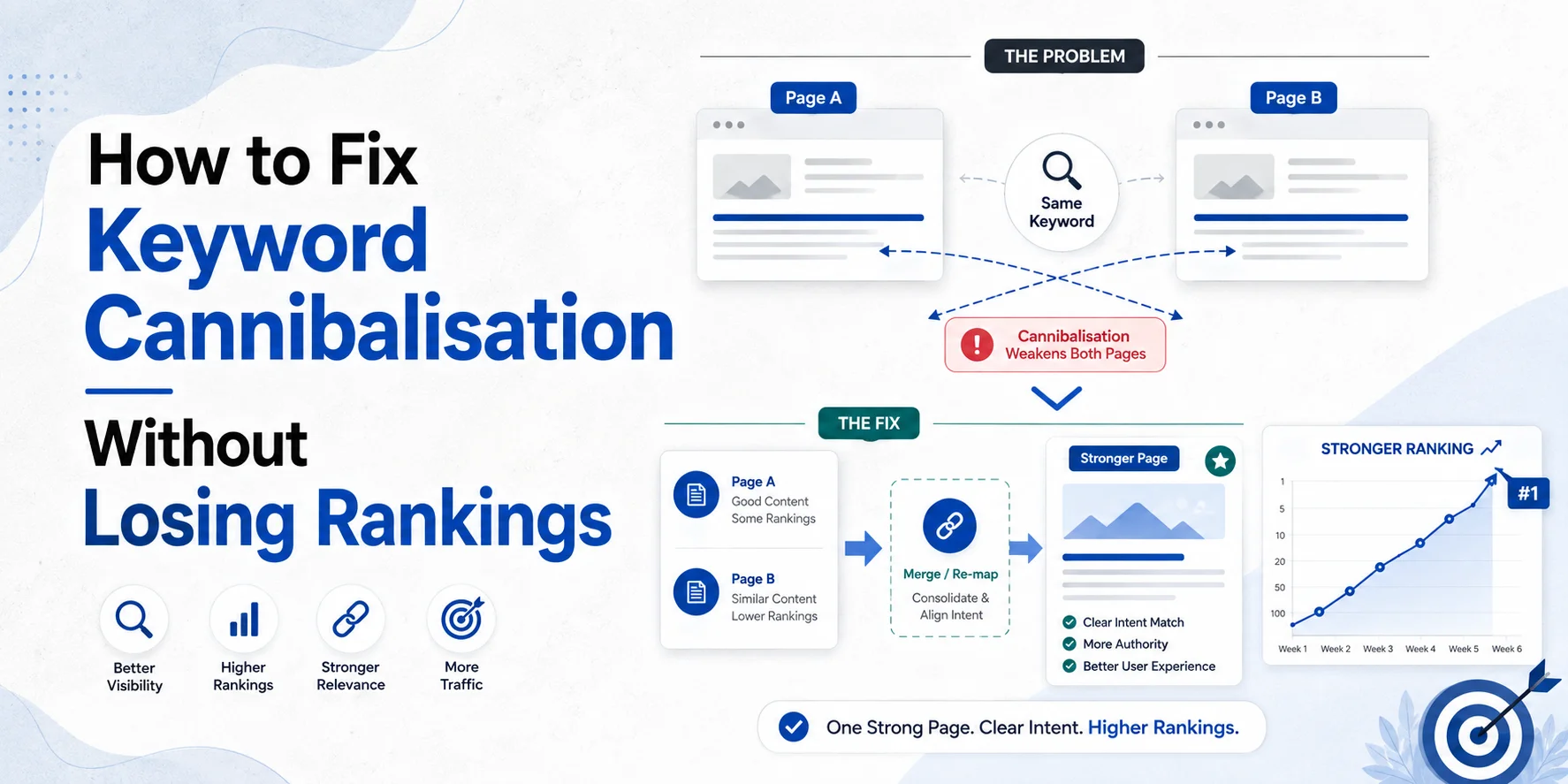
Two pages from your website rank for the same keyword. Is that a problem? Not always. Keyword cannibalisation happens when two or more pages compete for the same search need and make it harder to establish which URL should be your main page. But seeing two URLs for a similar keyword does not automatically mean something is wrong.
One page may be a service page. Another may be a pricing guide. A third may answer an informational question. They can mention similar terms while doing completely different jobs. The real problem starts when several pages target the same search intent, cover very similar information and compete for the same clicks.
That is when you need to decide whether to:
- Merge the pages
- Redirect one URL
- Refocus the pages
- Improve internal linking
This guide explains how to identify real SEO keyword cannibalisation and choose the right fix without deleting useful pages or putting existing rankings at unnecessary risk.
What Is Keyword Cannibalisation?
Keyword cannibalisation is when several pages on the same website compete for the same or very similar search intent. Imagine a London cleaning company has these pages:
/office-cleaning-london/
/commercial-office-cleaning-london/
/best-office-cleaning-services-london/
If all three pages offer almost the same service, target the same customer and answer the same search need, the website may have unnecessary overlap. That is different from having:
/office-cleaning-london/
and:
/how-often-should-an-office-be-cleaned/
Both pages may mention office cleaning, but the first page is commercial and the second is informational. They have different jobs. That is why a proper cannibalisation SEO audit should look at search intent, not just repeated keywords.
Not Every Keyword Overlap Is Keyword Cannibalisation
This point matters because people often start merging pages too quickly. Google Search Console can show several URLs from one website for the same query. That alone does not prove you have an SEO problem. Google’s Search Console guidance lets you select a query and then view the Pages report to see which URLs were shown for it. See Google’s Search Console Performance guidance.
Your next job is to understand why those URLs appear.
Imagine Wixdek has:
- SEO Services London
- and:
- How Much Does SEO Cost in London?
Both pages may appear for searches around SEO services and pricing. But their main intent is different. The service page is for somebody looking for SEO support. The pricing guide answers a cost question. They should not be merged simply because they share related words.
When Does Keyword Overlap Become a Real Problem?
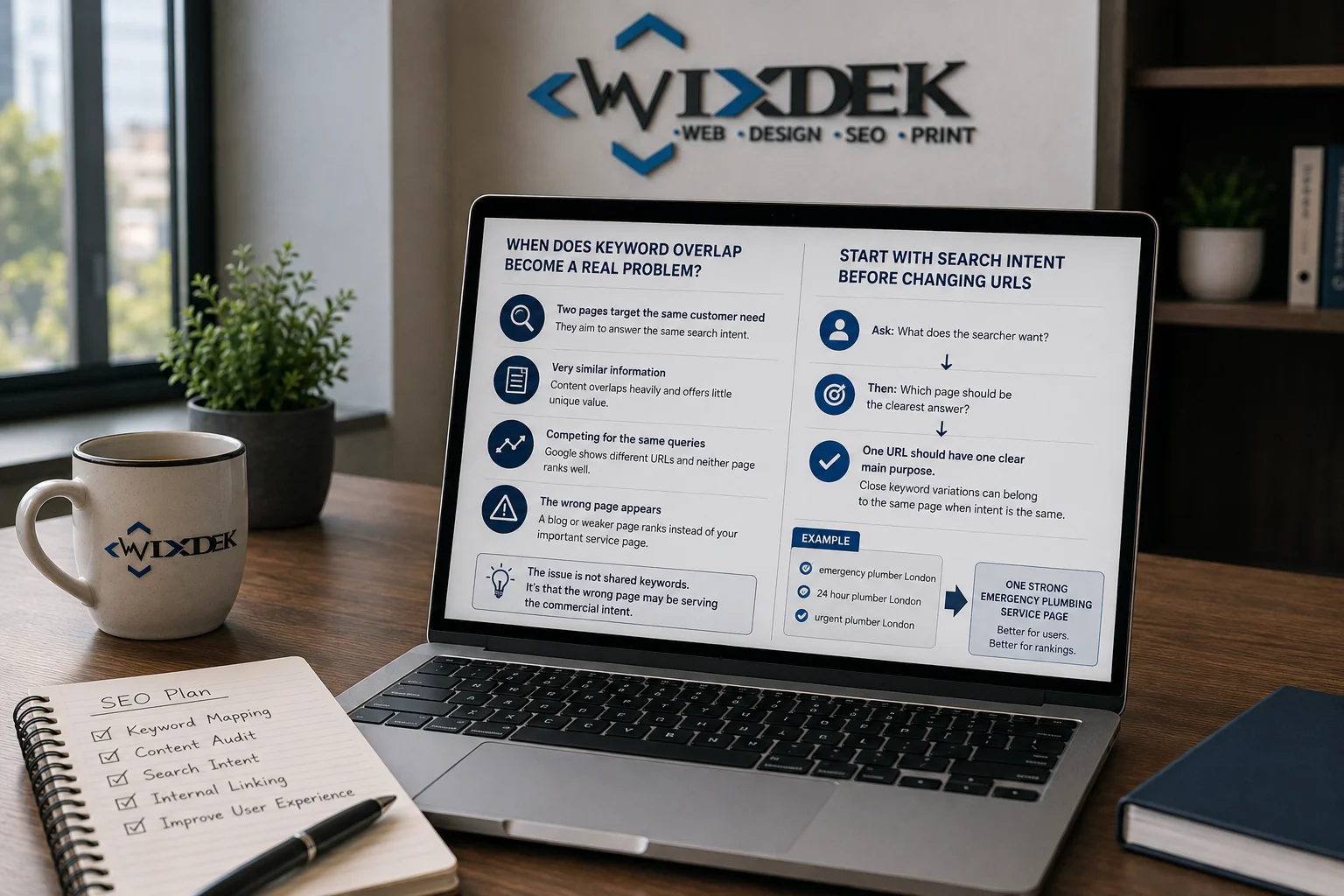
Look for repeated signs rather than one shared keyword. You may have a genuine problem when two pages target the same customer need, contain very similar information and repeatedly compete for the same important queries. Another clue is when Google keeps showing different URLs for the same query and neither page develops stable visibility. You may also see an older weaker page appearing instead of the commercial page you actually want customers to reach.
For example, your blog might rank for commercial cleaning London while your proper commercial cleaning service page struggles. That deserves investigation. The issue is not that both pages use “commercial cleaning”. The issue is that the wrong page may be serving the commercial intent.
Start With Search Intent Before Changing URLs
Before merging, redirecting or rewriting anything, decide what each page is meant to do.
Ask:
- What does the searcher want?
- Then:
- Which page should be the clearest answer?
This follows the same method used in our search intent mapping for service businesses guide. One URL should normally have one clear main purpose. That does not mean one exact keyword per URL. Several close keyword variations can belong to the same page when the intent is the same.
For example:
- emergency plumber London
- 24 hour plumber London
- urgent plumber London
These may all belong to one strong emergency plumbing service page. Creating three near-identical pages may simply create more work and more overlap.
How to Find Keyword Cannibalisation in Google Search Console
Search Console is one of the best places to start because it shows how Google is already displaying your website. Open the Performance report. Choose an important query. Then open the Pages tab. Google’s current Search Console guidance confirms that this view can show which URLs from your site appeared for the selected query. Now compare those pages.
Do they have different purposes? Or are they trying to answer the same question?
Example
Imagine the query is:
SEO consultant London
Search Console shows:
/seo-consultant-london/
and:
/blog/best-seo-consultant-london/
Now inspect both pages. If one is a genuine consultant service page and the other is a useful guide about choosing consultants, both may have a reason to exist. But if the blog is basically another sales page targeting the same customer, there may be real intent overlap.
Compare More Than Average Position
Do not choose a winning page only because it currently has the highest average position. Look at the wider picture. Search Console gives you data such as clicks, impressions, CTR and average position. Google recommends focusing on trends in clicks and impressions rather than position alone. Read Google’s Search Console performance guidance.
Also check whether the page generates:
- calls,
- forms,
- bookings,
- sales,
- or another useful business action.
A page with fewer visits may still be the stronger commercial URL if it produces better enquiries.
Check Whether Google Is Switching Between URLs
One pattern worth investigating is regular URL switching.
For example:
- Week 1: Page A appears.
- Week 2: Page B appears.
- Week 3: Page A returns.
- Week 4: Page B takes over again.
- That does not prove cannibalisation by itself.
But if both pages have almost identical intent, it is a useful clue that the website may need a clearer preferred destination. Review clicks, impressions and queries over a sensible period rather than reacting to daily movement.
Look for Competing Pages With a Website Crawl
Search Console shows search performance. A site crawl helps you find structural overlap.
Review similar:
- page titles,
- H1s,
- URL patterns,
- service pages,
- location pages,
- and blog topics.
- Again, similarity is a clue.
- It is not proof.
Two pages can have similar titles and still answer different customer needs. The final decision should come from content purpose and search intent.
Your Keyword Cannibalisation Decision Matrix
Use this before changing anything.
| Situation | Best action to consider |
| Two pages have the same intent and both contain useful material | Merge |
| One page has been replaced by a clearly better equivalent | Redirect |
| Two useful pages overlap but should serve different needs | Refocus |
| Correct page exists but internal links favour the wrong URL | Improve internal links |
| Pages are genuine duplicate or near-duplicate URL variants | Review canonicalisation |
| Pages share keywords but have clearly different intent | Usually keep both |
This is the core of a safe keyword cannibalisation fix.
Fix 1: Merge Pages That Serve the Same Purpose
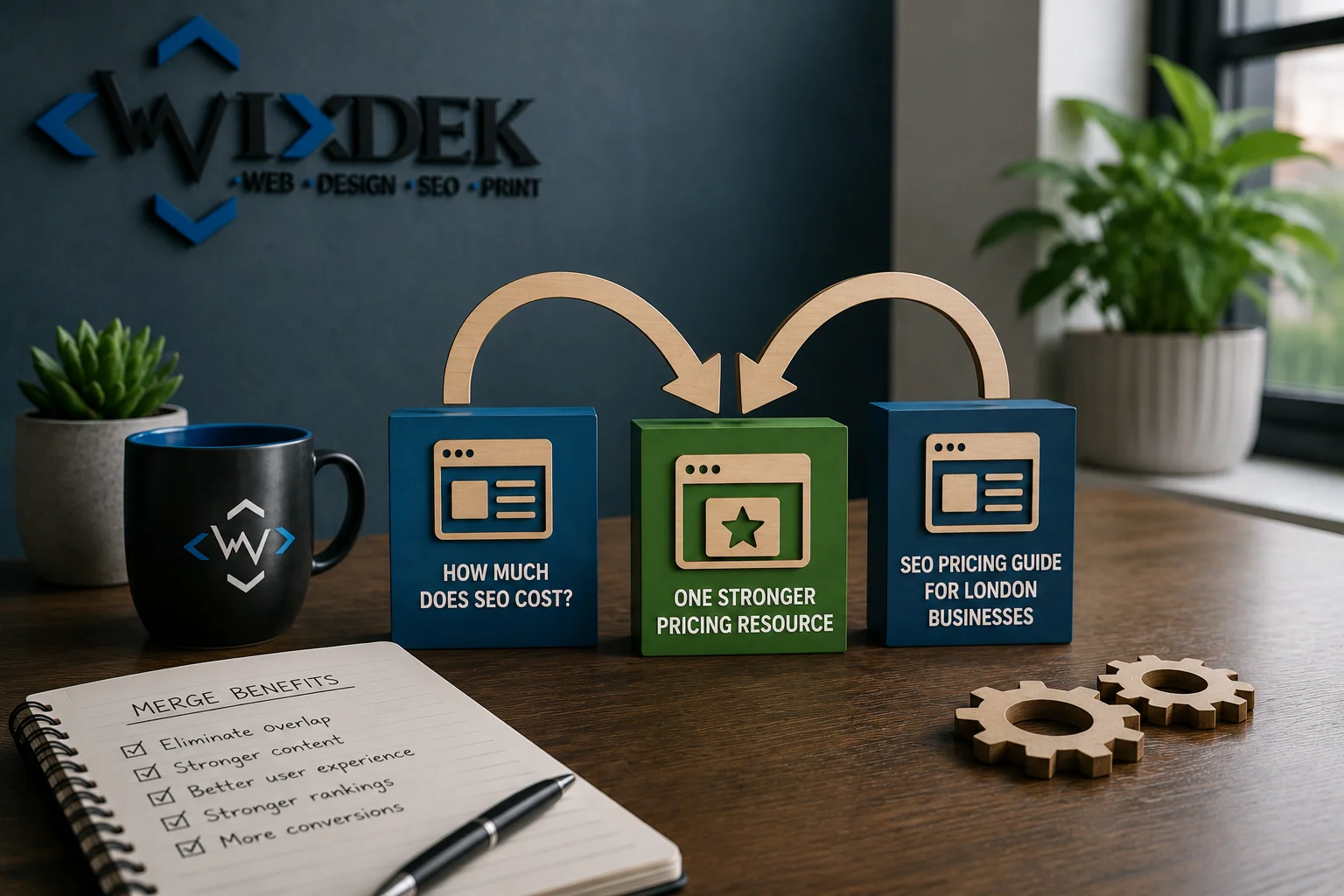
Merging makes sense when two pages are doing almost the same job and both contain something worth keeping.
Imagine you have:
- How Much Does SEO Cost?
- and:
- SEO Pricing Guide for London Businesses
- Both target the same audience.
- Both answer the same pricing questions.
- Both compete for similar searches.
- One has useful backlinks.
- The other contains newer pricing explanations.
Instead of maintaining two overlapping pages, you may be better off creating one stronger pricing resource.
How to Merge Safely
First choose the URL that makes the most sense as the long-term page. Do not automatically choose the page with the most words. Check its current visibility, useful backlinks, conversions, search intent, URL quality and role in the website. Then move any genuinely useful information from the weaker page into the main page. Do not copy every paragraph just to make the final page longer.
Keep what improves the answer. After the main page is complete, decide what should happen to the old URL. If the old page has genuinely been replaced by the new consolidated page, a permanent redirect may be suitable. Google treats permanent redirects as a strong canonicalisation signal. Read Google’s canonical guidance.
Fix 2: Redirect a Page That Has Been Replaced
Redirecting makes sense when one URL no longer needs to exist and there is a clear relevant replacement. Imagine you previously had:
/seo-audit-london-old/
but the full service has moved to:
/technical-seo/
If the old page no longer has a unique purpose and the new page is genuinely its replacement, a redirect may make sense. But redirects need care. Do not send every deleted page to the homepage. The destination should genuinely help someone who tried to visit the old URL.
Before You Redirect a Competing Page
Check what the old URL currently has. Does it receive clicks? Does it earn impressions? Does it rank for useful queries? Does it have backlinks? Does it produce conversions? Does it serve an intent that the new page does not? Is another page genuinely a suitable replacement? Only redirect after answering those questions. Once redirected, update your internal links so they point directly to the preferred URL instead of relying on the redirect forever.
Fix 3: Refocus Pages That Should Both Exist
Sometimes merging is the wrong answer. Two pages may be useful but poorly separated. In that case, refocus them.
Imagine a roofing company has:
- Roof Repair London
- and:
- How Much Does Roof Repair Cost in London?
- Both mention roof repair.
- But they should serve different intentions.
The service page should help somebody choose and contact the roof-repair company. The pricing guide should explain costs, pricing factors and what changes the final quote. If both pages currently contain the same long service pitch and target the same terms, clarify their jobs.
Refocus the Main Service Page
Keep it focused on service intent. Explain the service, common problems, process, areas served, proof and next step.
Refocus the Supporting Guide
Keep the cost article centred on pricing. Explain what affects the price, what customers should compare and which information is needed for an accurate quote. The pages can still link to each other. Now they support the same topic without doing the same job.
Don’t “De-Optimise” Pages Blindly
You may hear advice telling you to remove the keyword from every heading, title and image on the weaker page. That is too simplistic. If the keyword naturally describes the topic, removing every mention can make the page worse for users. The goal is not to hide the topic. The goal is to make the page’s purpose clearer.
Change the focus where needed. Do not make wording strange simply to avoid repeating a phrase.
Fix 4: Improve Internal Linking
Sometimes the content is fine. The website structure is the problem. Imagine your main commercial service page should own a valuable service query. But 25 related blog articles link heavily to another old article using service-focused anchor text. Your internal links may be giving the wrong page stronger contextual support. Google says links help it discover pages and understand relevance, and recommends crawlable links with useful anchor text. Read Google’s link best practices.
Review how your supporting content links to the main page. If the service page is the commercial destination, useful informational articles should normally link to it when that helps readers. You do not need to force an exact-match keyword into every anchor. Use natural wording that explains where the link goes. Our internal linking strategy for service websites goes deeper into this process.
When Canonical Tags Make Sense
Canonical tags are useful, but they are not the answer to every cannibalisation issue. Google uses canonicalisation to choose a representative URL from duplicate or very similar pages. Duplicate content itself is also normal in many cases and is not automatically a spam violation. Read Google’s explanation of canonicalisation. A canonical can make sense when several URL versions need to stay accessible but contain duplicate or near-duplicate content.
Examples may include certain filtered, parameter or technical URL variations. But if you have two genuinely different articles competing because their intent is poorly defined, adding a canonical tag may simply hide the real content-strategy problem. First ask whether both pages should exist. Then decide whether you need merging, refocusing, redirecting or canonicalisation.
Canonical Tags vs Redirects
These are not the same thing. A canonical normally leaves both URLs accessible while signalling a preferred representative version. A redirect sends users and crawlers from one URL to another. Google currently describes redirects and rel=”canonical” as strong canonicalisation signals, while sitemap inclusion is weaker. Read Google’s canonical URL guidance. Choose the method based on what should happen to the URL.
If the old page should disappear because it has been replaced, a redirect may be appropriate. If duplicate technical URLs must remain available, canonicalisation may be more suitable.
What Should You Check Before Deleting a Page?
Never delete a competing URL simply because another page ranks better today.
Before removing anything, check:
- Search visibility: Does the page still get useful impressions or clicks?
- Queries: Does it rank for searches the other page does not cover?
- Conversions: Does it produce enquiries, bookings or sales?
- Backlinks: Has the page earned useful external links?
- Internal links: Which important pages point towards it?
- Search intent: Does it have a distinct purpose?
- Content: Is there unique material worth preserving?
- Replacement: Is there genuinely another page that can take over its job?
- This check can stop you throwing away useful content.
What If the Page Has Very Little Traffic?
Low traffic alone is not enough reason to remove it. A page may have low traffic because the search itself is small. It might still generate a valuable enquiry. It may also have useful backlinks or support another important page. Look at its full purpose before deciding. This is the same principle used in our SEO content audit framework, where content is reviewed by value and intent rather than one traffic number.
Practical Example: Two London Service Pages Compete
Imagine a London cleaning company has:
/commercial-cleaning-london/
and:
/office-cleaning-services-london/
Search Console shows both appearing for queries around office and commercial cleaning. Do you merge them? Not yet. First check what the business actually offers. If commercial cleaning covers offices, warehouses, retail spaces and other commercial premises while office cleaning is a distinct high-value service with different customer needs, both pages may deserve to exist.
Refocus them. The commercial cleaning page can explain the broader commercial service. The office cleaning page can focus specifically on offices. But if both pages only sell office cleaning and say almost the same thing, merging may make more sense. That is why intent comes before the fix.
Practical Example: Blog Competing With a Service Page
Now imagine the company has:
/commercial-cleaning-london/
and:
/blog/best-commercial-cleaning-london/
The blog is written like another service page. Both target the same commercial searches. The service page should be the main conversion destination. You could refocus the blog into a genuinely useful informational or comparison topic. For example:
What to Check Before Choosing a Commercial Cleaning Company
Now the blog has a separate job. It can help somebody compare providers and link naturally to the service page. You have not deleted useful content. You have separated the intent.
Practical Example: Two Old Blogs Cover the Same Topic
Imagine two articles:
- How Often Should You Have Your Office Cleaned?
- and:
- How Often Does an Office Need Professional Cleaning?
- They target the same question.
- Both serve the same audience.
- One has useful links.
The other has a newer and stronger section on cleaning frequency by workplace type. This is a good merge candidate. Build one stronger article. Preserve the useful information. Use the better long-term URL. Then handle the retired URL properly.
A Wixdek Approach to URL Consolidation
Wixdek’s current Technical SEO service includes duplicate-content review, canonical tags and content consolidation as part of resolving technical and structural overlap.
But consolidation should not start with:
- “These two pages mention the same keyword.”
- It should start with:
- “Do these pages perform the same job?”
At Wixdek, a practical review looks at search intent, current visibility, useful search queries, internal links and the role of each page before choosing an action. If both URLs are genuinely useful and distinct, we keep and clarify them. If they overlap but should serve different needs, we refocus them. If they serve the same purpose and one stronger resource would be better, consolidation may make sense.
If one URL has genuinely been replaced, we can then consider a redirect. This keeps the decision tied to users and search behaviour rather than a crawler warning. After consolidating competing pages, review the surviving page with a full on-page SEO pass so its intent, headings, copy and internal signals all support the same target.
How to Use Search Console for a Keyword Cannibalisation Audit
Here is a simple process. Choose one important query in Search Console. Open the Pages view. See which URLs appeared. Then compare the pages over a useful time period. Look at clicks and impressions. Now review the search intent of each URL. The result may look like this:
| URL | Main intent | Search performance | Decision |
| Service page A | Commercial | Strong potential | Keep as primary |
| Blog B | Informational | Useful long-tail traffic | Refocus and support A |
| Old page C | Same as A | Weak and outdated | Consider merge/redirect |
This is much more useful than automatically deleting Page C because three URLs appeared for one query.
Cannibalisation Decision Guide
Use this as your Wixdek original decision graphic.
Do two URLs appear for similar queries?
Yes → Check intent.
Do they serve different search needs?
Yes → Keep them and make the difference clearer.
No → Continue.
Does each page contain useful unique information?
Yes → Consider merging the strongest material.
No → Continue.
Has one URL clearly replaced the other?
Yes → Consider a relevant permanent redirect.
No → Continue.
Should both pages remain but serve different jobs?
Yes → Refocus the content.
Is the right page not receiving enough internal support?
Yes → Improve internal links.
Are the URLs genuine duplicate technical versions?
Yes → Review canonicalisation. Suggested alt text: Keyword cannibalisation decision tree showing when to merge, redirect, refocus pages or improve internal links.
What Should You Monitor After the Fix?
Do not judge the change the next morning. Google may need time to recrawl pages and process redirects, content changes or internal-link updates. Monitor the affected query group and pages in Search Console. Check whether the preferred URL is gaining relevant impressions and clicks. Also check the business result. If the main goal is service enquiries, are more relevant visitors reaching the commercial page?
If you merged content, make sure the old URL redirects correctly and your internal links now point directly towards the chosen page. If you refocused pages, check whether each page starts appearing for its intended search themes.
Don’t Create Another Keyword Cannibalisation Problem
Once the issue is fixed, prevent it happening again. Before creating new content, check what already exists.
Ask:
What search intent will this new page own?
Then compare it with existing URLs. This is why search intent mapping should happen before content production. Your future topic cluster structure should also make it clear which commercial page owns the main service intent and which supporting articles answer related informational questions. Our guide on how to build topic clusters that support commercial pages covers that relationship in more detail.
Common Keyword Cannibalisation Mistakes
The biggest mistake is thinking:
- same keyword = same page
- That is not always true.
- Search intent matters more.
Another mistake is deleting the weaker page without checking its links, queries or conversions. A third is using canonical tags to avoid making a proper content decision. And another common problem is merging everything into one huge article. One giant page does not automatically serve five different search needs better. The best fix should make the website clearer.
How Wixdek Approaches Keyword Cannibalisation
At Wixdek, we first identify whether there is a real conflict. We compare the pages, their purpose and their search queries. Then we decide what each URL should do. The main options are straightforward. Merge when pages genuinely serve the same intent and both contain useful material. Redirect when one page has been fully replaced by another relevant URL.
Refocus when both pages deserve to exist but their purposes are too similar. Improve internal links when the correct page exists but the site structure does not clearly support it. Canonicalisation is considered separately when duplicate or near-duplicate URL versions need a preferred representative page. The goal is not to remove URLs. The goal is to give each useful page a clear role.
Fix the Conflict Without Throwing Away Good Work
Keyword cannibalisation does not need a panic response. Do not start deleting content because two pages rank for a similar phrase. Check the search intent first. Look at Search Console. Review clicks, impressions, conversions and links. Then decide whether the pages should be merged, redirected, refocused or better connected. When each page has a clear purpose, your content becomes easier for customers to use and easier for your SEO team to manage.
That is a much safer approach than deleting pages at random.
Get Technical SEO Support From Wixdek
If several pages are competing for the same search intent and you are not sure which URL should remain, Wixdek can review the structure before changes are made. Our Technical SEO services include technical audits, duplicate-content review, canonicalisation, internal-link improvements and website-structure work. For wider content strategy, search intent and ongoing SEO implementation, explore our SEO services in London.
If you already have an internal team and need strategic support, you can also work with an SEO consultant in London.
Request a Keyword Cannibalisation Review
Frequently Asked Questions
What Is Keyword Cannibalisation?
Keyword cannibalisation happens when multiple pages on the same website compete for the same or very similar search intent and make it harder to establish the best page for that need.
Is It Bad If Two Pages Rank for the Same Keyword?
Not always. Two pages can appear for a similar query while serving different purposes. Check search intent and page performance before deciding there is a problem.
How Do I Find Keyword Cannibalisation in Google Search Console?
Choose an important query in the Search Console Performance report and then open the Pages tab to see which URLs were shown for that search. Compare their intent, clicks, impressions and purpose.
How Do I Fix Keyword Cannibalisation?
The main options are merging overlapping content, redirecting a replaced URL, refocusing pages around different search intents or improving internal links to support the intended main page.
Should I Delete a Cannibalised Page?
Not automatically. Check its queries, visibility, conversions, backlinks, internal links, content and search intent first. It may be better to merge or refocus it.
When Should I Merge SEO Pages?
Consider merging when two pages genuinely answer the same search need and one stronger page can preserve the useful material from both.
When Should I Redirect a Competing Page?
A redirect may make sense when one page no longer needs to exist and another relevant URL has genuinely replaced it.
Can Internal Links Help Fix Keyword Cannibalisation?
They can help when the correct page already exists but your internal linking gives stronger contextual support to another URL. Links should still be useful and natural for readers.
Can Canonical Tags Fix Keyword Cannibalisation?
Canonical tags can help with duplicate or very similar URL versions, but they are not a universal fix for pages with poorly separated search intent.
Does Duplicate Content Cause a Google Penalty?
Duplicate content on a site is not automatically a violation of Google’s spam policies. Google uses canonicalisation to select representative URLs from duplicate or very similar pages. Read Google’s canonicalisation guidance.
How Long Does It Take to See Results After Fixing Keyword Cannibalisation?
There is no fixed period. Google needs to recrawl and process changes, and the timing depends on the URLs and type of change. Monitor the affected pages and queries rather than expecting an immediate result.
How Can I Prevent Keyword Cannibalisation?
Map search intent before creating new pages. Give each important URL a clear job and check existing content before adding another page targeting a similar topic.
