
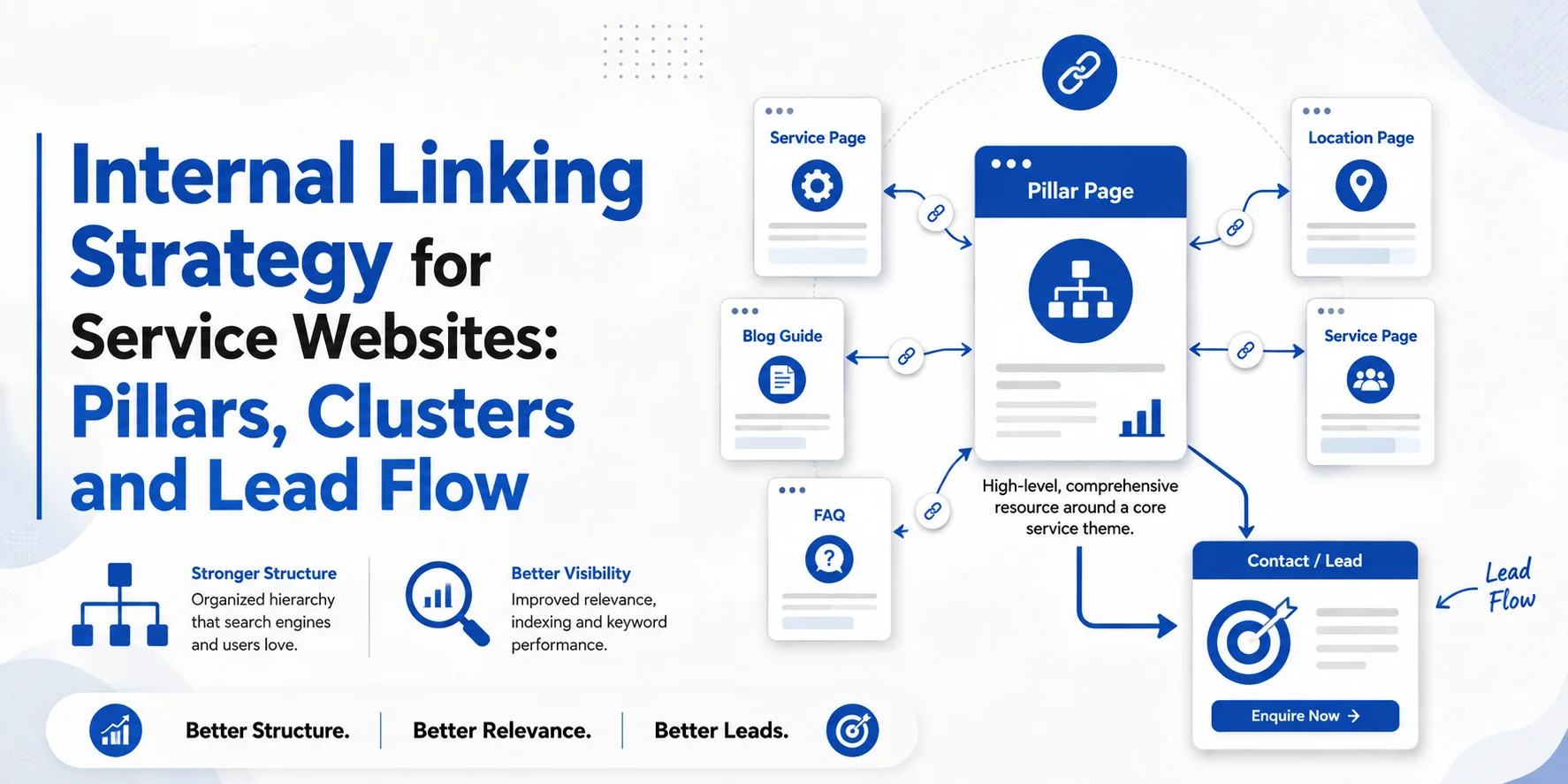
Publishing useful content is only part of SEO. How those pages connect matters too.
A plumbing website may have strong guides about boiler problems, repair costs and emergency services. If those pages do not link to the right service pages, visitors may struggle to find the help they need.
A good Internal Linking Strategy connects important pages, supports customer journeys and helps search engines understand how your content relates.
This guide explains how UK service businesses can build an Internal Linking Strategy around service pages, pillar content, topic clusters, location pages and lead flow.
What Is an Internal Linking Strategy?
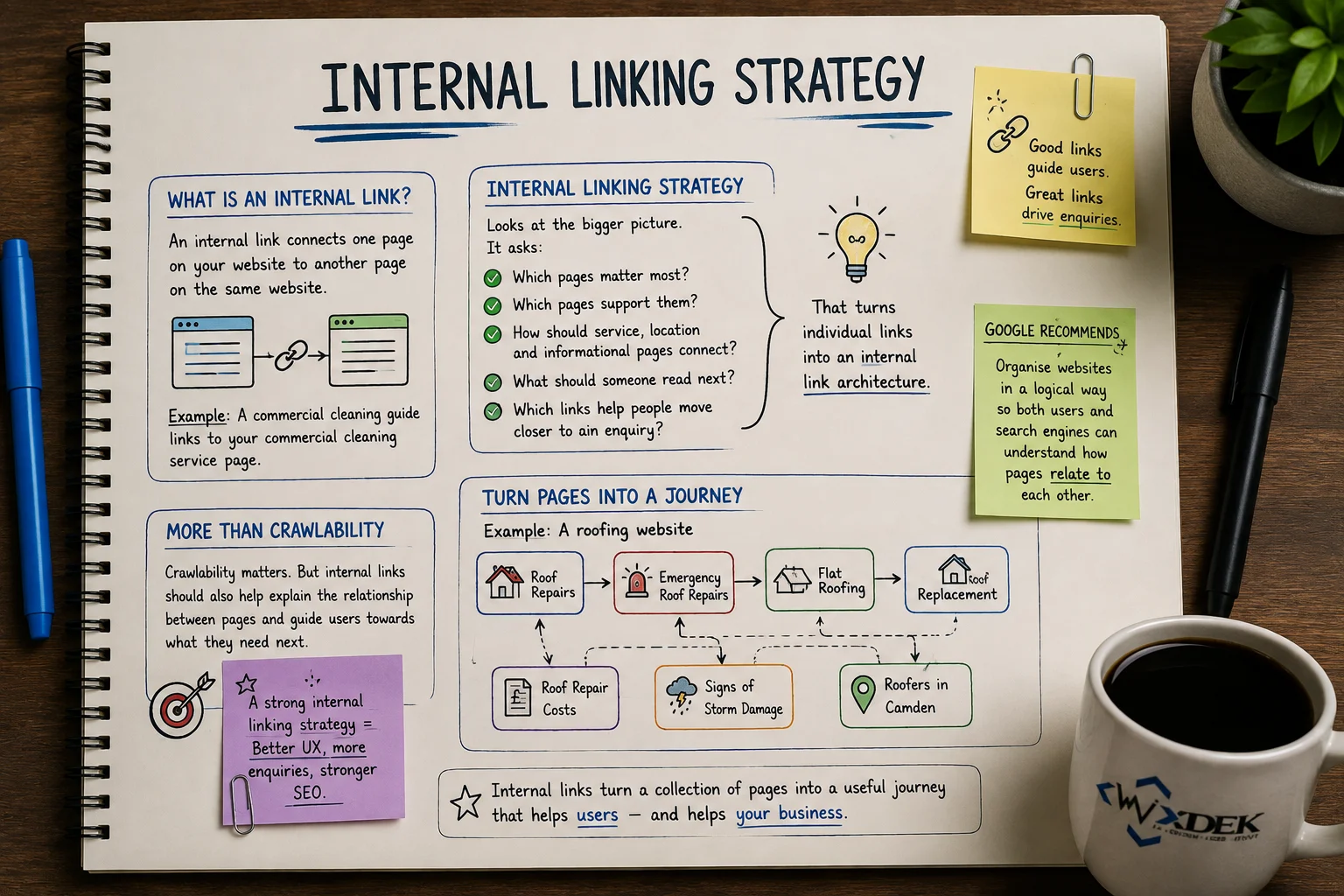
An internal link connects one page on your website to another page on the same website.
For example, a guide about office-cleaning costs might link to a commercial-cleaning service page.
An Internal Linking Strategy plans those connections across the website. It identifies:
- priority service pages;
- supporting content;
- location pages;
- useful next steps;
- links that help customers move towards an enquiry.
Google explains that links help it discover pages and understand relevance. It also recommends descriptive anchor text and linking important pages from relevant content.
The Four Main Jobs of Internal Links
| Purpose | How It Helps |
| Navigation | Helps visitors find useful information |
| Discovery | Helps search engines find connected pages |
| Context | Shows relationships between topics and services |
| Lead flow | Guides visitors towards relevant services and enquiries |
More links do not automatically mean better SEO. Relevance matters.
Step 1: Identify Your Most Important Service Pages
Start your Internal Linking Strategy with pages closest to your business goals.
For most service websites, these include:
- primary services;
- high-value sub-services;
- important service locations;
- pricing or comparison pages;
- case studies that support buying decisions.
A roofing company might prioritise:
- Roof Repairs;
- Emergency Roof Repairs;
- Flat Roofing;
- Roof Replacement;
- Commercial Roofing.
Supporting content should link to these pages when the relationship is useful.
Do Not Send Every Visitor to the Homepage
If someone is reading about emergency boiler problems, sending them to the homepage creates an unnecessary step.
Less useful: Boiler problem guide → Homepage → Services → Boiler repair
More useful: Boiler problem guide → Boiler repair service
Direct links usually create a clearer journey.
Do not make every blog link to the same service page. The destination should match the article’s purpose.
Prioritise Pages by Business Value
| Page Type | Suggested Priority | Reason |
| Main service page | High | Closely connected to enquiries |
| High-value sub-service | High | Targets specific service needs |
| Important location page | High where relevant | Supports local demand |
| Pricing/comparison page | Medium–High | Helps buyers decide |
| Informational guide | Medium | Supports related topics |
| Case study | Medium | Adds proof |
| Old low-value content | Low | Limited current business value |
These are planning priorities, not Google ranking scores.
Step 2: Build Pillars and Topic Clusters
A pillar-and-cluster structure groups related pages around an important subject.
For service businesses, the main commercial service page can often act as the pillar. Supporting pages answer narrower questions.
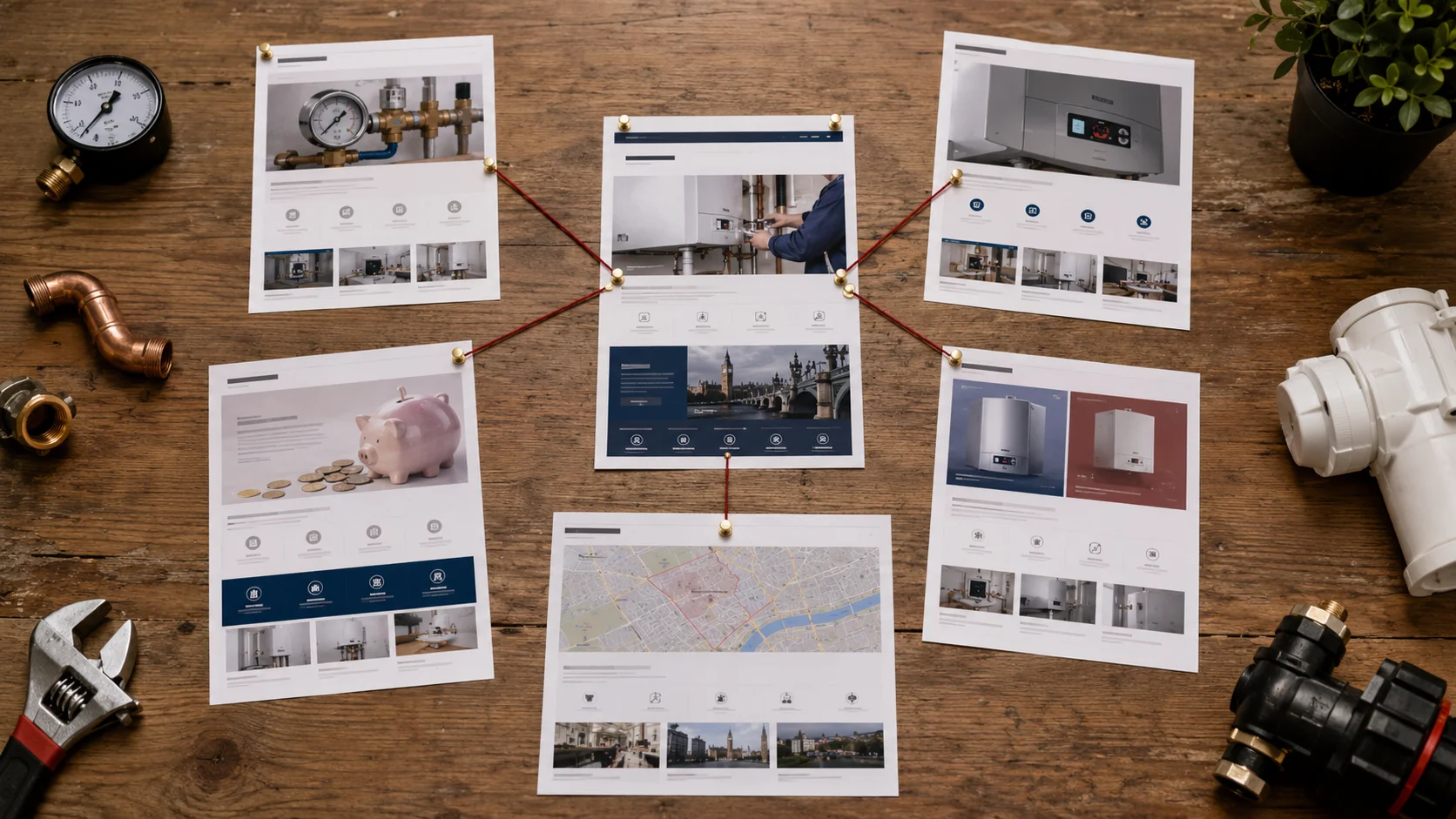
Example: Boiler Repair Cluster
| Page | Search Intent | Linking Role |
| Boiler Repair London | Commercial | Main service pillar |
| Why Is My Boiler Losing Pressure? | Informational | Links to repair service |
| Why Does My Boiler Keep Switching Off? | Informational | Supports repair enquiry |
| How Much Does Boiler Repair Cost? | Pricing | Helps buyers assess cost |
| Repair or Replace a Boiler? | Comparison | Helps decision-making |
| Boiler Repair Camden | Local commercial | Connects local demand to service |
Each page has a different purpose.
Someone researching pressure loss may need an explanation. Someone comparing repair costs may already be closer to booking.
A good Internal Linking Strategy reflects those differences.
Let Pillar Pages Link Back to Useful Content
Internal links should not only flow from blogs to services.
A service page can also link to:
- pricing guides;
- FAQs;
- case studies;
- comparison articles.
This helps visitors answer questions without leaving the site.
Connect Cluster Pages Where Useful
Supporting articles can also link to one another when the connection is genuinely useful.
Avoid connecting every article to every other article. Topic clusters should feel organised, not crowded.
Our guide on building topic clusters that support commercial pages explains this structure in more detail.
Step 3: Connect Location Pages With Relevant Services
Location pages should support genuine service coverage.
For example, a commercial-cleaning company serving Camden, Westminster and Chelsea may have one main service page and several useful local landing pages.
The service page can link to real service areas.
Location pages can link back to the relevant services available there.
Avoid Copied Location Pages
Changing only a town name does not create useful local content.
A location page should explain:
- services available in that area;
- genuine coverage;
- relevant local information;
- a clear next step.
Do not build location pages for areas the business does not actually serve.
Your Internal Linking Strategy should connect real service relationships, not artificial location pages.
Step 4: Use Clear Anchor Text
Anchor text is the clickable wording of a link.
It should help users understand what they will find after clicking.
Use Descriptive Anchors
| Weak Anchor | Better Anchor |
| Click here | Commercial cleaning services |
| Learn more | How much commercial cleaning costs |
| Read this | Roof repair or replacement guide |
| Our services | Emergency plumbing services |
Descriptive anchor text gives context.
Do Not Repeat Exact-Match Anchors Everywhere
Suppose the target page is SEO Services London.
Natural anchors might include:
- our SEO services in London;
- SEO support for London businesses;
- ongoing SEO services;
- how our SEO campaigns work.
Using the same exact-match phrase in every link can make the copy sound forced.
A strong Internal Linking Strategy uses varied, descriptive wording where appropriate.
Place Links Where They Help
There is no universal rule that an internal link must appear in the first 100 words.
A service link may appear early when someone needs urgent help. A detailed guide may introduce the service later.
Use context to decide placement.
There Is No Magic Link Count
Google does not recommend a fixed number of internal links per page.
A short service page may need only a few. A detailed guide may need more.
Focus on useful destinations, not quotas.
Step 5: Build Links Around Customer Journeys
An Internal Linking Strategy should support both SEO and lead flow.
Not every visitor is ready to enquire immediately. Some need pricing, comparisons or proof first.
Emergency Plumbing Journey
Someone searches for water leaking through a ceiling.
They land on a guide explaining causes and warning signs.
The guide links to emergency plumbing services when professional help becomes relevant.
Journey: Problem → Explanation → Emergency service → Call
Commercial Cleaning Journey
A facilities manager searches for office deep-cleaning frequency.
They read a useful guide.
The guide links to a relevant office-cleaning service.
The service page explains what is included and offers a quotation.
Journey: Question → Advice → Service evaluation → Quote request
SEO Pricing Journey
Someone searching for How Much Does SEO Cost in London? wants to understand pricing before choosing a provider.
A pricing guide can explain the main cost factors, then link to the relevant SEO service.
Journey: Pricing question → Budget understanding → SEO service → Consultation
These are example journeys, not guaranteed conversion paths.
Give Visitors Different Next Steps
One visitor may need pricing. Another may want a case study or comparison.
Service pages can provide different useful routes instead of sending everyone straight to a contact page.
Step 6: Audit Your Existing Internal Links
Before adding more links, review what already exists.
Start with important service pages and identify which relevant pages already link to them.
Then review:
- supporting blogs;
- location pages;
- pricing guides;
- case studies.
A crawler such as Screaming Frog can identify internal links, redirects and orphan pages. It cannot decide which customer journey makes commercial sense.
Internal Linking Strategy Audit Checklist
| Check | What to Record | Priority |
| Priority service pages | Relevant incoming internal links | High |
| Supporting articles | Missing links to suitable services | High |
| Anchor text | Clarity and relevance | Medium |
| Location pages | Links to genuine services | High |
| Orphan pages | Important URLs with no discoverable internal links | High |
| Redirecting links | Internal links pointing through redirects | Medium |
| Conversion paths | Whether visitors can reach useful next steps | High |
| Duplicate intent | Pages competing for the same purpose | Medium–High |
Check for Orphan Pages
An orphan page has no discoverable internal links from other crawlable pages.
Important service pages should normally receive links from relevant parts of the site.
Google recommends ensuring important pages have at least one link from another page.
Not every orphan URL is a serious problem. Some temporary or private pages may intentionally sit outside normal navigation.
Review Redirecting Internal Links
After a migration or URL change, some links may still point to old addresses.
Old route: Blog → Old service URL → New service URL
Better route: Blog → New service URL
Where practical, update internal links to point directly to the correct destination.
Update Relevant Older Content
When you publish a new guide or service page, review older related content.
Add links where the new page genuinely helps the reader.
Do not update every old blog just to increase link counts.
Step 7: Monitor and Improve the Structure
An Internal Linking Strategy should evolve as the website changes.
Review it when:
- new services launch;
- new content is published;
- location coverage changes;
- important URLs move;
- old pages are consolidated.
Use Google Search Console to review search performance and Google Analytics to examine visitor behaviour.
Where tracking is reliable, also monitor:
- enquiries;
- calls;
- bookings;
- conversions.
What Should You Measure?
Review:
- organic clicks and impressions for priority pages;
- internal links pointing to important services;
- visitor journeys between related pages;
- completed enquiries and bookings;
- technical issues affecting linked pages.
More links do not prove better performance.
Likewise, higher enquiries may result from several improvements, not internal linking alone.
Real Wixdek Internal Linking Example
Wixdek’s published London electrician campaign shows how internal linking can support a wider SEO programme.
The website already attracted organic traffic, but enquiries were inconsistent.
Before the campaign:
- around 76% of enquiries depended on Google Ads;
- organic search generated about 18–22 monthly enquiries;
- mobile conversion was 1.3%;
- priority service pages had a 64% bounce rate.
The wider campaign improved eight priority service pages and included:
- site structure;
- internal linking;
- local search intent;
- mobile usability;
- conversion tracking.
Reported Results
| Metric | Before | After |
| Monthly organic enquiries | 21 | 44 |
| Monthly organic phone calls | 13 | 31 |
| Enquiries dependent on Google Ads | 76% | 49% |
| Mobile conversion rate | 1.3% | 2.7% |
| Service-page bounce rate | 64% | 39% |
The campaign reported an increase of about 110% in monthly organic enquiries over four months.
These results reflect the overall campaign, not internal linking alone.
You can read the published Wixdek example in Why Your Website Rankings Dropped: A Practical Diagnostic Framework.
Internal Linking Strategy and Keyword Cannibalisation
Internal links can reveal pages competing for the same search intent.
Suppose several articles point to an old informational page as the main destination for a service, while the real commercial service page receives little support.
First, check whether the pages serve different purposes.
If the blog is informational and the service page is commercial, clarify their roles.
If two pages genuinely compete for the same intent, you may need to:
- improve one;
- merge them;
- redirect one;
- change their targeting.
Do not change URLs until you understand their purpose and performance.
Do Not Create Content Just to Build More Links
Internal links cannot compensate for weak content.
Before publishing another cluster article, ask:
- Does it answer a real customer question?
- Does it add original insight?
- Does it provide useful data?
- Does it offer a comparison or example?
- Does it serve a distinct search intent?
A useful cluster does not need the most pages.
Each page needs a reason to exist.
Common Internal Linking Mistakes
Avoid:
- irrelevant links;
- sending every blog to the homepage;
- repeating identical anchors;
- leaving priority service pages isolated;
- linking every page to every other page;
- using internal links to compensate for weak landing pages;
- creating location pages only to generate links.
The destination still needs to satisfy the user’s search intent.
How Wixdek Builds an Internal Linking Strategy
At Wixdek, an Internal Linking Strategy starts with business priorities.
We identify:
- important services;
- target locations;
- customer questions;
- pricing and comparison content;
- useful proof such as case studies.
Then we map how those pages should connect.
Relevant blogs can guide visitors towards services. Pricing pages and case studies can support buying decisions. Location pages can connect local searches with services genuinely available there.
The process also includes reviewing anchor text, orphan pages, redirecting links and customer journeys.
This keeps the Internal Linking Strategy tied to business goals rather than an arbitrary link count.
Build Links Around the Customer Journey
A strong Internal Linking Strategy helps visitors move naturally through the website.
Someone finds an answer, learns about a service, compares options and contacts the business when ready.
At the same time, useful internal links help search engines discover and understand related pages.
Start with your most important services.
Connect supporting pages where they genuinely help.
Then review the structure regularly.
Improve Your Internal Linking Strategy With Wixdek
If your website has plenty of content but important service pages remain difficult to find, Wixdek can review how those pages connect.
Our SEO services in London cover content strategy, technical SEO, internal linking and ongoing optimisation.
If you already have an internal team and need strategic guidance, speak with an SEO consultant in London.
Request an Internal Linking Strategy Review to identify gaps in your site structure and customer journeys.
Frequently Asked Questions
What Is an Internal Linking Strategy?
An Internal Linking Strategy is a planned approach to connecting pages on the same website so users and search engines can understand how important content relates.
Why Is an Internal Linking Strategy Important?
It can improve navigation, page discovery, topic relationships and customer journeys between informational and commercial pages.
What Is Internal Linking in SEO?
Internal linking means linking one page on your website to another page on the same site.
Should Blogs Link to Service Pages?
Yes, when the service is a relevant next step for the reader.
Should Service Pages Link to Blogs?
Yes, when guides, pricing pages, comparisons or case studies help visitors make a decision.
What Anchor Text Should I Use?
Use concise, descriptive wording that explains the destination naturally.
How Many Internal Links Should a Page Have?
There is no fixed number. Add links when they improve navigation, context or access to useful information.
What Is an Orphan Page?
An orphan page has no discoverable internal links from other crawlable pages.
Should Every Blog Link to the Same Service Page?
No. Choose destinations based on the topic and the customer’s likely next step.
Can an Internal Linking Strategy Fix Keyword Cannibalisation?
It can help clarify relationships between pages, but genuine overlap may require content changes, consolidation or redirects.
How Often Should an Internal Linking Strategy Be Reviewed?
Review it when you publish important new pages, change services, move URLs or find navigation gaps during an SEO audit.
