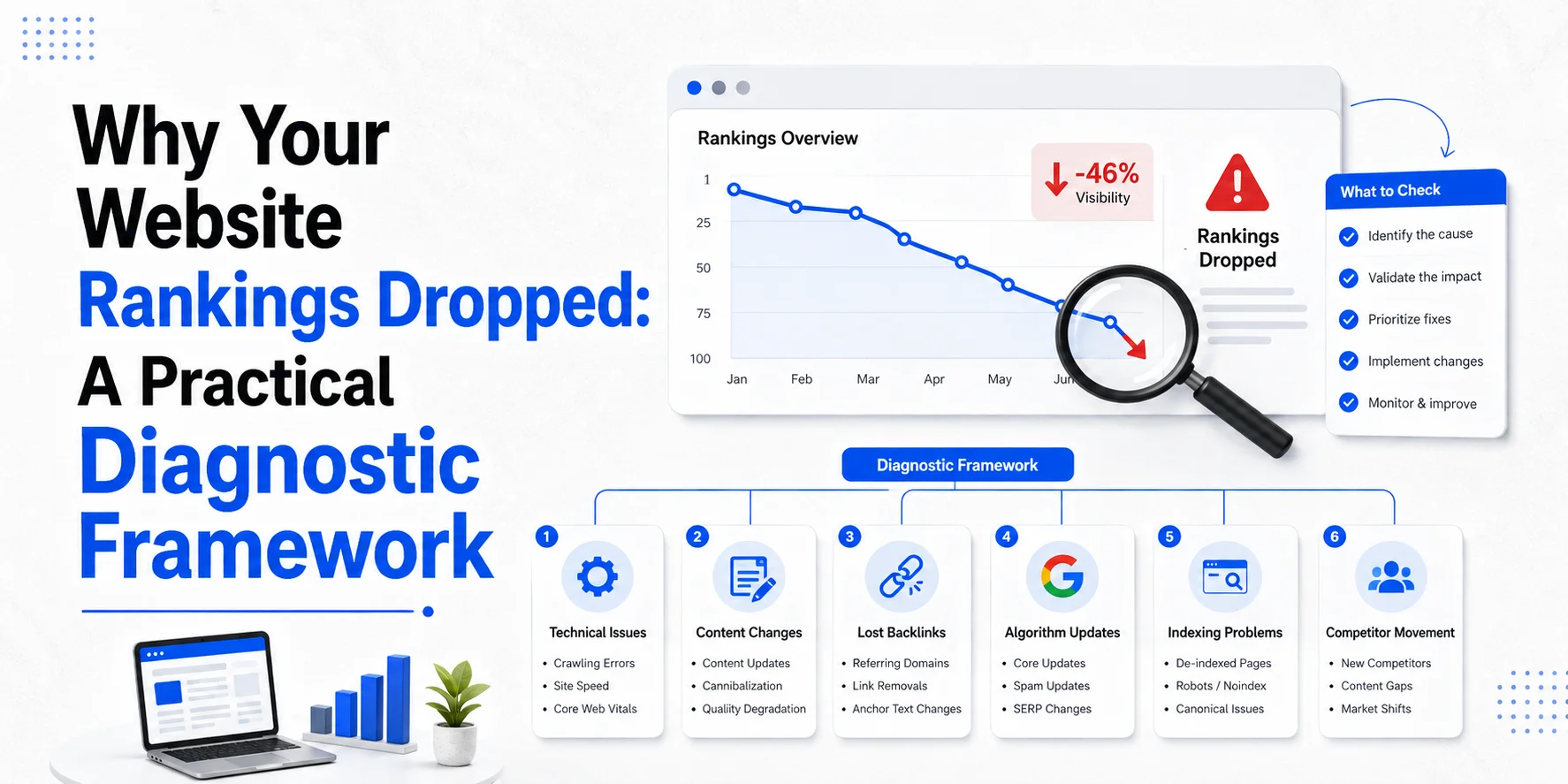
Your website rankings dropped. Traffic is down. Calls may be quieter. Important pages that used to appear near the top of Google have slipped. The worst thing you can do now is start changing everything. A sudden ranking drop does not automatically mean your content is bad. The cause may be broken tracking, a technical website change, weaker demand, a different search intent, stronger competitors, an indexing problem or a change in Google’s search systems.
Google’s own guidance says Search traffic drops can have several causes, including technical problems, algorithmic changes, security or spam issues, site moves, seasonality and changing search demand. Read Google’s guide to diagnosing Search traffic drops. The job is therefore not to guess. It is to narrow the problem until the evidence tells you what changed.
This guide shows you how to diagnose an SEO ranking drop in the right order.
Start by Asking: Did Your Rankings Really Drop?
Before changing content, links or technical settings, confirm what actually fell.
People often use these phrases as if they mean the same thing:
- “My rankings dropped.”
- “My organic traffic dropped.”
- “My impressions dropped.”
- They are different problems.
A decline in Google Analytics sessions does not automatically mean rankings fell. A drop in Search Console clicks does not always mean positions fell. A ranking tool may show movement while Search Console clicks and enquiries remain stable. Start by identifying the signal that actually changed.
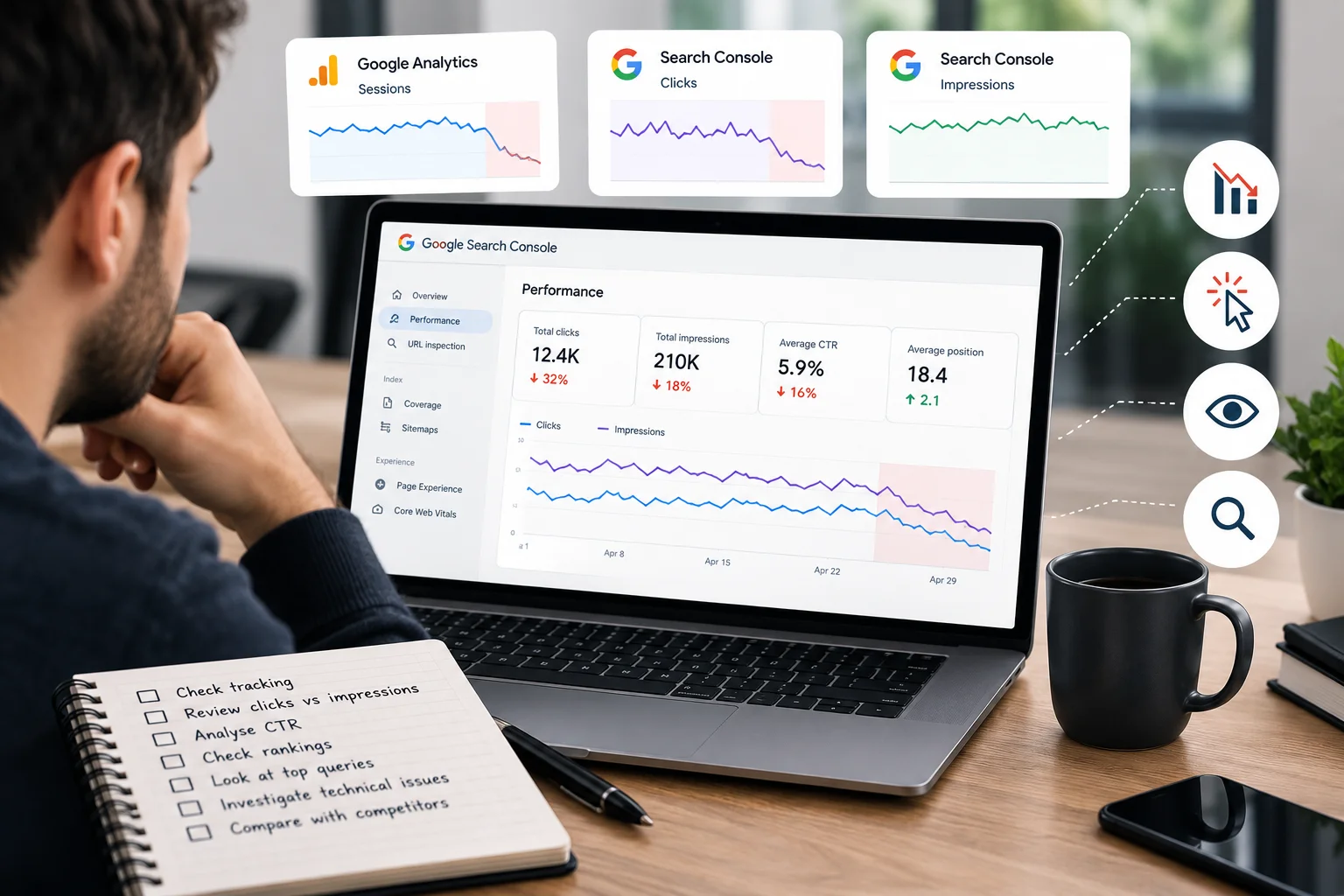
Use This Quick Ranking-Drop Diagnosis
This table is a starting point, not proof of the cause.
| What changed? | What to investigate first |
| Analytics traffic dropped but Search Console clicks stayed similar | Tracking, analytics tags, consent setup or reporting |
| Search Console clicks dropped but impressions stayed fairly stable | CTR, search-result changes, query mix or competitors |
| Clicks and impressions both dropped | Rankings, search demand, indexing, technical problems or algorithmic changes |
| One important page dropped | Page-level technical, intent, content, canonical or competitor issues |
| One group of keywords dropped | Search intent, competition or content relevance |
| Most of the website dropped suddenly | Tracking, server problems, robots/noindex, security or wider search changes |
| Traffic falls at the same time each year | Seasonality or changing demand |
Google recommends using the Search Console Performance report to separate drops by query, page, country, device and search type rather than judging the website only from one headline graph.
Step 1: Verify the Data Before Blaming SEO
A phantom SEO traffic drop can happen when measurement breaks. Imagine your website developer updates the site on Monday. On Tuesday, Google Analytics reports 35% fewer organic visits. It is tempting to assume rankings crashed. But Search Console still shows roughly the same number of Google clicks. That points towards a measurement problem before a ranking problem.
Compare Search Console With Analytics
Search Console measures how your website performs in Google Search. Analytics measures activity after visitors reach the website. Google recommends looking at both because the tools measure different parts of the search journey. If Search Console clicks are stable while Analytics organic sessions suddenly fall, investigate analytics implementation. Check whether tracking was removed, changed or blocked during a website update.
Also review recent consent-management, Google Tag Manager, CMS, theme or plugin changes. Don’t rewrite half the website because an analytics tag stopped firing.
Step 2: Choose the Right Comparison Period
One week against the previous week can give you the wrong answer. Service businesses often have seasonal demand. A pest-control company may see very different demand in July and January. An accountant may have seasonal peaks. Home-improvement searches may change around holidays, weather or economic conditions. Google recommends comparing traffic with a similar period and specifically suggests year-over-year analysis where seasonality may be involved. Its traffic-drop guidance also recommends checking Google Trends to see whether demand has changed across the market rather than only on your website.
Compare periods such as:
- Last 28 days vs previous 28 days
- and, where useful:
- Last 28 days vs the same period last year
If the same decline happened last year, you may be looking at demand rather than an SEO failure.
Step 3: Find Where the Drop Happened in Search Console
Don’t analyse the entire website as one number. Open the Search Console Performance report and compare the period before and after the decline. Google’s current Performance report lets you compare date ranges and then review differences by query, page, country, device and other dimensions. Start with pages. Which URLs lost the most clicks or impressions?
Then check the queries for those pages. This is where a vague “website visibility drop” becomes a real diagnosis.
Example
Suppose your London electrical website lost 25% of organic clicks. At first, it looks like the whole SEO campaign has gone backwards. Then you check pages. The homepage is stable. Commercial electrician pages are stable. One advice article that previously brought a large amount of traffic has dropped sharply. That is a very different situation from every service page losing visibility.
The business impact may also be much smaller than the headline traffic percentage suggests.
Step 4: Compare Queries, Not Just Average Position
Search Console average position can help, but it should not be the only measure you use. Google describes position as an average across the searches where your result appeared. Location, query and other factors can change the position a user actually sees. Google recommends paying particular attention to changes over time and also advises focusing on clicks and impressions rather than position alone.
When keyword rankings drop, ask:
- Which queries fell?
- Which page used to appear?
- Is the same page still ranking?
- Did impressions also fall?
- Did clicks fall?
- Is the query still important to the business?
A drop from position 4 to 18 for your main commercial service can matter far more than losing ten low-value informational rankings.
Step 5: Work Out Whether the Problem Is Site-Wide or Page-Level
This is one of the most useful diagnostic splits. If almost every important page drops at the same time, investigate website-wide or external causes first. These may include a technical deployment, indexing problem, site migration, security issue, spam problem or major search-system change. If only one page or one topic drops, start closer to that page.
Review its indexing, canonical, content, internal links, search intent and competitors. Google’s ranking systems work largely at page level, although site-wide signals and classifiers can also contribute to how pages are understood. So don’t assume one weak article means your entire domain has a problem.
Step 6: Check Crawling and Indexing
Once you know which pages dropped, check whether Google can still access and index them properly. Google identifies technical issues such as server availability, robots problems, missing pages and accidental noindex directives as possible causes of Search traffic drops. Use Search Console’s Page Indexing report, Crawl Stats and URL Inspection where appropriate.
Look for Recent Technical Changes
Ask whether anything changed shortly before the ranking loss. Was there a redesign? Did URLs change? Was a new WordPress theme installed? Did somebody change robots.txt? Were redirects added? Did staging settings reach the live site? Was content moved? Did a plugin change canonical or robots tags? The timing matters. A technical issue appearing immediately after a deployment deserves investigation before you blame a Google update.
Check for Accidental Noindex Rules
An accidental noindex directive can remove an important page from Google Search after Google crawls it. Google states that when it crawls an accessible page containing a valid noindex rule, that page is dropped from Google Search results. This can happen during redesigns or staging-to-live launches. If a priority page has disappeared rather than simply moved down a few positions, inspect the URL.
Check Canonical URLs
Canonical problems can also change which URL Google treats as the main version. Google describes canonicalisation as its process for selecting the representative URL from duplicate or very similar pages. You can provide canonical signals, but Google may still choose a different canonical where its systems consider another URL more representative. A wrong canonical can therefore create confusing visibility patterns.
For example, your main London boiler-repair page may accidentally point towards a broader heating page. Don’t change canonicals blindly. First confirm what Google has selected and why. For a deeper explanation, read canonical URLs explained for WordPress and service websites.
Check Redirects and URL Changes
If rankings dropped after a migration or redesign, review redirects carefully.
Look for priority URLs that now:
- lead to 404 pages,
- redirect through several steps,
- point to irrelevant destinations,
- or were replaced without a proper redirect.
Google notes that sites can experience ranking fluctuations while URLs are recrawled and reindexed after a move. Its guidance says a medium-sized website can take a few weeks to be processed, while larger sites may take longer. A migration-related drop should be diagnosed through URL mapping and indexing evidence rather than panic.
Step 7: Review Core Web Vitals and Page Experience
Poor website performance can be part of a wider issue, but don’t blame every ranking drop on PageSpeed.
Google’s current Core Web Vitals are:
- LCP, which measures loading performance.
- INP, which measures responsiveness.
- CLS, which measures visual stability.
Google recommends achieving good Core Web Vitals for users and Search, while also making clear that a perfect score does not guarantee top rankings. Use Search Console’s Core Web Vitals report and PageSpeed Insights to identify meaningful problems. Then ask whether those problems affect important pages and customer journeys. A broken mobile booking experience deserves more attention than chasing one extra performance point on a low-value page.
Step 8: Check Whether Search Intent Changed
Technical SEO may be perfectly healthy while rankings still fall. Search results themselves can change because Google’s systems decide other content is more useful for the query. This is where search intent matters. Imagine your page ranks for:
best office cleaning company London
but the page mainly explains what office cleaning is. Competitors may now provide stronger commercial information such as service details, sectors, proof, processes and clearer next steps. Your page may no longer match what searchers appear to need as well as competing pages do.
Check the Live Results
Search the affected query and look at the types of pages currently appearing.
Are they:
- service pages?
- guides?
- product pages?
- comparison pages?
- directories?
- location pages?
- The goal is not to copy competitors.
It is to understand whether the result set suggests a different user need. Then compare that need with your page.
Step 9: Check Content Quality Before Rewriting Everything
A ranking drop can be linked with content, but don’t automatically rewrite every page. Google’s core-update guidance specifically warns against making drastic changes to content that is already performing well after a small position decline. It suggests deeper assessment where the loss is sustained and substantial.
For affected pages, ask whether the content still:
- answers the main search need,
- contains accurate information,
- explains the service properly,
- uses first-hand or business-specific evidence where useful,
- has become outdated,
- or has been overtaken by more useful competing pages.
- Improve the page because you found a real weakness.
- Don’t add another 1,000 words simply because rankings fell.
Step 10: Check Whether Several Pages Are Competing
Sometimes a ranking loss is really a page-selection problem. For example, you may have:
/commercial-cleaning-london/
and:
/office-cleaning-london/
and several blogs that heavily target the same commercial query. Search Console can help you inspect which pages appear for a particular query. Its current reporting workflow allows you to click a query and then review the Pages tab to see which URLs were shown. If Google keeps switching between pages, investigate whether their purposes overlap.
The solution might be clearer intent, better internal linking, content consolidation or a redirect. It is not automatically “delete one page”.
Step 11: Check Competitor Improvements
Your website does not operate in a vacuum. Sometimes you lost visibility because another page became more useful.
A competitor may have improved:
- service information,
- content depth,
- user experience,
- internal linking,
- local relevance,
- authority,
- or the way the page matches search intent.
Remember, ranking loss does not necessarily mean Google has “penalised” you. Google’s core-update guidance uses a similar idea: pages can move because other content now deserves a higher position, not because the former result became bad. Compare the affected results carefully. Ask what competitors provide that genuinely helps the searcher. Do not copy their wording, layout or backlink profile.
Find the gap.
Step 12: Check Search Demand and Seasonality
Sometimes fewer people are searching. If impressions fall across several websites or the wider topic, improving your page may not restore the old traffic level. Google recommends using Google Trends when investigating a traffic decline to see whether interest in important queries has changed across the market. This is especially useful for UK businesses affected by seasons, weather, events or changing consumer demand.
A garden service may behave differently in winter. A boiler company may see stronger demand during colder periods. A summer decline for one business may be completely normal for another.
Step 13: Check Google Search Updates Carefully
A ranking change happening near a Google update deserves investigation. It does not prove the update caused the decline. Google recommends checking its Search Status Dashboard to confirm the start and end dates of a core update. It also recommends waiting at least one full week after a core update finishes before assessing the effect in Search Console.
Use the official Google Search Status Dashboard rather than relying only on SEO-industry rumours. Google’s 2026 dashboard history includes core and spam updates, which is why matching the exact dates matters before drawing conclusions.
Compare the Right Data
After an update finishes, compare a stable period before it with a stable period afterwards. Then review your important pages and queries. Google gives a useful distinction. A small movement, such as position 2 to 4, does not normally justify drastic changes. A large sustained loss, such as position 4 to 29, deserves deeper assessment.
That is much more sensible than rewriting everything the morning an update starts.
Step 14: Check Security, Spam and Manual Actions
A major sudden loss deserves a few extra checks. Search Console includes Security Issues and Manual Actions reports. Google says security problems such as malware or phishing can cause warnings before users reach the site and reduce Search traffic. It also says spam violations can lead to lower visibility or removal from results, including through manual actions where applicable.
Review the reports. If there is no manual action, don’t tell the client they have been “penalised” simply because rankings fell. Algorithmic ranking changes and manual actions are not the same thing.
What About Backlinks?
Backlinks may be part of the investigation, but don’t jump straight to a “toxic link cleanup”. Start by reviewing whether important referring domains or links disappeared around the same time as the ranking decline. Then assess whether those links genuinely mattered to the affected pages. Also review whether previous link-building activity may conflict with Google’s spam policies.
Google’s current spam policies include link spam and other practices intended mainly to manipulate rankings. Don’t disavow links or buy replacement links simply because a third-party tool changed an authority score. Investigate the evidence first.
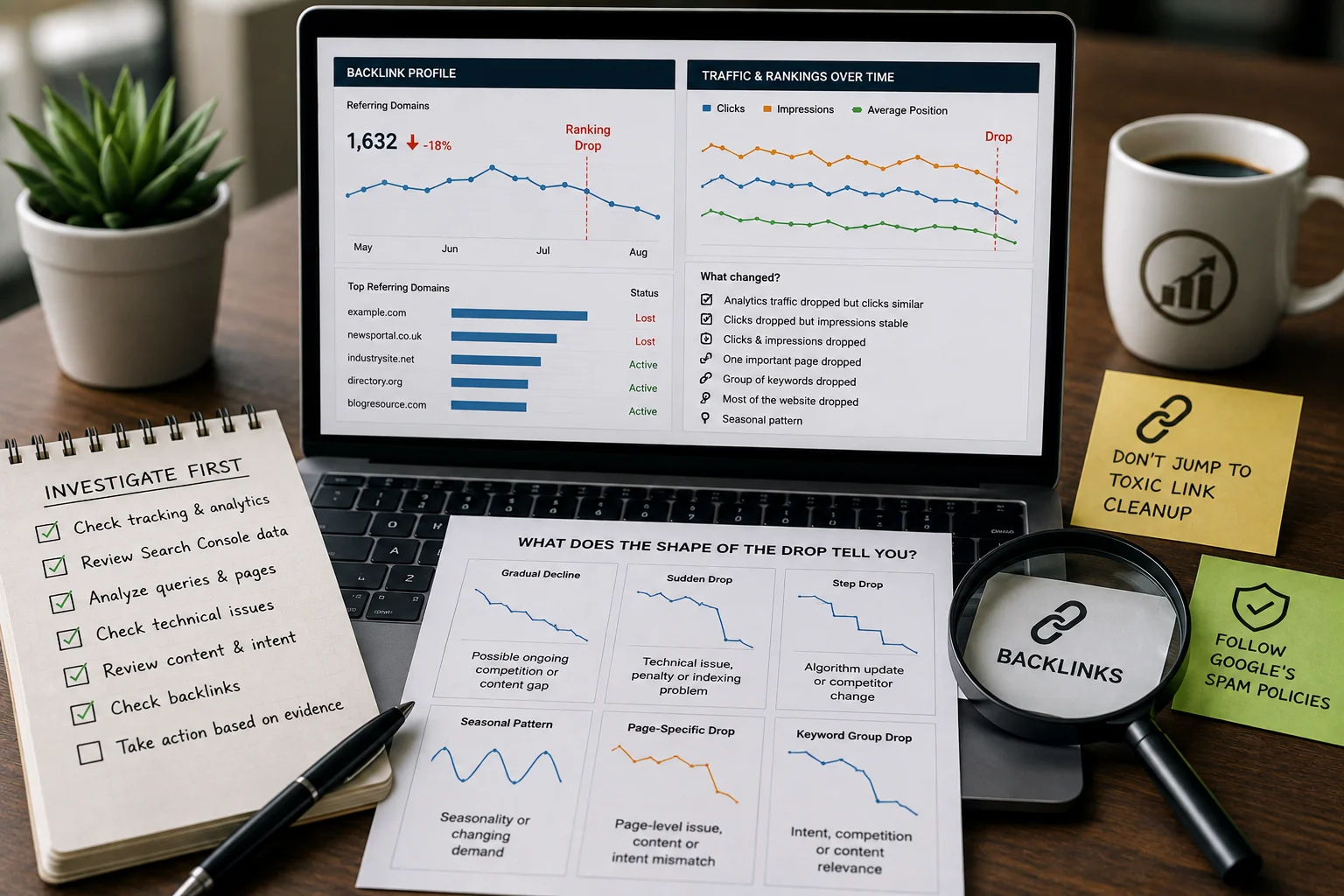
What Does the Shape of the Drop Tell You?
The graph itself can provide clues.
Sudden Site-Wide Drop
Start with tracking, server availability, robots rules, indexing, security, manual actions and major deployments.
Slow Site-Wide Decline
Look more closely at competition, changing demand, content relevance, website quality and wider search changes.
One Page Drops
Check that page’s indexing, canonical, intent, content, internal links and competitors.
Impressions Fall but CTR Stays Similar
This can point towards lower search visibility or reduced demand. Investigate queries and positions.
Impressions Stay Similar but Clicks Fall
Look at CTR by query and page. Check titles, snippets, competing results and whether the result page has changed. Search Console’s documentation suggests investigating low-CTR pages by comparing the queries showing the page and whether the title, snippet or content still represents what users want. Again, these patterns narrow the investigation. They do not prove the cause by themselves.
A Practical Ranking-Drop Diagnostic Order
Use the investigation in this order:
| Order | Check | Main question |
| 1 | Data | Is the drop real? |
| 2 | Scope | Which pages or queries fell? |
| 3 | Demand | Has search interest changed? |
| 4 | Technical SEO | Can Google still crawl and index the right pages? |
| 5 | Recent changes | Did the website change before the drop? |
| 6 | Search intent | Does the page still match the query? |
| 7 | Content | Has the page become weaker or outdated? |
| 8 | Competition | Did stronger results replace it? |
| 9 | Google updates | Does the timing match an official update? |
| 10 | Security/spam | Are there warnings or manual actions? |
| 11 | Recovery | What evidence-backed change should happen first? |
This order keeps you from making random changes.
Ranking-Drop Decision Tree
Use this flow as the original Wixdek diagnostic graphic.
Did Search Console clicks also fall?
No → Check Analytics and tracking.
Yes → Continue.
Did impressions fall too?
No → Check CTR, queries and search-result competition.
Yes → Continue.
Did the whole site drop?
Yes → Check technical changes, indexing, demand and Google updates.
No → Continue.
Did one page or topic drop?
Yes → Check indexing, canonical, intent, content and competitors.
Did the drop follow a website change?
Yes → Audit that deployment first. No → Compare demand, competitors and Google update timing.
Did you identify a clear cause?
Yes → Fix the highest-impact problem and monitor. No → Run a deeper technical and content audit before making broad changes. Suggested alt text: Ranking drop diagnostic decision tree showing how to investigate tracking, Search Console, technical SEO, content, competitors and Google updates.
Example: A Ranking Drop That Wasn’t a Ranking Drop
Imagine a UK service company sees organic traffic fall by 30% in Analytics after a website update. The team first assumes Google rankings dropped. Search Console tells a different story. Clicks and impressions on the important service pages are broadly stable. The investigation finds that analytics tracking was changed during the website deployment. The correct action is to repair measurement.
Rewriting the service pages would have solved nothing. This is an illustrative example, not a Wixdek client result.
Example: One Service Page Loses Visibility
Now imagine a London service page loses both impressions and clicks while the rest of the website remains stable. The diagnostic process becomes page-specific. First, inspect whether the URL is indexed and whether Google has selected the expected canonical. Then compare its queries before and after the decline. Review competing search results and whether the intent has changed.
Finally, inspect the content and internal links. Only then decide whether the page needs technical correction, content improvement, consolidation or no major change at all. Again, the order matters.
A Real Wixdek Visibility Diagnostic Example
One Wixdek campaign involved a London electrician providing emergency, residential and commercial electrical services. The website already had organic traffic, but it wasn’t turning into enough reliable enquiries. Around 76% of enquiries depended on Google Ads, while organic search was producing around 18 to 22 enquiries per month. Mobile conversion was only 1.3%, and key service pages had a 64% bounce rate.
Rather than assuming the problem was simply “poor rankings”, Wixdek looked at the wider search journey. We reviewed service-page intent, local relevance, mobile usability, site structure and call tracking. The findings showed that traffic alone wasn’t the main problem. The website needed to do a better job of matching ready-to-call searches and turning those visitors into enquiries.
Wixdek improved eight priority service pages, strengthened local relevance, improved internal linking and made it easier for mobile visitors to contact the business. Call and enquiry tracking was also separated so organic and paid performance could be judged properly. Over the four-month campaign, organic enquiries increased from 21 to 44 per month, while organic phone calls increased from 13 to 31. Mobile conversion improved from 1.3% to 2.7%, and the service-page bounce rate fell from 64% to 39%.
This wasn’t a classic sudden ranking-drop case, but it shows an important diagnostic lesson. When visibility or SEO performance looks weak, don’t assume rankings are the only problem. Check search intent, landing pages, tracking and conversions before deciding what needs to change.
How Search Console Helps Find the Cause
Search Console can help you work out whether a ranking drop affects the whole website or only certain pages and queries. For example, if clicks and impressions fall mainly on one important service page while the rest of the website stays stable, the problem is likely to be page-specific. Wixdek would then compare the affected queries and review the page’s indexing, canonical setup, recent website changes, search intent and competing results.
If the evidence shows that the page no longer matches what people are searching for, the priority would be to improve or refocus that page rather than make broad changes across the whole website. This is why Search Console should be used to narrow down the problem first. It helps you find where the loss happened before deciding why it happened and what should be fixed.
How Wixdek Diagnoses an SEO Ranking Drop
At Wixdek, the first aim should be to find the cause before recommending the fix. That means starting with the business and measurement, then narrowing the problem. We look at whether the decline is site-wide or page-specific, which queries changed, whether important pages are still crawlable and indexed, whether recent website work created technical problems and whether the affected pages still match search intent.
Competition, search demand and official Google update dates are then reviewed where relevant. The result should be a prioritised diagnosis, not a list of guesses.
A useful diagnostic should answer:
- What changed?
- Where did it change?
- What is the most likely cause?
- What evidence supports that conclusion?
- What should be fixed first?
How Should You Prioritise Recovery Work?
Once you find problems, do not try to fix everything at once. Prioritise by impact and confidence.
| Finding | Impact | Evidence confidence | Action |
| Main service page accidentally noindexed | Very high | High | Fix immediately |
| Analytics tracking broken | High | High | Repair measurement |
| Wrong canonical on important page | High | High | Correct and retest |
| Page no longer matches search intent | High | Medium/high | Improve or refocus |
| Competitor page is more useful | Medium/high | Medium | Improve where real gaps exist |
| Small position movement | Low | Low/medium | Monitor before changing |
| Third-party SEO score fell | Unknown | Low | Investigate before acting |
The strongest recovery action is normally the one supported by the clearest evidence.
What Should You Avoid After a Ranking Drop?
Avoid panic SEO. Don’t delete pages simply because they lost traffic. Don’t add thousands of words because somebody said “content depth” is the problem. Don’t remove all internal links. Don’t change every title at once. Don’t buy a large backlink package. Don’t rewrite high-performing pages because a core update has just started. Google explicitly advises against drastic action for small position changes after a core update.
Make changes you can explain. Then monitor what happens.
How Long Does Ranking Recovery Take?
There is no fixed recovery date. A technical mistake may improve after the problem is fixed and Google recrawls the affected URLs. Content or search-intent changes may take longer to be reassessed. Google says some improvements can take effect within days while others may take several months, and no change guarantees a noticeable effect in Search.
That is why recovery should be measured over a sensible period rather than judged the next morning.
When Should You Run a Full SEO Audit?
A focused diagnosis may be enough when one page has dropped. A wider audit becomes more useful when the cause is unclear, several parts of the site are affected or the website has had years of technical and content changes. Read SEO audit checklist for UK service businesses for the wider audit process. If crawling, indexing, canonicals, redirects, JavaScript or performance appear to be the main problem, continue with the technical SEO audit guide.
These articles should support this diagnostic framework rather than repeat it.
Request a Technical SEO Diagnosis
If your Google rankings or organic traffic have dropped and the cause is unclear, don’t start changing pages at random. Wixdek can review Search Console data, important pages, crawling and indexing, recent website changes and other evidence to identify what deserves attention first. Our Technical SEO services cover technical auditing and implementation across crawling, indexation, website architecture and performance.
For wider strategy, content, Local SEO and ongoing implementation, explore our SEO services in London.
Before interpreting movement, review how search engine positioning is measured and keep the query, location and device context consistent.
Request a Ranking Drop Diagnosis
Frequently Asked Questions
Why did my website rankings suddenly drop?
A sudden ranking drop can have several causes, including technical problems, tracking errors, indexing changes, website deployments, changing competition, spam or security issues and Google ranking updates. Diagnose the evidence before making changes.
Why has my organic traffic dropped but rankings look stable?
Check Search Console clicks against Analytics. If Google clicks remain stable while Analytics organic traffic falls, tracking or reporting may be part of the problem. Search demand and click-through rate should also be reviewed.
How do I diagnose an SEO ranking drop?
Start by confirming the data. Then identify the affected pages and queries before checking demand, technical SEO, recent website changes, search intent, content, competitors and official Google updates.
Can a Google core update cause rankings to drop?
Core updates can change how pages perform because Google broadly reassesses how its systems present helpful and relevant results. A drop does not necessarily mean the website received a penalty.
How long should I wait after a Google core update?
Google recommends waiting at least one full week after a core update finishes before analysing the effect in Search Console.
Can a noindex tag cause rankings to disappear?
Yes. If Google crawls an accessible page carrying a valid noindex rule, the page can be removed from Google Search results.
Can changing my website cause rankings to drop?
Yes. URL migrations, redirects, indexing settings, content changes and other deployments can affect Search performance. Diagnose exactly what changed and when before deciding on a fix.
By Wixdek