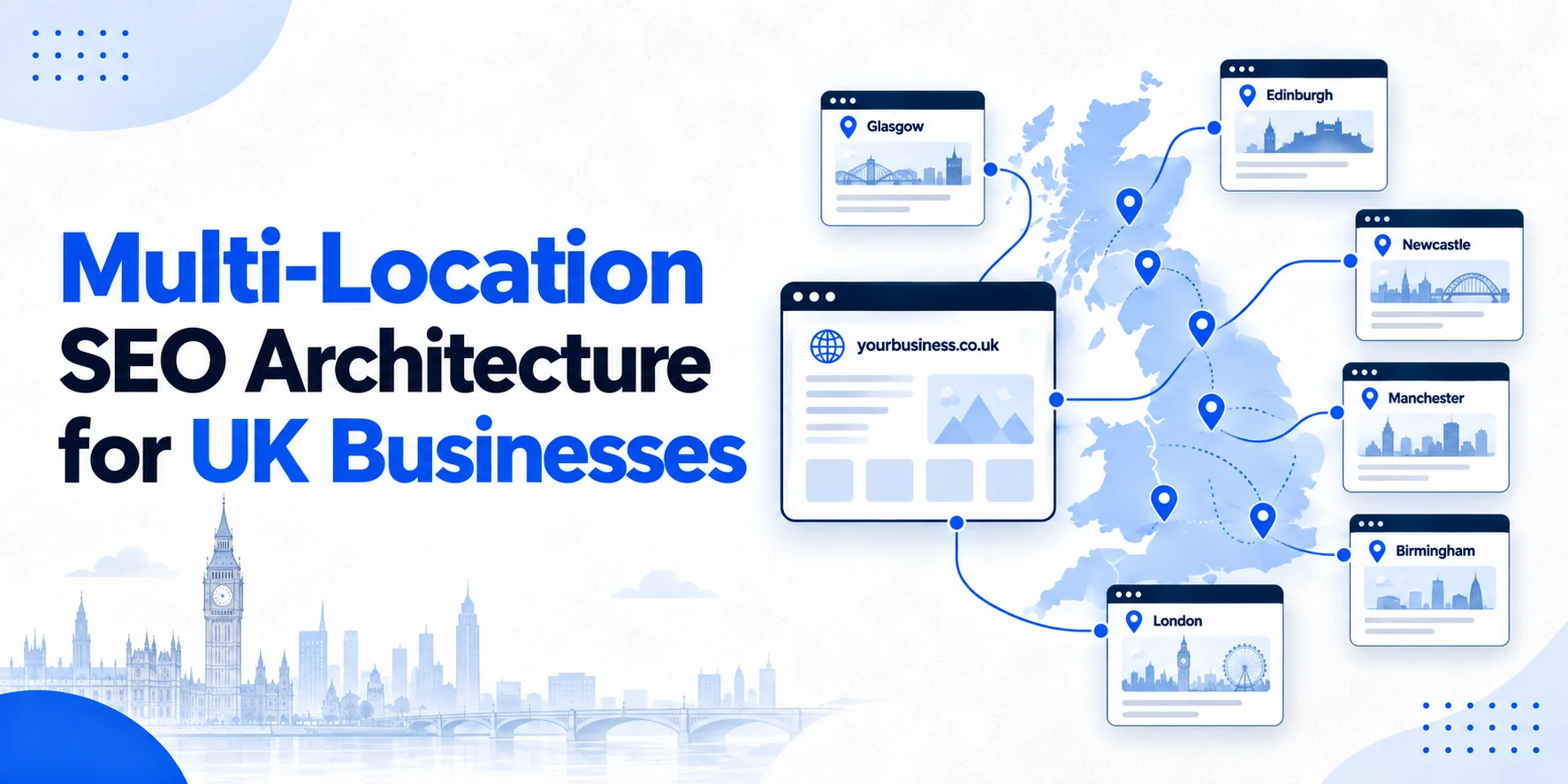
Running a business across several UK locations creates a bigger multi-location SEO challenge than simply adding more location pages.
As your locations grow, your website can quickly become difficult to manage. You may have separate branches, service pages, location pages, blog posts and Google Business Profiles, all competing for attention.
Without a clear structure, pages can overlap, important locations can become buried, and Google may struggle to understand how everything connects.
A strong multi-location SEO architecture gives every page a clear job.
It connects your main business, services and locations in a way that makes sense to customers and search engines. It also gives your team a structure that can grow without creating a pile of duplicate URLs.
What Is Multi-Location SEO Architecture?
Multi-location SEO architecture is the way you organise a website when a business serves customers from several physical locations or branches.
Instead of treating every location as a separate website, you create one clear structure that connects:
Business → Services → Locations → Relevant service and location pages
For example, imagine a UK plumbing company with branches in London, Manchester and Birmingham.
The website might have:
- A main services hub
- A locations hub
- A London location page
- A Manchester location page
- A Birmingham location page
- Relevant service pages
- Service and location pages where there is a genuine reason for them to exist
The goal isn’t to create as many URLs as possible.
The goal is to make the website easy to understand, easy to navigate and useful for customers in each market.
Why Website Architecture Matters for Multiple Locations
A single-location website is usually fairly straightforward.
A multi-location business is different.
You might have ten branches but twenty services. Suddenly, there are hundreds of possible service and location combinations.
Creating every possible combination would be a mistake.
For example, a company with 10 locations and 20 services could technically create 200 service-location pages. But not every combination will have enough demand, local relevance or useful information to deserve its own page.
This is where a clear multi-location SEO architecture becomes important.
You need to decide which pages should exist, how they should connect and which pages should remain supporting content.
A clear information architecture also helps users move from a broad service to the branch that can actually help them.
Passion Digital explains that information architecture and internal linking help users and search engines understand relationships between pages.

The Basic Multi-Location SEO Website Structure
A simple structure can look like this:
Homepage
│
├── Services
│ ├── Service A
│ ├── Service B
│ └── Service C
│
├── Locations
│ ├── London
│ ├── Manchester
│ ├── Birmingham
│ └── Leeds
│
└── Supporting Content
├── Guides
├── FAQs
└── Local resources
For businesses where a particular service and location combination deserves its own page, the structure can go one level deeper:
Locations
│
├── London
│ ├── Service A London
│ └── Service B London
│
├── Manchester
│ ├── Service A Manchester
│ └── Service B Manchester
│
└── Birmingham
├── Service A Birmingham
└── Service B Birmingham
The second structure should only be used when those pages provide real value.
Don’t build hundreds of pages just because the URL pattern makes it easy.
Build a Central Locations Hub
A locations hub is an important part of a strong multi-location SEO strategy and should act as the main doorway to your physical branches.
For example:
/locations/
This page can introduce the business’s wider UK coverage and link to each genuine location.
A customer looking for a branch in Manchester should be able to reach it without hunting through the website.
The hub can also explain how locations differ, such as opening hours, services, accessibility, parking or local contact details where relevant.
Keep the page useful rather than turning it into a long list of town names.
Create One Strong Page for Each Genuine Location
Each physical branch should normally have its own dedicated location page when that page provides useful information about the branch.
A location page might include:
- Branch name
- Full address
- Local phone number
- Opening hours
- Services available
- Directions or travel information
- Parking details where useful
- Accessibility information
- Local team information
- Genuine photographs
- Local customer information
- Relevant FAQs
The page should make it easy for someone to understand what they can do at that location.
Google’s Business Profile guidance also stresses that business information should accurately represent the real-world business and that businesses should use accurate addresses and service areas.
Use a Scalable URL Structure
Your URLs should reflect the structure of the website.
A simple example is:
example.co.uk/locations/manchester/
Then, where a genuine service-location page is needed:
example.co.uk/locations/manchester/plumbing/
Or:
example.co.uk/locations/manchester/emergency-plumbing/
The exact format can vary.
What matters most is consistency.
Don’t use one pattern for London and another for Manchester without a good reason.
A consistent folder structure makes the website easier to manage as more locations are added.
Don’t Create Every Possible Service and Location Page
This is one of the biggest mistakes in multi-location SEO.
Suppose a business has branches in Leeds, York and Sheffield.
It offers:
- Domestic cleaning
- Commercial cleaning
- Carpet cleaning
- End of tenancy cleaning
That doesn’t automatically mean you need 12 location-service pages.
Before creating one, ask:
Does this service have meaningful demand in this location?
Then ask:
Can we provide useful information that is genuinely specific to this combination?
If the answer is no, the main location page may be enough.
This keeps the website smaller, stronger and easier to manage.
Avoid Duplicate Location Content
Changing only the town name isn’t enough.
For example:
We provide professional electrical services in Manchester.
Changing Manchester to Leeds doesn’t make the page meaningfully different.
A useful location page should contain information that relates to that actual branch.
That could include local services, branch staff, opening arrangements, genuine customer questions, local access information or real work completed there.
For London businesses creating borough pages, the same principle applies. See Wixdek’s guide on building London borough pages without creating doorway pages for more detail.
Google’s spam guidance warns against scaled content created primarily to manipulate search results, so location expansion should be based on genuine customer value rather than URL volume.
How Services and Locations Should Connect
Your architecture should make the relationship between services and locations obvious.
Imagine a business offering commercial cleaning across three cities.
The structure could be:
Commercial Cleaning
│
├── Manchester
├── Birmingham
└── Leeds
Each location page can link back to the main commercial cleaning service page.
The location page can also link to other relevant services offered at that branch.
This creates a useful two-way relationship:
Service → Location
and
Location → Service
That is much better than leaving location pages isolated.
Use Internal Links With a Purpose
Internal links shouldn’t be added simply because an SEO checklist says every page needs links.
Each link should help the visitor move to the next useful piece of information.
For example:
Our Manchester branch provides commercial cleaning, office cleaning and specialist carpet cleaning.
The service names can link to the relevant service pages.
Likewise, a service page can link to locations where that service is actually available.
Use clear anchor text so people know what they will find after clicking.
Avoid repeating the same keyword-rich anchor text across hundreds of pages.
A useful internal linking system also strengthens multi-location SEO by helping search engines discover important pages and understand how they connect.
Navigation Should Reflect the Architecture
Your main navigation should support the structure rather than hide it.
For a multi-location business, this might mean:
Services | Locations | About | Resources | Contact
The Locations section can then lead to the central locations hub.
You don’t need every branch in the main navigation.
That can become messy very quickly.
Instead, use the locations hub to organise branches clearly.
Breadcrumbs can provide another useful navigation layer.
For example:
Home > Locations > Manchester
Or:
Home > Locations > Manchester > Commercial Cleaning
This gives users a clear sense of where they are.
Canonical Rules for Location Pages
Canonicalisation becomes important when similar URLs exist.
A canonical URL tells search engines which URL you consider the main version when duplicate or very similar content exists.
Google explains that canonicalisation helps it select a representative URL from a group of duplicate pages. It also makes clear that a canonical is a hint rather than an absolute instruction.
For genuine location pages, don’t automatically canonicalise every branch page back to the main locations page.
If Manchester has its own useful, unique page, that page should normally stand on its own.
A canonical should not be used as a quick fix for weak content.
If two pages are actually different pages serving different users, ask whether they should exist independently rather than hiding one with a canonical.
Google Business Profile for Multiple Locations
Your website architecture and Google Business Profile structure need to agree with the real business.
A business with genuine physical branches can have individual profiles for those locations, subject to Google’s eligibility rules.
Google’s current guidance says businesses with multiple locations should accurately represent each real-world location and maintain appropriate business information.
Google also provides a bulk management system for businesses with 10 or more eligible locations, which can make larger location sets easier to manage.
Each branch should point customers to the relevant location page rather than sending everyone to the homepage.
Google’s Business Profile link guidance specifically says that local business action links for multiple locations should lead to a website for the specific location. For multi-location SEO, each eligible branch should have accurate business information that matches its real-world location.
Keep NAP Information Consistent
NAP means:
Name, Address and Phone number.
For a multi-location business, consistency becomes harder because there are more records to manage.
Your website, Business Profiles and relevant local directories should use accurate information for each branch.
Don’t accidentally give the Manchester branch the Birmingham phone number.
Don’t use an old address after a branch moves.
Don’t mix different versions of the business name without a real-world reason.
A simple location master sheet can help your team keep this information under control.
Location Page Schema Should Match the Page
Structured data can help search engines understand information about a page.
For genuine branch pages, relevant LocalBusiness structured data may be appropriate when it accurately represents the business and visible page content.
Important details can include:
- Business name
- Address
- Phone
- Opening hours
- URL
- Geographic information where appropriate
Don’t add information simply because you think it might help rankings.
The structured data should describe what users can actually see on the page.
Google’s documentation also makes clear that structured data needs to follow its guidelines and should represent the page accurately.
How to Handle Service-Area Businesses
Not every multi-location business has physical branches.
Some businesses travel to customers.
This distinction matters.
A plumber might operate from one base while serving several towns. That doesn’t mean the company should create fake offices across every town it serves.
Google’s Business Profile guidelines distinguish between storefront businesses and service-area businesses, and service-area businesses should accurately represent where they operate.
For these businesses, the website architecture should reflect genuine service coverage rather than pretending every service area is a physical branch.
If this applies to your business, see Wixdek’s guide on service-area businesses versus physical locations.
Build Location Pages Around Real Differences
A useful location page doesn’t need completely different branding.
It needs meaningful local information.
For example, a Manchester branch might have different:
- Opening hours
- Services
- Team members
- Parking information
- Accessibility arrangements
- Customer FAQs
- Local project examples
A Birmingham branch might have different details.
Those differences give the pages a genuine reason to exist.
The aim isn’t to make every sentence unique.
The aim is to make every page useful for the location it represents.
Use Local Proof Carefully
Real local evidence can make location pages much stronger.
This could include:
A genuine project completed by the branch.
A real photograph of the team.
A customer testimonial from that location.
Information about the branch’s services.
A local case study.
A genuine explanation of how customers access the branch.
Don’t invent local experience.
If a business has never worked in a particular area, don’t create a fake project simply to make the page look local.
That may look clever on a spreadsheet, but it creates a poor experience for real customers.
How Supporting Content Fits Into the Structure
Your blog shouldn’t sit separately from your multi-location SEO architecture. Supporting articles can answer questions that customers have before choosing a service.
For example:
Service: Commercial Cleaning
Location: Manchester
Supporting content: How Much Does Commercial Cleaning Cost?
The supporting article can link naturally to the commercial cleaning service page.
That service page can link to the Manchester location page where appropriate.
This creates a content cluster around a real customer journey.
The blog supports the commercial page instead of competing with it.
Don’t Let Supporting Articles Compete With Location Pages
Keyword overlap can become a problem when a website grows.
Imagine you have:
/locations/manchester/
and a blog called:
/best-cleaning-services-in-manchester/
If both pages target almost the same search intent, Google may have difficulty deciding which page should rank.
Before publishing new content, ask:
What question does this page answer that another page doesn’t?
If the answer isn’t clear, don’t create the page yet.
This is one of the easiest ways to control keyword cannibalisation.
A Practical Multi-Location SEO Architecture Example
Imagine a UK legal business with offices in London, Birmingham and Manchester.
A sensible structure could look like this:
/
├── services/
│ ├── employment-law/
│ ├── family-law/
│ └── commercial-law/
│
├── locations/
│ ├── london/
│ ├── birmingham/
│ └── manchester/
│
└── insights/
├── employment-law-guide/
├── business-law-guide/
└── legal-cost-guide/
If there is a genuine reason for a specific service-location page, the structure could expand:
locations/
└── manchester/
├── employment-law/
└── commercial-law/
But those deeper pages should only be created where they offer enough distinct value.
The Multi-Location SEO Architecture Decision Process
Before creating any new URL, work through this simple process:
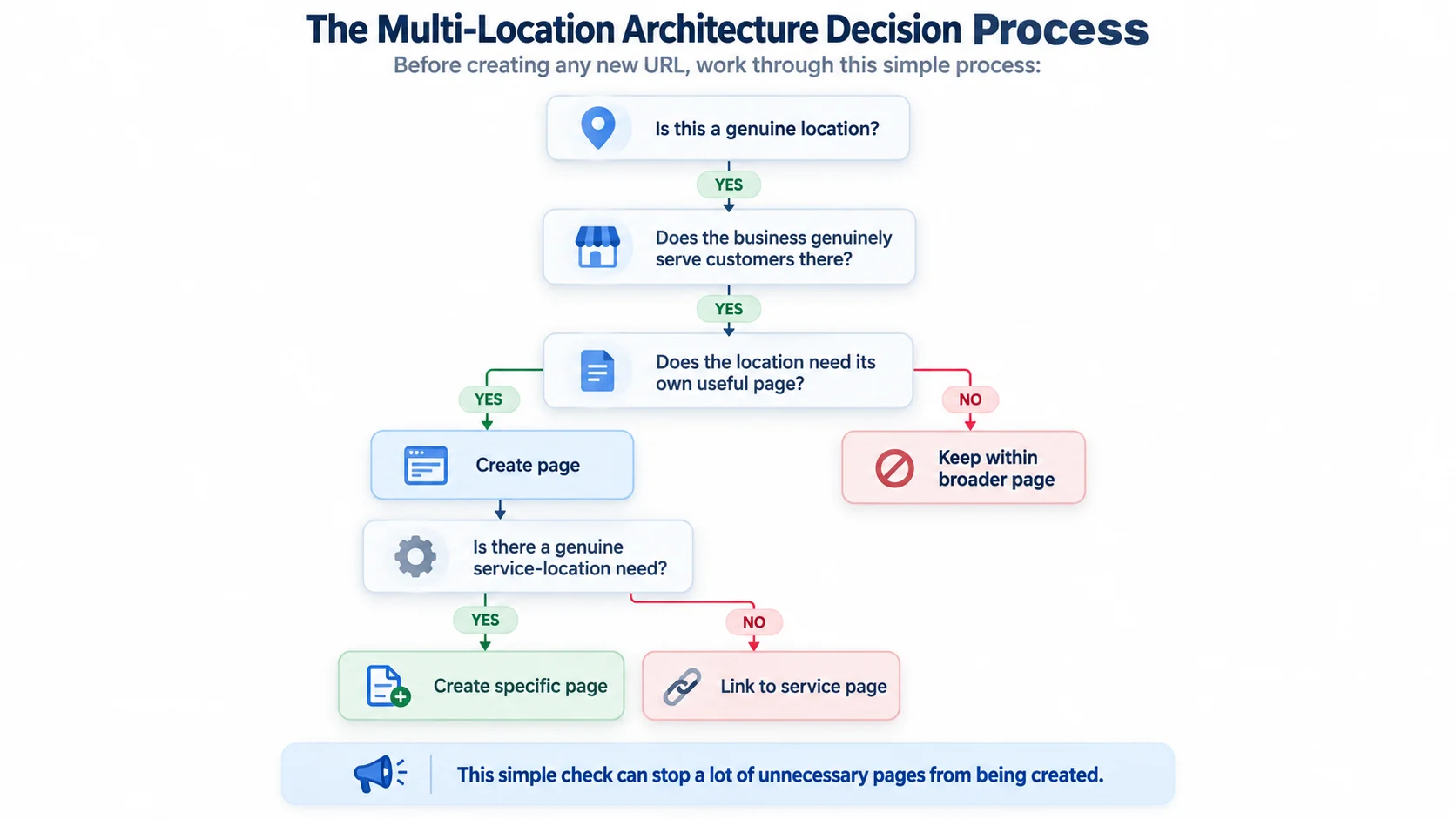
This simple check can stop a lot of unnecessary pages from being created.
How to Audit an Existing Multi-Location SEO Website
If your multi-location SEO website already has dozens or hundreds of location pages, don’t start deleting them blindly.
First, build a list of the existing URLs.
Then review:
- Which locations are genuine?
- Which pages receive organic impressions?
- Which pages generate clicks?
- Which pages generate enquiries?
- Which pages have unique content?
- Which pages have internal links?
- Which pages overlap with another URL?
- Which pages are no longer relevant?
Google Search Console can help you understand which queries and pages are receiving search visibility.
For larger structural changes, compare performance before and after the changes rather than judging the result immediately.
If a page is weak but useful, improve it.
If two pages genuinely overlap, consider consolidation.
If a page has no valid purpose, then removal or redirection may make sense.
Track Leads, Not Just Rankings
A multi-location SEO strategy should eventually connect search visibility with business results.
For each location, consider tracking:
- Organic clicks
- Search impressions
- Important local queries
- Calls
- Form enquiries
- Bookings
- Directions or location actions where relevant
- Revenue where reliable attribution exists
A location ranking well but producing no enquiries may need a closer look.
Likewise, a location with modest traffic but strong lead quality may be commercially valuable.
For a deeper look at this approach, see Wixdek’s guide to Local SEO reporting and the metrics that show calls, bookings and revenue.
When Should You Add Another Location Page?
Don’t add a new page just because someone finds a new keyword.
Add one when there is a real business and customer reason.
A new page may make sense when:
The business has a genuine branch there.
The location has meaningful customer demand.
The business provides services there.
There is enough useful information to make the page worthwhile.
The page won’t simply duplicate another location page.
The URL fits the existing architecture.
If those conditions aren’t met, wait.
Good architecture grows when the business grows. It shouldn’t grow simply because an SEO tool produces another keyword variation.
Common Multi-Location SEO Architecture Mistakes
Creating a Page for Every Town
Serving an area doesn’t automatically mean you need a dedicated page.
Copying the Same Location Template
A shared layout is fine.
Copied content with a different town name isn’t.
Creating Fake Branches
Never create locations that don’t represent real business operations.
Sending Every Location Back to the Homepage
Each genuine branch should have useful information and a clear path for customers.
Using Canonicals to Hide Weak Pages
Canonicalisation isn’t a replacement for useful content.
Forgetting Internal Links
A location page that nobody links to can become difficult to discover.
Mixing Branch Information
Wrong phone numbers, addresses or opening hours can quickly create confusion.
Building Too Many Service-Location Pages
Only create deeper pages when they have a clear customer and search purpose.
Multi-Location SEO Architecture Checklist
Before launching or restructuring your website, check:
| Area | What to check |
| Locations | Every location is genuine |
| URLs | Structure is consistent |
| Location pages | Each page has a clear purpose |
| Services | Services are clearly organised |
| Internal links | Services and locations connect naturally |
| Navigation | Locations are easy to find |
| Breadcrumbs | Page hierarchy is clear |
| Canonicals | Used correctly as canonical hints |
| NAP | Branch information is accurate |
| GBP | Profiles match genuine locations |
| Schema | Structured data matches visible content |
| Content | Location pages aren’t copied |
| Reviews | Location-specific feedback is handled accurately |
| Tracking | Search and lead performance is measurable |
How Wixdek Approaches Multi-Location SEO Architecture
At Wixdek, we look at multi-location SEO as a website structure problem first.
The question isn’t simply how many location pages you can publish.
We look at the relationship between services, locations, search intent, internal links and business operations.
A strong structure should help a customer answer three questions quickly:
What does this business offer?
Where does it operate?
Which location or service is right for me?
Once those relationships are clear, SEO becomes much easier to manage.
The architecture can grow without every new location creating another layer of confusion.
Final Thoughts
Multi-location SEO works best when your website reflects the real structure of your business.
Create dedicated pages for genuine locations. Organise services clearly. Connect related pages with useful internal links and keep branch information accurate.
Don’t chase every possible town and service combination.
A smaller website with clear relationships can be far more useful than hundreds of near-identical pages.
If you’re expanding across the UK, plan the architecture before adding dozens of URLs. That way, your website has room to grow without becoming difficult for customers, your team or search engines to understand. For larger websites, canonicalisation should also be reviewed alongside indexing, crawlability and overall site architecture. These areas form an important part of Technical SEO.
Frequently Asked Questions
What is multi-location SEO?
Multi-location SEO is the process of organising and optimising a website and local presence for a business operating from multiple locations.
It combines location pages, service pages, internal linking, Business Profiles and local business information into one clear structure.
How should I structure a multi-location seo website?
A common structure is a main website with separate service and location hubs.
For example:
/services/
/locations/
Individual location pages can then sit under the locations folder.
The exact structure depends on the size and type of the business.
Should every location have its own page?
Not always.
A genuine physical branch may benefit from its own page when that page can provide useful, location-specific information.
Don’t create pages simply because the business serves an area.
Should every service have a page for every location?
No.
Only create service-location pages when there is a genuine reason for the page to exist and enough useful information to make it different.
Otherwise, link the location page to the main service page.
Should all location pages use the same template?
They can share a basic layout, but the useful content should reflect each location.
Branch details, services, staff, access information, FAQs and genuine local proof can all differ.
How should Google Business Profiles work for multiple locations?
Each eligible physical location can have its own Business Profile, provided it meets Google’s guidelines.
The website should also provide accurate information for each branch.
Google provides specific guidance for businesses with multiple locations.
What is the best URL structure for multiple locations?
A simple structure such as:
/locations/manchester/
can work well because it creates a clear location folder.
The important thing is to use a consistent structure across the website.
Should I use LocalBusiness schema on every location page?
Where appropriate, structured data can help describe a genuine local business location.
However, the information must accurately represent the visible page content.
Don’t add false addresses, opening hours or other details for SEO purposes.
What is NAP consistency?
NAP means Name, Address and Phone number.
For multi-location businesses, each branch needs accurate information across the website and relevant external listings.
Can multi-location SEO create duplicate content problems?
It can if location pages are built from the same template with little meaningful difference.
A location page should provide useful information about that specific branch or market.
How do I avoid keyword cannibalisation between locations?
Give each page a clear purpose.
Avoid creating several pages that target the same search intent with almost identical content.
Review search data regularly and consolidate overlapping pages where appropriate.
How often should a multi-location SEO structure be reviewed?
Review major performance and architecture issues around 90 days after significant changes.
After that, review the structure every six to 12 months, or sooner when the business opens, closes or changes locations.
Need Help With Your Multi-Location SEO Website Structure?
If your website has several branches and you’re unsure whether your pages, URLs and internal links are structured correctly, Wixdek can review the architecture and identify areas that need improvement.
Start with a Local SEO review to assess your location structure, local signals and search visibility.