A local landing page should do more than swap one town name for another. It needs to help people in that area understand what you offer, why you’re relevant to them, and how they can take the next step. If every location page says almost the same thing, changing only “Camden” to “Ealing”, you haven’t really created useful local content. A better approach is to build each landing page around real local context, service detail, proof and customer needs. This guide gives you a practical local SEO landing page template you can use for London service businesses.
What Makes a Local Landing Page Useful?
A useful location landing page connects three things:
- The service: What does the business actually provide?
- The location: Where does it genuinely operate?
- The customer: What does someone in that area need to know before making contact?
For example, an emergency plumber serving Wimbledon shouldn’t simply create a page called “Emergency Plumber Wimbledon” and repeat the same text used elsewhere. The page should explain the plumbing services available in Wimbledon, the types of properties served, common local problems, how bookings work, and why customers can trust the business. That gives the page a reason to exist. Google recommends creating helpful, reliable, people-first content that provides real value for visitors rather than content made mainly to attract search traffic. Google Search Central: Creating helpful, reliable, people-first content
Avoid Doorway Pages
A doorway page is created mainly to rank for a search query while offering little unique value. This is a common risk when businesses create dozens of city or borough pages from one template. Before publishing another page, ask: Would this page still be useful if Google didn’t exist? If the answer is no, stop and improve it. A good location page should contain information that makes sense for that particular market. Don’t create pages simply by changing “Camden” to “Ealing”, “Croydon” or “Hackney”. Each page needs a genuine reason to exist and should help customers understand the service available in that area. Google’s current spam policies specifically warn against doorway abuse and pages created mainly to manipulate search visibility. Google Search Central: Spam policies for Google Web Search
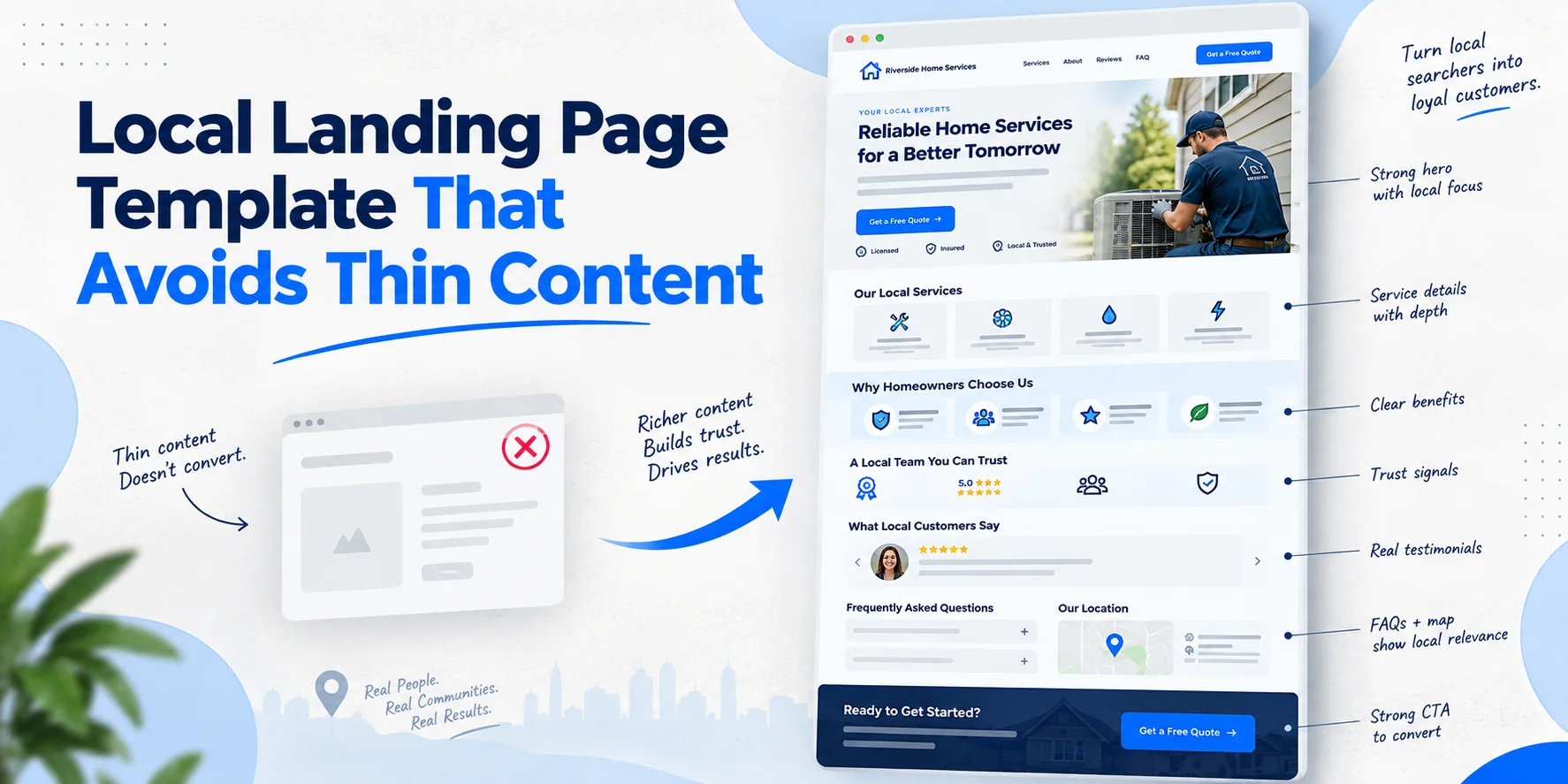
The Local Landing Page Template
Use the following structure as a starting point. You don’t need every section on every page, but each section should earn its place.
1. Above-the-Fold Section
Start with a clear H1 that tells visitors exactly what the landing page is about.
H1: [Primary Service] in [Location] For example: Emergency Plumbing Services in North London Under the H1, write two or three short sentences. Explain what you do, who you serve and whether you genuinely cover that area. Don’t stuff the opening with borough names or repeated keywords. Then add one clear CTA, such as: Request a Quote
Or Book a Service If you have genuine local trust signals, show them here too. This could include a real local review, an industry accreditation or evidence of work completed in the area.
2. Explain the Service Locally
What We Do for Customers in [Location]
This section should answer the visitor’s main question quickly. Explain the service in plain English and connect it to the location. For example, a London locksmith could explain emergency lockouts, broken keys, lock repairs and security upgrades for homes and businesses in the areas it actually serves. Don’t simply copy the main service page. Explain what customers in this location are likely to need and how the business handles those jobs. This is where a location page becomes more useful than a generic service page.
3. Add Real Local Proof
Recent Work in [Location]
This is one of the most important sections for avoiding thin location pages. Show genuine evidence that the business operates in the area. You could include:
- A recent project
- A short case study
- Original photographs
- A customer story
- A local service example
For instance:
Recently completed an emergency boiler repair for a homeowner near Wimbledon after a loss of heating during winter.
Only use real examples. Don’t invent jobs, customers or local landmarks just to make the page look local. Real evidence is far more useful than manufactured location references.
4. Build a Locally Relevant Service Section
Our [Service] Services in [Location]
Now explain the main services available in that area. Each service should have a short explanation rather than a long keyword list. For example, a London electrician could cover:
- Emergency Electrical Repairs Explain when customers may need urgent help and how the service works.
- Consumer Unit Upgrades Explain who may need an upgrade and what customers should expect.
- Lighting Installation Explain the types of lighting work available for homes or commercial properties. The exact services should reflect what the business really offers.
Don’t add services simply because they have search volume.
5. Explain Why Local Customers Choose You
What Makes Our Service Different?
This section should focus on genuine business strengths. You might explain:
- Years of relevant experience
- Local operating knowledge
- Response times, where accurate
- Relevant qualifications
- Warranty information
- Areas genuinely covered
- Types of customers served
Avoid vague claims such as “the best service in London” unless you can support them. Specific information builds more trust. For example:
Our team handles emergency locksmith work for homeowners, landlords and local businesses, with bookings available throughout our stated service area.
That’s more useful than simply saying you’re “trusted by everyone”.
6. Add Local Customer Reviews
What Customers in [Location] Say
Use real reviews where possible. A review mentioning the service and location can give visitors useful context, especially when it describes an actual customer experience. Don’t create fake reviews or edit customer comments to insert locations. You can also link to your wider Local SEO services if you need help building stronger local trust and visibility.
7. Include Local NAP and Business Information
Business Information
If customers visit your premises, clearly show the verified business information they need. Include the:
- Business name
- Address
- Phone number
- Opening hours
- Directions
- Parking or access details, where useful
If the business is a service-area business and customers don’t visit the listed address, don’t present a residential or private address as a customer-facing shopfront. The information should match the business’s real-world setup.
8. Add a Useful Local Map
If you operate from a genuine customer-facing location, an embedded map can help visitors find you. You can also explain nearby transport, parking or access information when it genuinely helps customers. Don’t add a map simply because every location page has one. The map should serve a real user need.
9. Create Genuine Location-Specific Content
What Customers in [Location] Should Know
This is where you can add useful local detail. For a property service, you might discuss common property types in the area. For a chauffeur company, you might explain common journeys to nearby airports, hotels or business districts. For a trades business, you might explain common property-related issues that affect the customers you actually serve. The important part is relevance. Don’t create a list of ten London boroughs and call that local content. Google’s spam guidance specifically warns against blocks of location terms created to manipulate rankings.
10. Add a Local FAQ Section
Frequently Asked Questions About [Service] in [Location]
Your FAQs should answer real customer questions.
Do you provide [service] in [location]?
Explain the actual coverage area.
How quickly can I book the service?
Give an accurate answer based on your normal process.
Do you work with homes and businesses?
Explain which customer types you serve.
Do customers need to visit your premises?
Answer according to your real business model.
How much does [service] cost?
If pricing varies, explain what affects the price rather than giving an unrealistic fixed figure. These questions should be unique to the page where possible. Don’t create the same five FAQs for 30 borough pages.
11. Use Internal Links With a Purpose
Internal links should help visitors move to the next useful piece of information. For example, a location page can link back to your main Local SEO resource when discussing wider local visibility. If the page needs technical improvements, you can also point readers towards Technical SEO support. For related Wixdek articles such as local link building, London borough pages and multi-location SEO architecture, add the dedicated article links once those pages are live. Don’t add internal links simply to increase the number of links on the page.
12. Avoid Doorway Pages
A doorway page is created mainly to rank for a search query while offering little unique value. This is a common risk when businesses create dozens of city or borough pages from one template. Before publishing another page, ask: Would this page still be useful if Google didn’t exist? If the answer is no, stop and improve it. A good location page should contain information that makes sense for that particular market. If you remove the location name and almost nothing else changes, the page probably needs more work.
If you’re planning pages across several London areas, read our guide on how to build London borough pages without creating doorway pages.
13. Local Landing Page Technical Setup
URL Structure
Keep URLs simple and readable. For example:
/emergency-plumber-wimbledon/
is easier to understand than a long string of unnecessary parameters.
Title Tag and Meta Description
Write a unique title and description for each genuinely useful landing page. Don’t simply replace the location name in a copied template.
Heading Structure
Use one H1 for the main topic. Then use H2s and H3s to organise the service, local proof, FAQs and other useful information.
Structured Data
Structured data can help search engines understand specific information about a page, but it shouldn’t be used to make claims that aren’t visible to visitors. For example, if a page contains information about a genuine business location, the structured data should accurately reflect the same business details shown on the page. Don’t add locations, services, reviews or other information simply because you want search engines to associate the page with them. Google’s structured data guidelines state that markup should represent the main visible content of the page and should not mislead users or search engines. Google Search Central: General structured data guidelines
Images
Use original images whenever possible. A real photograph of your team, vehicle, shop, completed work or local operation can provide much more useful context than a generic stock photograph. Write descriptive image alt text for accessibility and clarity. Don’t stuff location keywords into every image field.
14. Local Landing Page Checklist
Before publishing a new page, check the following:
| Check | Ready? |
| Genuine location served | ✓ |
| Unique service information | ✓ |
| Real local proof | ✓ |
| Useful customer information | ✓ |
| Accurate business details | ✓ |
| Clear CTA | ✓ |
| Local FAQs | ✓ |
| Helpful internal links | ✓ |
| Original images where possible | ✓ |
| Accurate structured data | ✓ |
| No copied location template | ✓ |
| No fake claims or locations | ✓ |
If several boxes are missing, the page probably isn’t ready yet.
When Should You Create a Local Landing Page?
Don’t create a page just because a keyword tool shows searches for a borough. Create one when there is a genuine business reason. You may have regular customers there, provide a meaningful service there, have local projects to show, or have enough useful information to help customers make a decision. That approach also protects your site from ending up with dozens of weak pages that say almost the same thing.
Final Thoughts
A strong local landing page isn’t a city name wrapped around copied content. It’s a useful page built around a real service, a real location and real customer needs. Give visitors clear answers, show genuine local proof, explain the service properly and make the next step obvious. That’s the difference between a page created for a keyword and a page created for people. If you’re building multiple location pages and aren’t sure whether they’re adding value, a focused review can help. Explore Wixdek’s Local SEO services to assess your location-page strategy before scaling it.
Frequently Asked Questions
How much unique content should a local landing page have?
There is no fixed percentage that guarantees good performance. Focus on whether the page provides substantial information that is genuinely useful for that location.
Should every London borough have its own landing page?
No. Only create landing pages where there is a genuine reason for the business to target that location and enough useful information to make the page valuable.
Can I use the same template for different locations?
Yes, a consistent structure can make your site easier to manage. However, the important information, examples, proof and customer guidance should be genuinely relevant to each location.
Are local landing pages good for SEO?
They can be useful when they provide relevant, original information for customers in a specific area. Creating large numbers of near-identical pages simply to target location keywords is a poor strategy.
Should local landing pages include FAQs?
They can, especially when the questions address genuine customer concerns about the service and location. Keep the questions relevant and avoid repeating generic FAQs across every page.
By Wixdek