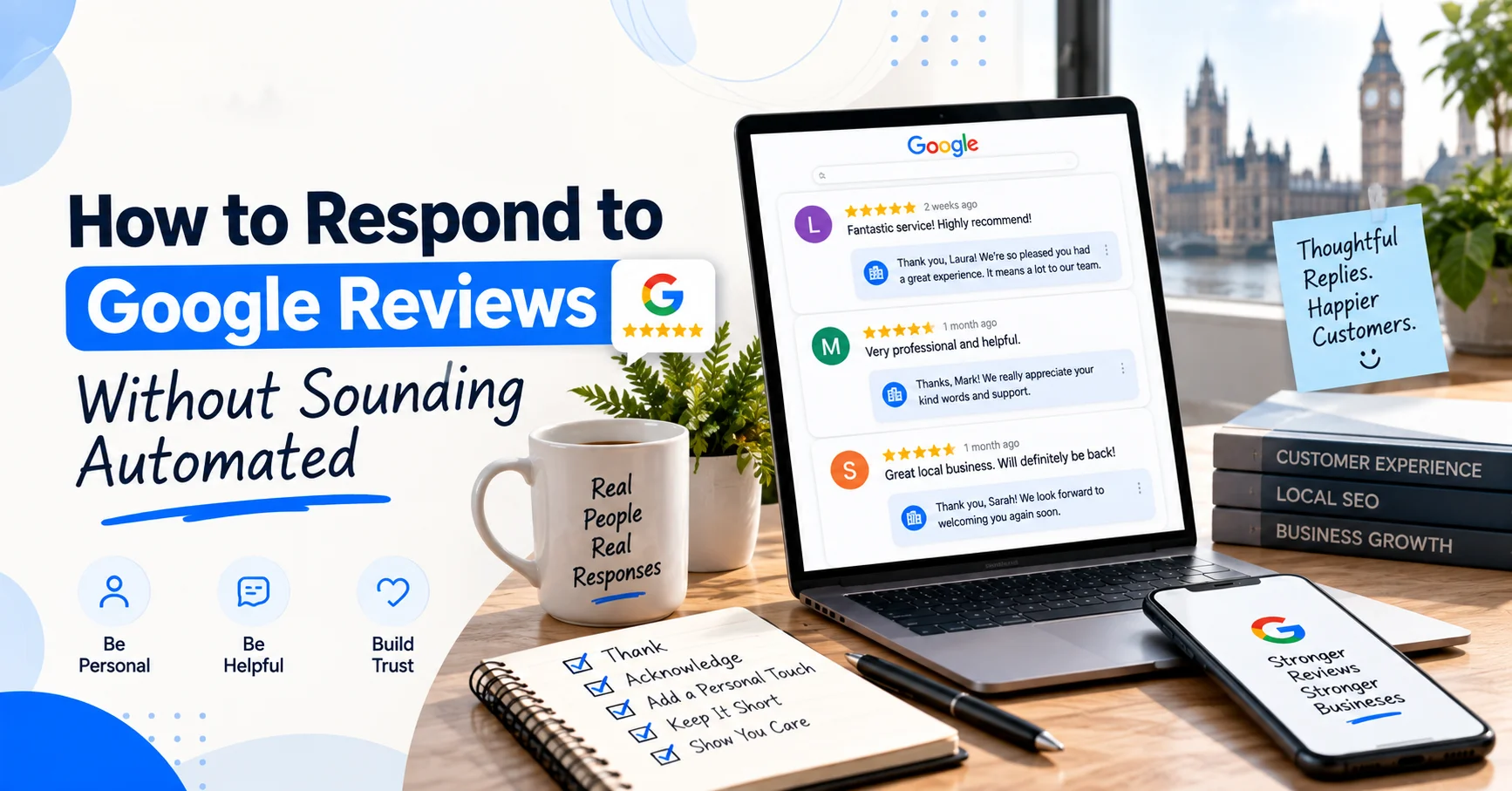
A good Google review deserves more than a copy-and-paste thank you. Customers can see your replies, so every response is also part of your public reputation. A useful reply can show that you listen, care about customer feedback and take problems seriously. The tricky part is sounding like a real person. If every customer gets the same “Thank you for your wonderful feedback” response, people will notice. It can make your business sound distant, even when the service itself is excellent. At Wixdek, we recommend keeping google review replies simple, specific and human. You don’t need a clever script for every situation. You need a clear structure that gives you enough guidance without making every response sound identical.
Why Your Google Review Responses Matter
Reviews give potential customers an idea of what working with your business may be like. Your response gives them another piece of information. Google itself recommends keeping replies professional, relevant, short and simple. It also advises businesses to make replies conversational rather than promotional. Google’s guidance on writing better review replies That matters because your response isn’t only for the person who left the review. Someone searching for a plumber in Ealing, a locksmith in Croydon or a restaurant in Kensington may read it too. A thoughtful response can show future customers that your business is active and willing to listen.
What Makes a Google Review Response Sound Human?
The easiest way to avoid sounding automated is to respond to what the customer actually said. Start with their name if it is visible. Then mention one genuine detail from their review. For example, instead of:
“Thank you for your five-star review. We really appreciate your feedback.”
Try:
“Thanks, Sarah. We’re glad we could get your boiler working again so quickly.”
The second reply feels more personal because it connects with the customer’s actual experience.
Use the Reviewer’s Name
If the review shows the customer’s name, using it can make the opening feel more natural. You don’t need to force it into every sentence. A simple “Thanks, Sarah” is enough.
Mention a Specific Detail
Look for something useful in the review. It could be:
- A service they used
- A problem you solved
- A team member they mentioned
- A location they referred to
- Something they particularly liked
This creates a response that would be difficult to reuse for another customer.
Change Your Opening Lines
Don’t start every response with exactly the same sentence. You could use: “Thanks for taking the time to leave this review.” “Really appreciate you sharing this, James.” “Glad we could help with the emergency repair.” “Thanks for the kind words, Sarah.” The wording can change while your tone stays consistent.
Write Like You Speak
Your response doesn’t need corporate language. Avoid phrases such as “We are delighted to ascertain that your expectations were met”. Nobody talks like that. A simple “We’re glad we could help” feels much more natural. Google also recommends keeping replies short and simple, rather than writing long responses that customers may not finish reading.
A Simple Formula for Human Review Replies
You don’t need a complicated process. Use this basic structure: Name + specific detail + genuine response + natural close For example:
“Thanks, James. We’re glad we could sort the lockout quickly and get you back inside. Really appreciate you taking the time to share your experience.”
It is short, specific and easy to read. The formula gives your team a starting point without forcing every reply into the same wording.
How to Respond to Positive Google Reviews
Positive reviews are usually straightforward, but they can still become repetitive. The goal isn’t simply to say thank you. Show that you actually read the review.
Example: Local Plumber
Customer review:
“Brilliant service. The engineer arrived on time and fixed our leaking boiler.”
Automated response:
“Thank you for your five-star review. We really appreciate your feedback.”
More natural response:
“Thanks, Mark. We’re glad we could get the boiler leak sorted quickly. We appreciate you taking the time to share this.”
The second response acknowledges the actual service.
Example: Locksmith
Customer review:
“Called after losing my car keys and they were out within the hour.”
Response:
“Thanks, Daniel. We’re pleased we could get to you quickly and get you back on the road. Appreciate you sharing this.”
There’s no need to add several keywords or mention every service you offer. The customer already knows what happened.
How to Respond to Negative Google Reviews
Negative reviews need more care. Your first instinct might be to defend the business, especially if you believe the customer has misunderstood something. Don’t rush into an argument. A public response should stay calm and helpful. Google recommends avoiding personal attacks and protecting the reviewer’s privacy, while moving complex issues into a private conversation where appropriate. Google’s guidance for negative reviews A simple structure works well: Acknowledge + apologise where appropriate + explain next step + move the discussion privately For example:
“Hi James, we’re sorry to hear that your experience wasn’t what you expected. We’d like to understand what happened and look into this properly. Please contact our team directly so we can discuss it with you.”
You don’t need to admit something that isn’t true. You also don’t need to write a public defence covering every detail of the situation.

Don’t Share Private Customer Information
Be careful when replying to complaints. A response should never reveal private information about the customer, their appointment or their personal circumstances. Even if you know exactly what happened, keep sensitive details out of the public reply. If the issue needs a detailed discussion, invite the customer to contact the business directly. This protects the customer and keeps the public response professional.
How to Respond When a Review Is Disputed
Sometimes a business doesn’t recognise the customer or believes a review is unrelated to its services. Don’t immediately accuse the reviewer of lying. First, check your own records and consider whether the review may relate to another branch, employee or previous interaction. If you believe the review breaks Google’s policies, you can report it through the appropriate process. Google provides a system for businesses to flag reviews that may violate its content policies. Google’s review reporting guidance Your public response could say:
“We’re sorry to hear about this experience. We can’t identify the details from the information provided, so we’d appreciate the opportunity to look into it. Please contact our team directly so we can investigate.”
That is much safer than starting an argument in public.
What Not to Put in Every Review Response
A common mistake is trying to turn every reply into an SEO exercise. Don’t add the same service keywords to every response. Don’t advertise your business under every review. Don’t paste your website address into every reply. Don’t use a long list of services. Don’t write five paragraphs when two sentences would do. Google specifically recommends that review replies remain conversational rather than promotional. Your review response has one main job: respond to the customer.
Should You Use AI to Write Review Responses?
AI can help with drafting, but don’t let it publish generic replies without review. A useful workflow is simple. Give the tool the actual review and ask for a short draft. Then check the wording yourself and add a detail only your business would know. For example, AI might produce:
“Thank you for sharing your positive experience. We are delighted that our team was able to assist you.”
That’s fine, but it could belong to almost any business. Make it more personal:
“Thanks, Emma. We’re glad the team could get your replacement key sorted on the same day.”
The second version sounds like someone actually read the review.
Positive Google Review Response Templates
Templates are useful when they’re treated as frameworks rather than scripts.
General Positive Review
Thanks, [Name]. We’re really glad you were happy with [specific service]. We appreciate you taking the time to share your experience.
Service-Specific Review
Thanks, [Name]. We’re pleased we could help with [specific service]. It’s great to hear everything went smoothly.
Review Mentioning a Team Member
Thanks, [Name]. We’ll make sure [team member] sees your kind words. We’re glad they could help and really appreciate the feedback.
Review Mentioning Speed
Thanks, [Name]. We’re glad we could get things sorted quickly for you. We really appreciate you sharing your experience.
Don’t use the same template word for word each time. Change the opening, detail and closing based on the actual review.
Negative Google Review Response Templates
General Complaint
Hi, [Name]. We’re sorry to hear that your experience wasn’t what you expected. We’d like to understand what happened and see how we can help. Please contact our team directly so we can look into this properly.
Service Problem
Hi, [Name]. We’re sorry that the service didn’t meet your expectations. We take feedback like this seriously and would appreciate the chance to look into what happened. Please contact us directly so we can discuss it with you.
Disputed Review
Hi, [Name]. We’re sorry to read this. We can’t identify the details from the information provided, so we’d like to investigate further. Please contact our team directly so we can look into the matter.
These templates should guide your wording, not replace genuine responses.
How Often Should You Respond to Google Reviews?
There isn’t a need to turn review replies into a race. The important thing is to respond consistently and appropriately. Google confirms that verified businesses can read and reply to reviews through their Business Profile. Customers are also notified when a business replies. Set a routine that your team can actually maintain. A small business might review new feedback several times a week. A busy business with many locations may need a more structured process. Consistency is more useful than replying quickly with poor-quality messages.
How Reviews Fit Into Your Wider Local SEO Strategy
Review responses are only one part of local search. Your Google Business Profile, website, local citations, links and customer feedback all work together. If you want to understand the wider relationship between reviews and local visibility, read our guide on how customer reviews affect local visibility. If your business information is inconsistent across directories, our guide to finding and fixing incorrect local citations can help. Local authority matters too, but buying links is not the answer. Our guide to local link building without buying links explains safer ways to build relevant local connections.
Build a Review Response Process for Your Team
If several people manage your Google Business Profile, create a simple response process. First, check the review and identify its main point. Then decide whether it is positive, negative, neutral or potentially against Google’s policies. Write a short response using the customer’s actual experience. Finally, check that you haven’t included private information, unnecessary promotion or an argument. Google allows owners and managers to respond to reviews, so businesses can share responsibility for managing customer feedback. Google’s Business Profile owner and manager guidance A simple internal checklist can keep responses consistent without making them robotic.
Review Response Checklist
Before publishing, ask:
- Did we use the customer’s name where appropriate?
- Did we mention a real detail?
- Does the response sound natural?
- Is it short enough?
- Have we avoided private information?
- Have we avoided unnecessary promotion?
- Are we calm and professional?
- If the review breaks a policy, have we considered reporting it?
If the answer is yes, you’re probably ready to reply.
Don’t Manipulate Reviews
Never create fake reviews or ask people to pretend they are customers. Don’t offer money, discounts or gifts in exchange for positive reviews. Google states that reviews should reflect genuine experiences and prohibits incentives offered in exchange for reviews, changes to reviews or removal of negative reviews. Google’s review policy guidance For UK businesses, there is also an important consumer law point. The Competition and Markets Authority has published guidance on fake reviews and misleading review practices under UK consumer protection rules. CMA guidance on fake reviews The CMA’s guidance covers fake reviews, concealed incentivised reviews and misleading review information. CMA’s short guide for businesses So, leave the shortcuts at the door. Genuine customer feedback is the safer and more useful approach.
Use Reviews to Improve the Customer Experience
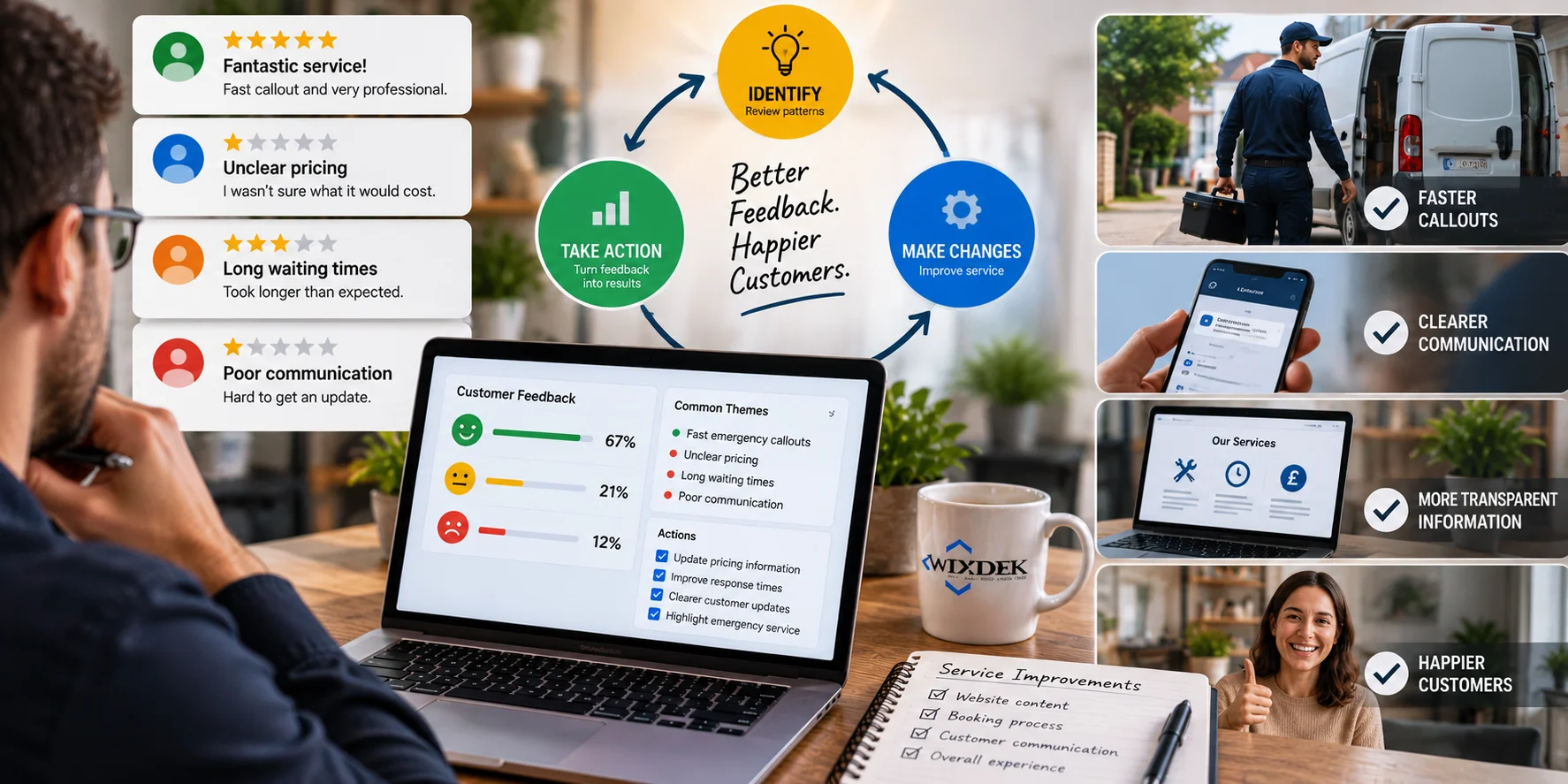
A review response shouldn’t always be the end of the process. Look for patterns. If several customers praise fast emergency callouts, that tells you something about what they value. If several customers complain about unclear pricing, long waiting times or poor communication, that’s useful too. The answer isn’t simply to write better replies. Use that feedback to improve the service itself. You can then make useful changes to your website, service information, booking process or customer communication. That’s where review management becomes much more valuable.
How to Measure Review Management
Don’t judge your review strategy only by the number of replies you publish. Look at the wider customer journey. Google Business Profile performance data can show how people discover your profile and what actions they take, including website clicks, calls and other interactions. Google Business Profile performance guidance You can compare performance over time and look for changes in customer behaviour. For example, you might track:
- Review volume and rating trends
- Profile views
- Website clicks
- Calls
- Direction requests
- Customer enquiries
These numbers won’t prove that a single google review response caused a conversion. They can, however, help you understand whether your wider local presence is moving in the right direction.
Final Thoughts
Learning how to respond to Google reviews isn’t about finding one perfect script. It’s about making each customer feel heard. Use their name when appropriate, mention a genuine detail and keep your wording natural. For negative feedback, stay calm, protect privacy and move complex conversations away from the public review. Templates can save time, but they shouldn’t make every reply sound identical.
The best response is usually simple, specific and written for that customer. At Wixdek, we treat google review responses as part of a wider local search and reputation strategy. If your Google Business Profile, website and local signals need a closer look, a focused local SEO review can help identify where to improve. For broader support, explore Wixdek’s Local SEO services.
Frequently Asked Questions
How should I respond to a Google review?
Use the customer’s name when appropriate, mention a specific detail from their review and keep the response short. Your reply should sound like a genuine conversation rather than a company script.
Should I respond to every Google review?
Responding consistently is a good practice, particularly when you can provide a useful and relevant response. Google recommends responding to reviews and keeping replies professional, relevant and conversational.
Should I use keywords in Google review responses?
Don’t force keywords into review replies. Write naturally and focus on responding to the customer’s experience. Repeated keyword use can make responses sound promotional rather than human.
How do I respond to a negative Google review?
Acknowledge the concern, remain calm and avoid arguing publicly. If the issue needs further discussion, invite the customer to contact the business directly while protecting their privacy.
Can I remove a negative Google review?
You generally cannot remove a review simply because it is negative. If you believe it violates Google’s content policies, you can report it for review.
Can I offer customers an incentive for a Google review?
No. Google prohibits incentives offered in exchange for reviews, changes to reviews or removal of negative reviews. Google’s review policy UK businesses should also consider the CMA’s guidance on fake and misleading reviews.
Can AI write my Google review responses?
AI can help create a first draft, but someone should review and personalise it before publishing. Add real details from the customer’s review so the response doesn’t sound generic.
How long should a Google review response be?
Keep it short enough to read quickly. Google specifically recommends short and simple replies, especially when a longer response adds little value.