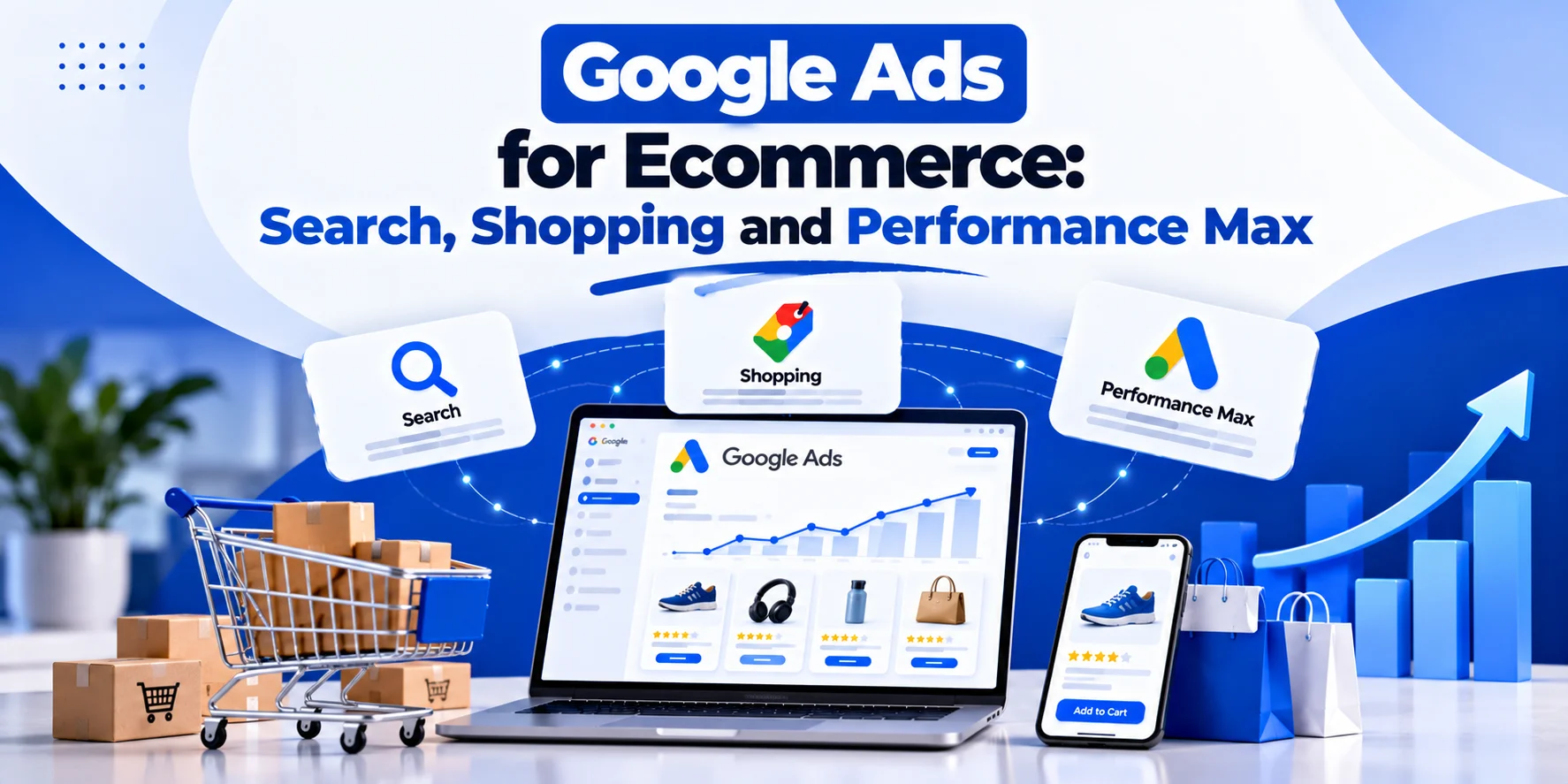
Google Ads for Ecommerce becomes messy when every campaign is judged by the same number.
Search can capture high-intent brand and category demand.
Shopping can show specific products to people already comparing price and features.
Performance Max can expand reach across more Google inventory using Merchant Center data, assets and conversion signals.
All three can work.
All three can also waste money.
The real question is not:
“Which campaign type is best?”
It is:
“Which campaign should handle which part of the buying journey, and which products are actually worth promoting?”
That second question matters because revenue is not profit.
A campaign can show excellent ROAS while pushing products with weak margins, high return rates or expensive fulfilment.
This guide explains how Google Ads for Ecommerce can use Search, Shopping and Performance Max together while connecting product feeds, budgets and bidding with real commercial value.
The Three Main Roles in Google Ads for Ecommerce
Search, Shopping and Performance Max overlap, but they do not serve exactly the same purpose.
| Channel | Main Strength | Main Input |
|---|---|---|
| Search | Query and message control | Keywords, ads, landing pages |
| Shopping | Product-level visibility | Merchant Center product data |
| Performance Max | Automated cross-channel reach | Feed, assets, goals and conversion data |
This is not a rigid rule.
The right account structure depends on catalogue size, margin, demand and business goals.
Search Still Has a Clear Ecommerce Role
In Google Ads for Ecommerce, Search works well when the query reveals useful buying intent.
Examples:
buy men’s waterproof hiking jacket
black leather Chelsea boots size 9
Acme coffee machine
These searches show different levels of intent.
Search gives you more control over:
- keyword themes;
- ad copy;
- landing pages;
- budget;
- messaging.
That makes it useful for:
- brand searches;
- high-value categories;
- high-intent non-brand terms;
- premium ranges;
- products where messaging matters.
Search Is Not Only for Brand
Brand campaigns can be useful.
But using Search only for branded queries may leave valuable non-brand demand uncovered.
An outdoor retailer might also target:
- waterproof walking jackets;
- women’s insulated coats;
- men’s hiking trousers;
- premium walking boots.
These users know what they want.
They may not know the retailer yet.
That gives Search a customer-acquisition role within Google Ads for Ecommerce.
Do Not Build Search Around Every SKU
A catalogue with 8,000 products does not need 8,000 keyword ad groups.
That creates:
- excessive management;
- tiny data pockets;
- fragmented budgets.
Search campaigns usually work better around meaningful themes such as:
- category;
- brand;
- product type;
- premium range;
- seasonal demand.
Structure should follow how customers search and how the business allocates budget.
Shopping Works Differently
Standard Shopping does not use ordinary positive keywords in the same way Search does.
Google uses Merchant Center product data to understand what you sell and match products to relevant searches.
That makes feed quality a major part of Google Ads for Ecommerce.
A weak feed can limit an otherwise strong campaign.
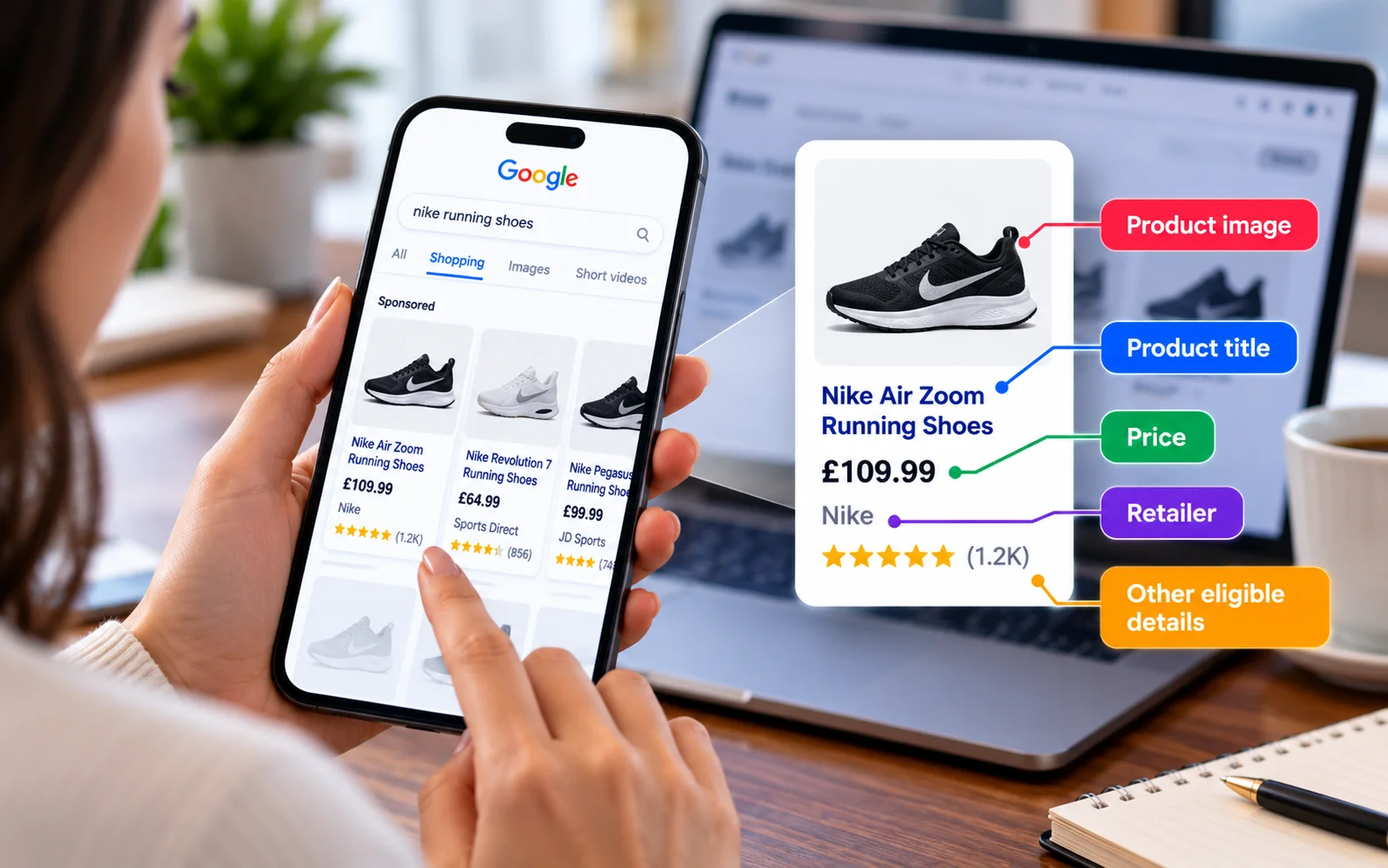
What Shoppers See Before the Click
Shopping ads can show:
- product image;
- title;
- price;
- retailer;
- other eligible product details.
That changes the buying journey.
A shopper may already know what the product looks like and roughly what it costs before visiting the site.
That can create strong commercial intent.
Performance Max Has a Broader Role
Performance Max can use Merchant Center products while also serving across additional Google inventory.
That gives retailers broader automated reach than Standard Shopping alone.
The trade-off is less direct control.
Performance Max can be useful, but it should have a clear commercial role rather than simply receiving the whole catalogue by default.
Search, Shopping and PMax Should Not All Do the Same Job
A weak ecommerce account may have:
- Search promoting every category;
- Shopping promoting every product;
- Performance Max promoting every product too.
Then the business asks:
“Which campaign is really working?”
A cleaner Google Ads for Ecommerce structure may use:
- Search for high-value brand and category demand;
- Shopping for controlled product groups;
- Performance Max for scalable automated reach.
The exact split should follow commercial performance.
Product Feed Quality Is a PPC Issue
The Merchant Center feed is not just a technical upload.
It is advertising input.
Compare:
Jacket 123
with:
Men’s Waterproof Hiking Jacket – Navy – Lightweight
The second title provides much more useful context.
Feed optimisation should therefore be part of Google Ads for Ecommerce management.
Product Titles Matter
Useful title information may include:
- brand;
- product type;
- colour;
- size or variant;
- material;
- important feature.
Do not stuff titles with promotional phrases.
The title should describe the product accurately.
Product Images Matter
Images are often the first thing a Shopping user notices.
Use:
- clear photography;
- accurate product representation;
- strong resolution;
- consistent presentation.
In Google Ads for Ecommerce, a good image cannot rescue a poor product.
A bad image can weaken a good one.
Keep Price and Availability Accurate
If an ad shows one price and the site shows another, trust drops immediately.
The same applies to availability.
When prices or stock change, Merchant Center data should stay aligned with the website.
Product Identifiers Matter
Depending on the product, useful feed fields may include:
- brand;
- GTIN;
- MPN;
- product type;
- Google product category;
- variant attributes.
Missing or inaccurate data can reduce visibility or trigger disapprovals.
Segment Products by Commercial Value
Not every product in Google Ads for Ecommerce deserves equal budget.
Imagine:
Product A
- Revenue: £100
- Gross profit before ads: £60
- Ad spend: £20
- Contribution after ads: £40
Product B
- Revenue: £100
- Gross profit before ads: £15
- Ad spend: £20
- Contribution after ads: -£5
Both campaigns report:
500% ROAS
Commercially, they are completely different.
ROAS Is Not Profit
ROAS is:
Revenue ÷ Ad Spend
It does not automatically include:
- cost of goods;
- shipping;
- returns;
- discounts;
- payment fees;
- warehouse costs;
- staff costs;
- gross margin.
This is one of the most important lessons in Google Ads for Ecommerce.
A campaign can hit its ROAS target and still sell the wrong products.
Use Margin Segmentation Where Useful
Merchant Center custom labels can help group products using business logic.
Examples:
- High margin;
- Medium margin;
- Low margin;
- Bestseller;
- Clearance;
- Seasonal;
- New launch.
This makes it easier to analyse and control products based on commercial value.
Example Margin Structure
| Product Group | Example Margin | Priority |
|---|---|---|
| High-margin hero products | 60%+ | High |
| Core products | 35–60% | Medium |
| Low-margin products | Under 35% | Controlled |
| Clearance | Variable | Separate goal |
| New products | Unknown | Testing |
These bands are illustrative.
Use thresholds that fit the business.
Custom Labels Can Track More Than Margin
Useful labels may also include:
- summer;
- winter;
- bestseller;
- promotion;
- high return rate;
- premium range;
- clearance.
Use labels only when they support a real budget, bidding or reporting decision.
Search Campaign Example
Imagine an online furniture retailer.
Search themes might include:
- solid oak dining table;
- extendable dining table UK;
- premium dining chairs.
The ads can highlight:
- material;
- delivery;
- product range;
- finance where genuinely available;
- current offers.
The landing page should match the search.
Someone searching for dining tables should not land on the homepage.
Standard Shopping Gives Product-Level Control
Standard Shopping can be useful when the retailer wants clearer control over product groups.
Products can be subdivided using attributes such as:
- brand;
- category;
- product type;
- item ID;
- condition;
- custom labels.
This can make Shopping useful for deliberate product segmentation in Google Ads for Ecommerce.
Shopping Does Not Use Positive Keywords Like Search
You do not normally tell Standard Shopping:
“Bid on red running shoes.”
The feed helps Google match products to searches.
Negative keywords can still help block unwanted intent.
This makes feed quality and query control important.
Example Shopping Structure
An apparel retailer might start with:
- Women’s Dresses;
- Men’s Jackets;
- Women’s Footwear;
- Men’s Footwear.
Then segment further by commercial value.
For example:
Women’s Dresses
- High margin;
- Core;
- Clearance.
Now bidding decisions can reflect product economics.
Performance Max Can Use Listing Groups
Retail Performance Max can include selected Merchant Center products.
You do not have to place the entire catalogue into every PMax campaign.
Product selection should be deliberate.
Do Not Put the Whole Catalogue Into One PMax Campaign by Default
Imagine one PMax campaign contains:
- high-margin bestsellers;
- low-margin products;
- clearance items;
- new products;
- premium ranges;
- cheap accessories.
Automation may favour the easiest conversions.
Those may not be the most profitable sales.
Google Ads for Ecommerce should separate product groups when the commercial objective changes materially.
When Separate PMax Campaigns Make Sense
Separate campaigns may be useful when products need different:
- budgets;
- ROAS targets;
- margin goals;
- countries;
- promotions;
- seasonal schedules;
- commercial priorities.
For example:
- PMax – High Margin
- PMax – Core
- PMax – Clearance
Do not create separate campaigns for every label.
Over-segmentation can reduce useful data.
Product Margin Example
Premium Furniture
- Average order value: £700
- Gross margin: 55%
- Return rate: 5%
Low-Cost Accessories
- Average order value: £40
- Gross margin: 25%
- Return rate: 8%
A single ROAS target may not make sense for both.
The business can tolerate very different acquisition costs.
Revenue-Based Bidding Can Still Be Useful
For Google Ads for Ecommerce, value-based bidding is usually stronger than treating every purchase as identical.
A £20 order and a £2,000 order should not automatically have the same conversion value.
For ecommerce, purchase revenue is often a useful starting signal.
But revenue is still not the same as profit.
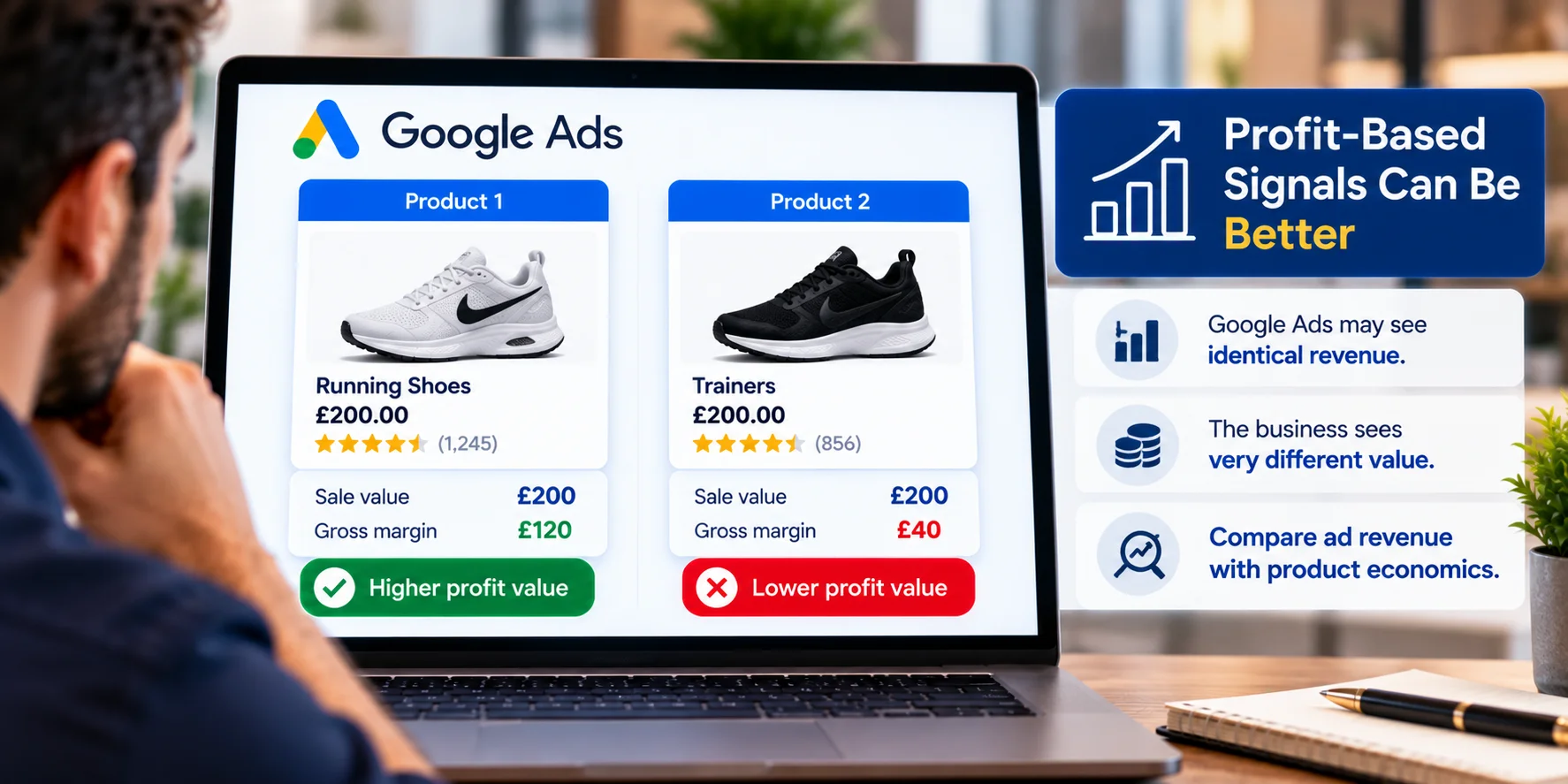
Profit-Based Signals Can Be Better
Where tracking and systems support it, advertisers may want optimisation to reflect profitability more closely.
Imagine:
Product 1
- Sale value: £200
- Gross margin: £120
Product 2
- Sale value: £200
- Gross margin: £40
Google Ads may see identical revenue.
The business sees very different value.
That is why ecommerce reporting should compare ad revenue with product economics.
Use Conversion Value Rules Carefully
Value rules can help reflect genuine differences in business value.
Use them when there is a real commercial reason.
Do not apply arbitrary multipliers simply to push the algorithm towards products you prefer.
Budget Should Follow Profitable Demand
In Google Ads for Ecommerce, do not divide spend evenly between channels simply to make the account look balanced.
A retailer may find:
- Search has strong brand efficiency but limited scale;
- Shopping produces profitable non-brand sales;
- PMax drives volume but mixed margins.
There is no universal:
20% Search / 30% Shopping / 50% PMax
formula.
Example Channel Budget
Suppose monthly Google Ads spend is:
£20,000
An illustrative starting point could be:
| Channel | Example Budget | Main Role |
|---|---|---|
| Search | £4,000 | Brand + key categories |
| Standard Shopping | £6,000 | Product-level control |
| Performance Max | £10,000 | Automated scale |
After enough data, adjust based on:
- profitability;
- incremental sales;
- margin;
- stock;
- seasonality;
- operational capacity.
Stock Levels Should Influence Spend
A product may perform brilliantly but have only five units left.
Increasing spend may create:
- stockouts;
- cancellations;
- refunds;
- poor customer experience.
Google Ads for Ecommerce should connect advertising with stock reality.
Merchant Center Errors Can Limit Performance
Common feed problems include:
- incorrect price;
- outdated availability;
- weak images;
- poor titles;
- missing identifiers;
- broken variants;
- disapproved products;
- broken landing pages.
Do not try to solve feed problems with bidding.
Fix the data.
Check Merchant Center Diagnostics
If important products have weak volume, confirm they are actually eligible to serve before changing campaign strategy.
Warnings and disapprovals can limit exposure.
Do Not Optimise Only at Campaign Level
A campaign can report:
600% ROAS
and still contain:
- profitable winners;
- low-margin sellers;
- products consuming spend without sales;
- products with high return rates.
Product-level analysis matters in Google Ads for Ecommerce.
Use Product Reporting to Find Winners and Losers
Ask:
- Which products spend but do not sell?
- Which products sell but have poor margin?
- Which high-margin products have weak exposure?
- Which categories dominate spend?
- Which products have high returns?
- Which products regularly go out of stock?
This is where Google Ads for Ecommerce becomes product economics rather than just campaign management.
Simple Product Performance Matrix
High Sales + High Margin
Protect and scale.
High Sales + Low Margin
Review profitability before increasing spend.
Low Sales + High Margin
Review demand, feed quality, pricing and visibility.
Low Sales + Low Margin
Reduce priority unless there is a strategic reason to keep promoting them.
Returns Can Change the PPC Answer
Imagine:
Campaign A revenue:
£50,000
Campaign B revenue:
£40,000
Campaign A looks better.
Now add:
- Campaign A return rate: 35%
- Campaign B return rate: 10%
The commercial answer may change completely.
Where possible, connect advertising with:
- returns;
- refunds;
- net revenue;
- margin.
Discounts Can Distort ROAS
A sale campaign may generate strong revenue while destroying margin.
If a product falls from:
£120
to:
£80
the revenue may still look healthy.
The profit after product cost, discount and advertising may not.
Promotional campaigns need commercial targets, not just revenue targets.
Search and Shopping Can Work Together
Search can capture category and brand demand with controlled messaging.
Shopping can show specific products.
Both may contribute to the same buying journey.
That overlap is not automatically a problem.
The real question is whether each campaign contributes useful sales efficiently.
PMax Can Overlap With Search Too
Performance Max can overlap with other Google inventory.
Do not assume every campaign lives in its own isolated box.
Review:
- total account profitability;
- brand demand;
- incremental value;
- product performance;
- search insight where available.
Do not judge PMax only by headline ROAS.
Separate Brand Performance Where Possible
Brand traffic often converts well because the shopper already knows the retailer.
If brand sales are mixed into broader acquisition reporting, performance can look stronger than it really is.
Ask:
- How much revenue comes from existing brand demand?
- How much comes from new non-brand demand?
This matters when comparing Search and PMax.
New Customer Acquisition Needs Its Own Logic
Some retailers care more about acquiring new customers.
Others rely heavily on repeat orders.
Suppose:
- First-order profit: £20
- Expected repeat profit over 12 months: £100
That may justify a higher initial acquisition cost.
But only if retention data supports it.
Do Not Invent Lifetime Value
If the business says:
“Our customer is worth £500 over time.”
there should be evidence.
Use:
- repeat purchase rate;
- average order value;
- gross margin;
- retention period;
- customer cohorts.
Do not use optimistic LTV to excuse weak campaigns.
Ecommerce Landing Pages Still Matter
In Google Ads for Ecommerce, campaign structure cannot rescue poor product pages.
The customer still needs:
- accurate price;
- stock information;
- clear images;
- delivery details;
- returns information;
- useful product descriptions;
- easy checkout;
- trust.
A high-intent Shopping click can be wasted quickly by a poor product page.
Product Page Speed Matters
Ecommerce pages often become heavy because of:
- large galleries;
- videos;
- review widgets;
- recommendations;
- tracking scripts;
- personalisation;
- chat tools.
A strong campaign still loses money if the website is slow or difficult to use.
Track Purchase Value Correctly
Ecommerce conversion tracking should usually use transaction-specific values.
A £30 order and a £500 order should not automatically appear identical.
Accurate purchase values are the foundation of useful Google Ads for Ecommerce ROAS reporting.
Watch for Duplicate Purchase Tracking
One purchase may be measured through:
- Google Ads;
- GA4;
- ecommerce integration;
- third-party tracking.
If the same transaction is counted twice, ROAS becomes unreliable.
Deduplication and transaction IDs matter.
High-Margin Search Example
Imagine a coffee-machine retailer has:
Premium Machines
- AOV: £900
- Gross margin: 45%
Entry-Level Machines
- AOV: £120
- Gross margin: 18%
The premium range may deserve its own Search campaign because:
- query intent is clear;
- product value is high;
- budget deserves protection;
- messaging matters.
That is segmentation based on economics.
Shopping Margin-Label Example
The retailer could use:
custom_label_0 = high_margin
and:
custom_label_0 = low_margin
This allows Shopping and PMax reporting to connect directly with product economics.
Performance Max Example: Core vs Clearance
Imagine a fashion retailer mixes:
- full-price products;
- clearance products
inside one PMax campaign.
Clearance may convert easily because pricing is low.
That may pull spend towards discounted products.
If full-price profitability matters more, separation can make sense:
- PMax – Core Full Price
- PMax – Clearance
Different groups can then use different budgets and goals.
Do Not Over-Segment
Segmentation is useful.
Forty tiny campaigns are not.
Group products where:
- margins are similar;
- goals are similar;
- budgets can be shared;
- bidding targets are similar.
Separate them when the commercial decision genuinely changes.
When Standard Shopping May Be Useful
Standard Shopping may suit retailers who want:
- clearer product-group control;
- structured testing;
- more direct Shopping management;
- specific negative-query control;
- a simpler setup.
It is not automatically better than Performance Max.
It offers a different balance between control and automation.
When Performance Max May Be Useful
PMax may be useful when the retailer has:
- reliable conversion tracking;
- strong Merchant Center data;
- good product imagery;
- useful creative assets;
- meaningful sales data;
- clear value goals.
There is no magic conversion number that makes PMax automatically safe.
Data quality matters.
When Search Deserves More Budget
Search may deserve more investment when:
- important categories have clear intent;
- brand protection matters;
- messaging needs control;
- premium ranges justify dedicated budget;
- specific terms repeatedly create profitable customers.
Use evidence.
Not channel fashion.
Bidding Should Match the Business Goal
If purchases are similar in value, conversion-volume bidding may sometimes be enough.
If order values vary, value-based bidding becomes more useful.
If margins vary heavily, pure revenue ROAS may still be incomplete.
The closer the value signal is to the actual business goal, the more useful the bidding logic becomes.
ROAS Example
Campaign A
- Spend: £10,000
- Revenue: £50,000
- ROAS: 500%
- Gross margin: 20%
- Gross profit before ad spend: £10,000
Campaign B
- Spend: £10,000
- Revenue: £35,000
- ROAS: 350%
- Gross margin: 50%
- Gross profit before ad spend: £17,500
Campaign A looks better in Google Ads.
Campaign B may be healthier commercially.
That is why margin belongs in Google Ads for Ecommerce reporting.
Build Budget From Profitability
Suppose the store wants:
£100,000 additional monthly sales
At an expected blended ROAS of 500%:
£100,000 ÷ 5 = £20,000 estimated media spend
That is only step one.
You still need to ask:
- Is margin strong enough?
- Can stock support demand?
- Can fulfilment cope?
- Are returns controlled?
- Is the target ROAS realistic?
Our guide on how to set a Google Ads budget without guessing explains this planning approach in more detail.
Budgets Should Move With Seasonality
Ecommerce demand changes throughout the year.
Common periods include:
- Black Friday;
- Christmas;
- summer;
- back-to-school;
- product launches;
- clearance;
- payday periods.
Do not keep one flat budget all year if demand and inventory change significantly.
Do Not Scale Products You Cannot Fulfil
If a bestseller has two days of stock remaining, aggressive scaling may create:
- cancellations;
- refunds;
- support issues;
- poor customer experience.
Marketing, merchandising and operations need to communicate.
The Google Ads for Ecommerce Feedback Loop
A stronger account works like:
Product Feed → Campaign → Purchase → Margin/Return Outcome → Budget and Bidding
Weak accounts stop at:
Purchase
Strong ecommerce management asks:
- Was the order profitable?
- Was it returned?
- Was it a new customer?
- Was the product still in stock?
- Should we buy more of this sale?
That feedback loop matters.
Sample Google Ads for Ecommerce Structure
Search
- Brand;
- premium categories;
- high-intent non-brand terms.
Standard Shopping
- High-margin products;
- core products;
- testing products.
Performance Max
- Bestsellers;
- scalable core catalogue;
- seasonal ranges.
This is only a framework.
The real structure should follow catalogue size, margin, data and business goals.
Google Ads for Ecommerce Readiness Checklist
Before increasing spend, check:
- Merchant Center is linked correctly.
- Prices and stock match the website.
- Product titles are accurate.
- Product identifiers are complete.
- Important disapprovals are fixed.
- Purchase values are accurate.
- Duplicate tracking is controlled.
- High- and low-margin products can be identified.
- Product groups follow commercial logic.
- Search covers valuable high-intent themes.
- Shopping and PMax overlap is intentional.
- ROAS is compared with margin.
- Stock and return data influence scaling.
If several areas are missing, more budget may simply scale the wrong products.
Four-Layer Google Ads for Ecommerce Framework
1. Product
What are we selling?
Is the feed accurate?
Is the item in stock?
2. Demand
Which campaign is capturing the right shopper?
Search?
Shopping?
Performance Max?
3. Value
What revenue does the sale create?
What margin does the product carry?
4. Profitability
After product cost, returns, discounts and advertising, was the sale worth buying?
This fourth layer is where many ROAS-only reports fail.
How Wixdek Approaches Google Ads for Ecommerce
At Wixdek, we would not judge Google Ads for Ecommerce from ROAS alone.
We would ask:
- Which products created the revenue?
- What margin did those products carry?
- Which campaign drove the sale?
- Were products returned?
- Was stock available?
- Were premium categories receiving enough budget?
- Was PMax scaling profitable products or simply easy conversions?
That changes the question from:
“Which campaign had the highest ROAS?”
to:
“Which advertising created the strongest business value?”
Need Help With Google Ads for Ecommerce?
If Search, Shopping and Performance Max all report sales but it is still unclear which products deserve more spend, the account may need a profitability-led review.
Wixdek can review:
- Merchant Center data;
- Search structure;
- Shopping product groups;
- PMax segmentation;
- conversion values;
- ROAS;
- product margins;
- stock and return data.
Our PPC agency in London service focuses on commercial outcomes rather than dashboard metrics alone.
The goal of Google Ads for Ecommerce is not simply more revenue.
It is more revenue that is worth buying.
Frequently Asked Questions
Which Google Ads campaign type is best for ecommerce?
There is no universal winner.
Search, Shopping and Performance Max have different strengths and can work together depending on catalogue size, margin, data and business goals.
What is Search best for in Google Ads for Ecommerce?
Search is useful for brand terms, important categories, high-intent non-brand themes and situations where messaging needs more control.
What is Standard Shopping best for?
Standard Shopping can be useful when retailers want clearer product-group control and structured Shopping management.
What is Performance Max best for?
Performance Max can help expand automated reach when Merchant Center data, tracking, assets and commercial goals are strong.
Does Performance Max replace Shopping?
No.
Retailers can still use Standard Shopping.
The right mix depends on control, automation and business goals.
Do Shopping campaigns use keywords?
Shopping primarily uses Merchant Center product data rather than positive Search-style keywords.
Why is Merchant Center important?
Google uses feed data to understand products and match them with relevant searches.
Poor product data can reduce eligibility and relevance.
Which feed fields matter most?
Important fields may include:
- title;
- description;
- price;
- availability;
- image;
- brand;
- GTIN;
- MPN;
- product type;
- variant data.
Should product titles be optimised?
Yes.
They should describe the product clearly and accurately without promotional keyword stuffing.
What are custom labels?
Custom labels allow retailers to group products using internal categories such as margin, season, bestseller status or clearance.
Can products be grouped by margin?
Yes.
Margin-based labels can support Shopping and Performance Max analysis and segmentation.
Is high ROAS always good?
No.
ROAS measures revenue against advertising spend.
It does not automatically include margin, returns, shipping, discounts or other costs.
Can lower ROAS be more profitable?
Yes.
A lower-ROAS campaign selling high-margin products can generate more profit than a high-ROAS campaign selling low-margin products.
Should Google Ads for Ecommerce use Target ROAS?
It can be useful when conversion-value tracking is reliable.
The correct target depends on product economics.
Should every product use the same ROAS target?
Not necessarily.
Products with different margins and commercial roles may justify different targets or structures.
How should Performance Max be segmented?
Segment when the commercial goal changes, such as:
- high-margin products;
- clearance;
- seasonal ranges;
- different profitability targets.
Avoid unnecessary fragmentation.
Should the entire catalogue sit in one PMax campaign?
Not automatically.
Some retailers can use one campaign effectively.
Others need separate groups because margins, budgets and goals differ.
How should budget be split between Search, Shopping and PMax?
There is no fixed percentage.
Budget should follow profitable demand and commercial performance.
Why should margin be tracked as well as revenue?
Revenue shows what was sold.
Margin helps show whether the sale was worth buying.
Should returns affect PPC analysis?
Yes.
High return rates can make apparently strong revenue performance much less profitable.
Does stock level matter?
Yes.
Scaling products that cannot be fulfilled can create cancellations, refunds and wasted advertising spend.
What should a Google Ads for Ecommerce dashboard include?
Useful metrics include:
- spend;
- revenue;
- ROAS;
- gross margin;
- product performance;
- returns;
- conversion value;
- stock status;
- profitability by campaign or product group.